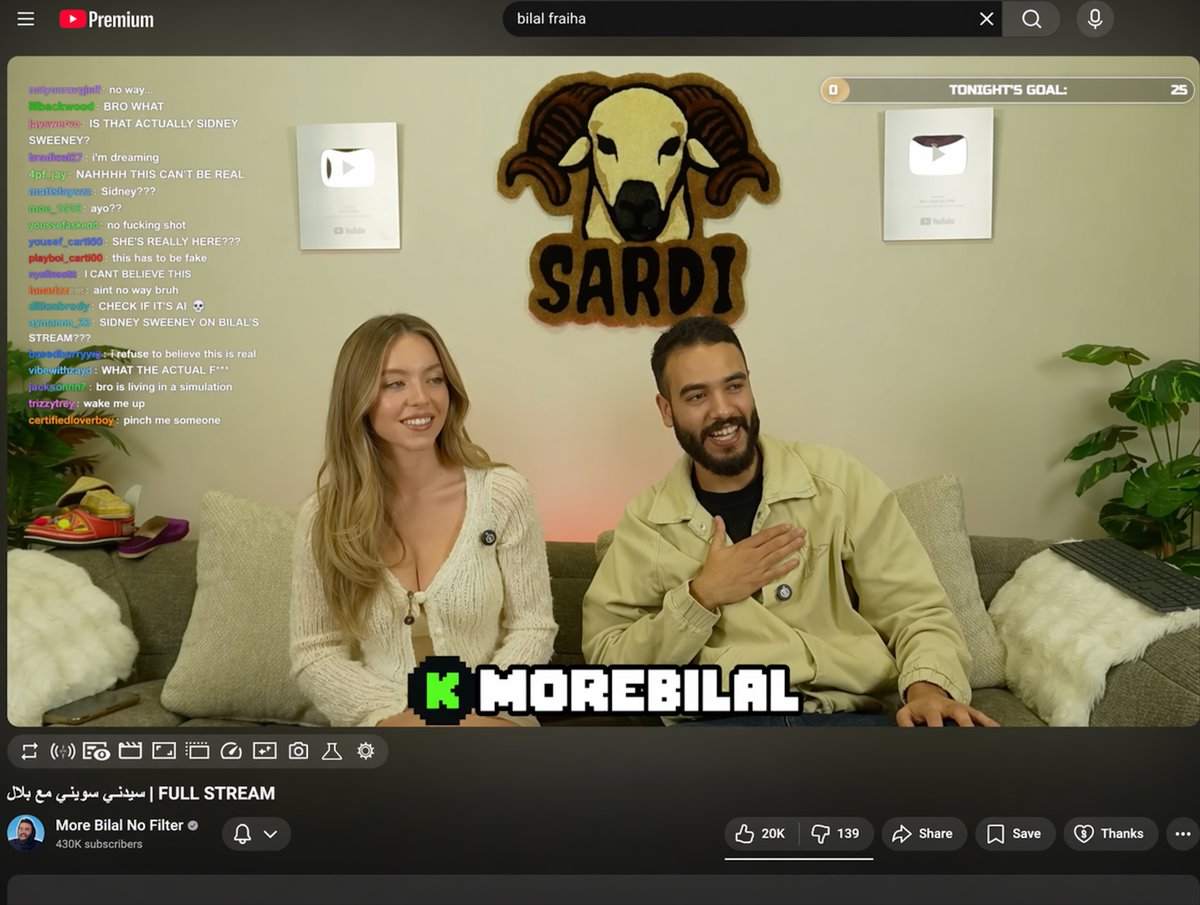
YouTube Livestream Interface Mockup
Generates a realistic YouTube livestream UI featuring a video player with chat overlays, channel details, and customizable text fields.
This is a gpt-image-2 prompt case for Other Inspiration. Use the copy-ready prompt below to generate similar visuals, and review YouMind OpenLab awesome-gpt-image-2 attribution plus commercial-use rights before reuse.
Prompt
Copy-ready prompt
{
  "type": "YouTube Live UI",
  "top_nav": {
    "logo": "YouTube Premium",
    "search": "{argument name=\"search query\" default=\"bilal fraiha\"}",
    "icons": 3
  },
  "player": {
    "subjects": [
      "{argument name=\"female guest\" default=\"Sydney Sweeney\"} Wearing a white cardigan",
      "A bearded man wearing a beige jacket is laughing."
    ],
    "bg": "Sofa, two silver play buttons, and the 'SARDI' ram logo.",
    "overlays": {
      "chat": {
        "pos": "Left side",
        "count": 15,
        "desc": "Colored usernames, white text"
      },
      "goal": {
        "pos": "Top right corner",
        "text": "Tonight's goal: 0 to 25"
      },
      "banner": {
        "pos": "Bottom Center",
        "text": "K {argument name=\"streamer name\" default=\"MOREBILAL\"}"
      }
    },
    "controls": {
      "count": 10
    }
  },
  "details": {
    "title": "{argument name=\"video title\" default=\"FULL STREAM | سيدني سويني مع بلال\"}",
    "channel": "{argument name=\"channel name\" default=\"More Bilal No Filter\"}",
    "buttons": 5
  }
}
Prompt variables
Editable argument placeholders found in the prompt, with their default values.
Variable
search query
Default
bilal fraiha
Variable
female guest
Default
Sydney Sweeney
Variable
streamer name
Default
MOREBILAL
Variable
video title
Default
FULL STREAM | سيدني سويني مع بلال
Variable
channel name
Default
More Bilal No Filter
Reuse and source notes
Use this prompt safely after previewing the case.
- 1.Copy the prompt or open it directly in Dovoo with the generation button.
- 2.Adjust variables, aspect ratio, and reference images for your own use case.
- 3.Before publishing or paid usage, verify source rights, attribution requirements, and brand or likeness risks.
Can I use this prompt commercially?
Commercial-use status is unknown. Review the original source, license, brand constraints, and legal requirements before paid usage.
Where does this case come from?
This case is imported from YouMind OpenLab awesome-gpt-image-2; keep attribution visible and check the source URL before reuse.