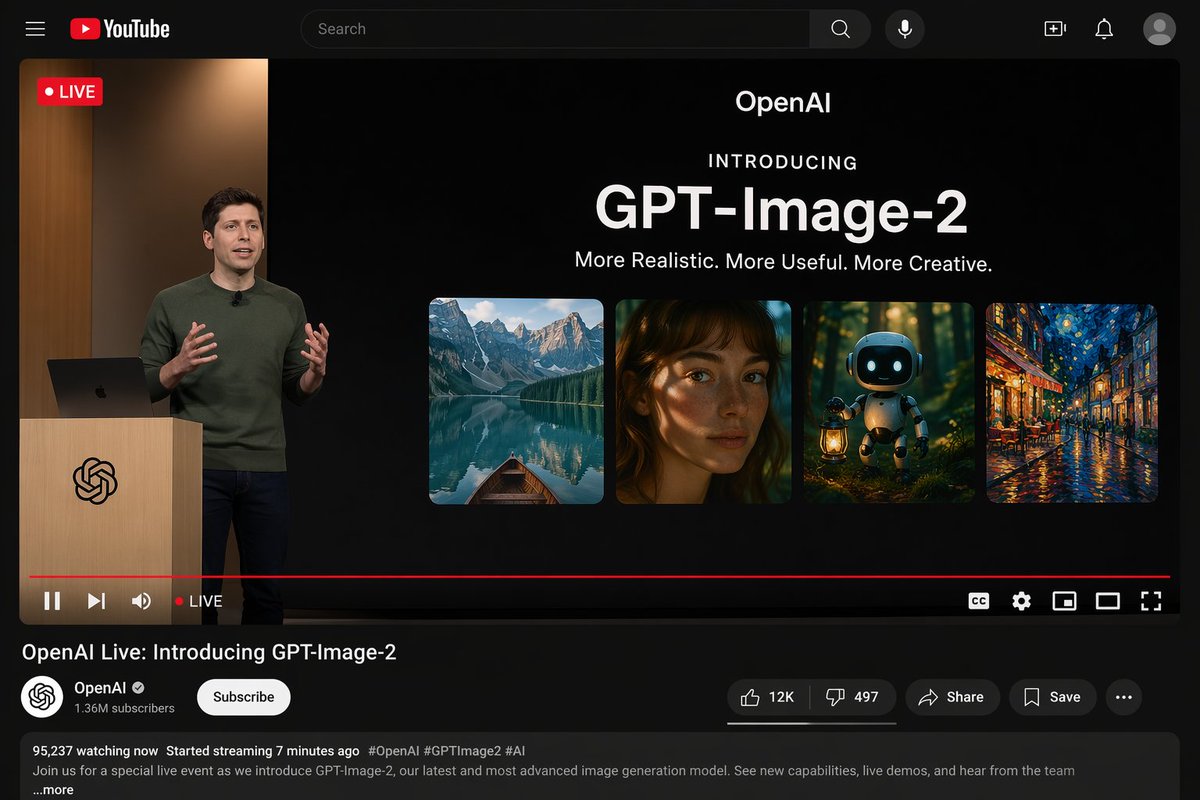
YouTube Live Stream Announcement Mockup
Generates a realistic YouTube dark mode interface showing a live product announcement presentation.
This is a gpt-image-2 prompt case for Other Inspiration. Use the copy-ready prompt below to generate similar visuals, and review YouMind OpenLab awesome-gpt-image-2 attribution plus commercial-use rights before reuse.
Prompt
Copy-ready prompt
{
  "type": "YouTube live streaming interface demo",
  "theme": "Dark mode",
  "layout": {
    "top_bar": {
      "components": [
        "Hamburger menu",
        "YouTube logo",
        "Search bar",
        "microphone icon",
        "Create icon",
        "Notification icon",
        "Personal profile picture"
      ]
    },
    "video_player": {
      "status": "The LIVE logo is displayed in the top left corner.",
      "left_side": "One{argument name=\"presenter description\" default=\"The man wearing a green sweater\"} Standing in front of a wooden lectern with a spiral logo, they are communicating with gestures, and a laptop is placed on the lectern.",
      "right_side_presentation": {
        "text_elements": [
          "OpenAI",
          "Introduced with great fanfare",
          "{argument name=\"product name\" default=\"GPT-Image-2\"}",
          "{argument name=\"tagline\" default=\"More realistic, more practical, and more creative.\"}"
        ],
        "image_gallery": {
          "count": 4,
          "panels": [
            "Mountain lakes with small boats",
            "A close-up portrait of a woman with dappled light and shadow",
            "A cute robot carrying a lantern in the dark forest.",
            "Impressionist paintings of city streets illuminated at night"
          ]
        }
      },
      "bottom_controls": {
        "components": [
          "Play/Pause",
          "Next",
          "volume",
          "LIVE Text",
          "Red progress bar",
          "CC",
          "Set gears",
          "Mini Player",
          "Cinema mode",
          "full screen"
        ]
      }
    },
    "video_info": {
      "title": "{argument name=\"video title\" default=\"OpenAI Live Stream: GPT-Image-2 Officially Launched\"}",
      "channel_section": {
        "name": "{argument name=\"channel name\" default=\"OpenAI\"}",
        "badge": "Authentication checkmark",
        "subscribers": "1.36 million subscribers",
        "button": "Subscribe (white capsule button)"
      },
      "action_buttons": {
        "count": 5,
        "labels": [
          "Likes (12,000)",
          "Dislike (497)",
          "share",
          "keep",
          "..."
        ]
      },
      "description_box": {
        "metadata": "95,237 people are currently watching; the live stream started 7 minutes ago.",
        "hashtags": "#OpenAI #GPTImage2 #AI",
        "body_text": "Welcome to our special live stream event where we'll be showcasing OpenAI's latest and most advanced image generation model, GPT-Image-2. Learn about new features, watch a live demo, and hear from the team…and more."
      }
    }
  }
}
Prompt variables
Editable argument placeholders found in the prompt, with their default values.
Variable
presenter description
Default
The man wearing a green sweater
Variable
product name
Default
GPT-Image-2
Variable
tagline
Default
More realistic, more practical, and more creative.
Variable
video title
Default
OpenAI Live Stream: GPT-Image-2 Officially Launched
Variable
channel name
Default
OpenAI
Reuse and source notes
Use this prompt safely after previewing the case.
- 1.Copy the prompt or open it directly in Dovoo with the generation button.
- 2.Adjust variables, aspect ratio, and reference images for your own use case.
- 3.Before publishing or paid usage, verify source rights, attribution requirements, and brand or likeness risks.
Can I use this prompt commercially?
Commercial-use status is unknown. Review the original source, license, brand constraints, and legal requirements before paid usage.
Where does this case come from?
This case is imported from YouMind OpenLab awesome-gpt-image-2; keep attribution visible and check the source URL before reuse.