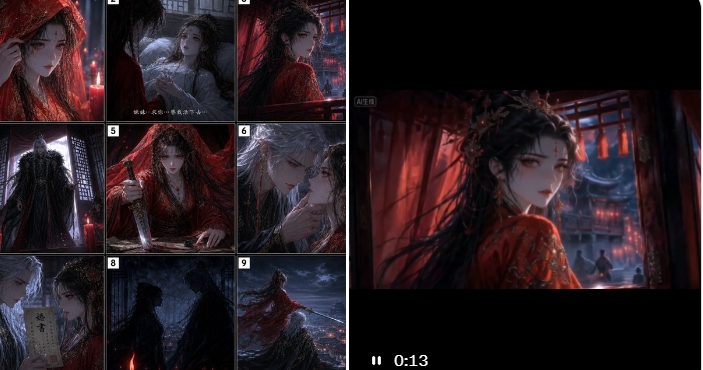
Dark Fantasy Storyboard and Video Preview
Generates a cinematic 3×3 gothic xianxia storyboard beside a matching video-player preview for showcasing an AI drama production workflow.
This is a gpt-image-2 prompt case for 插画艺术. Use the copy-ready prompt below to generate similar visuals, and review YouMind OpenLab awesome-gpt-image-2 attribution plus commercial-use rights before reuse.
Prompt
Copy-ready prompt
Objective: To create a workflow demonstration of a dark cinematic AI-generated series: The left side features a 3x3 fantasy storyboard grid, while the right side displays a widescreen video preview frame, demonstrating how a static storyboard is transformed into an animated scene. Canvas: Wide horizontal composition, approximately 2:1 aspect ratio, black background with a thin white border. The left half contains a square storyboard contact sheet; the right half contains a large embedded video player screenshot with a black overlay and a small playback time indicator. Left-side storyboard layout: Uses 9 numbered panels arranged in a 3x3 grid, each separated by a thin white border and labeled with a small white number from 1 to 9 in the upper left corner. The panels should depict a gothic fantasy/dark fantasy romantic narrative, with the protagonist being {argument name="female character" default="A bride dressed in a gorgeous crimson robe and wearing a veil"} and{argument name="male character" default="A stern-faced, white-haired immortal dressed in a dark robe."} Add small, cinematic Chinese subtitles to one or two of the panels, but keep them small and as a secondary element. The nine panels contain the following: 1) A close-up of a bride in a crimson veil, her sleeves partially obscuring her face, with the texture of red candlelight and rain; 2) The bride sits or leans against a window in a dimly lit room, with a pale, white-haired figure behind her and blurry text lines at the bottom; 3) The bride turns towards the interior of a palace bathed in red light, her long black hair and red veil fluttering; 4) A tall figure in a dark robe stands before a latticed window, against a backdrop of cold blue moonlight; 5) The bride kneels or lies beneath a red veil, one hand supporting her on the ground, the red fabric creating a dramatic effect; 6) An intimate close-up of a white-haired immortal touching the bride's chin, their faces close together, creating a tense yet romantic atmosphere; 7) A close-up of a white-haired man holding a vertical talisman or strip of paper with Chinese characters; 8) Two dark silhouettes stand facing each other in the rain or fog, with a red candle or ember glowing at the bottom; 9) A bride in red stands on a high balcony or rooftop, her robe and hair billowing in the wind, overlooking a blue cityscape in a storm. Right-side video preview layout: A large widescreen cinematic frame is placed in the right half. The image shows the back or three-quarter profile of the same Scarlet Bride, set in a red wooden palace. She has dark hair adorned with a dark, thorny headdress or a veil, her red robe embroidered with shimmering flowers. Blue moonlight can be seen through the latticed windows, and small figures are visible in the background. Thick black overlays are added above and below the frame. In the lower left corner of the black player area, a white pause icon and a timestamp "0:13" are displayed. A small, blurred label, such as an AI-generated identifier, is included in the upper left corner of the video frame. Visual style: Dramatic Chinese dark fantasy, gothic romance, high-contrast red and blue lighting, candlelight interiors, rain, fog, ornate robes, cinematic depth of field, melancholic shadows, cinematic still quality, high detail, atmospheric fantasy drama.{argument name="primary color palette" default="Crimson, cool blue, black and pale silver"} Face rendering: All visible faces should be deliberately obscured with a soft, square gray blur, similar to the anonymization process used in screenshots. The blur block should be centered over the face and ensure consistency across the storyboard and video frame. Text restrictions: Keep all text minimal and small, except for the visible timestamp "0:13" and storyboard numbers 1 through 9. Do not add any logos, watermarks, additional UI panels, or extra storyboard frames.Prompt variables
Editable argument placeholders found in the prompt, with their default values.
More cases in this category
Prioritized by category, input mode compatibility, quality, and lower risk.






Reuse and source notes
Use this prompt safely after previewing the case.
- 1.Copy the prompt or open it directly in Dovoo with the generation button.
- 2.Adjust variables, aspect ratio, and reference images for your own use case.
- 3.Before publishing or paid usage, verify source rights, attribution requirements, and brand or likeness risks.
Can I use this prompt commercially?
Commercial-use status is unknown. Review the original source, license, brand constraints, and legal requirements before paid usage.
Where does this case come from?
This case is imported from YouMind OpenLab awesome-gpt-image-2; keep attribution visible and check the source URL before reuse.