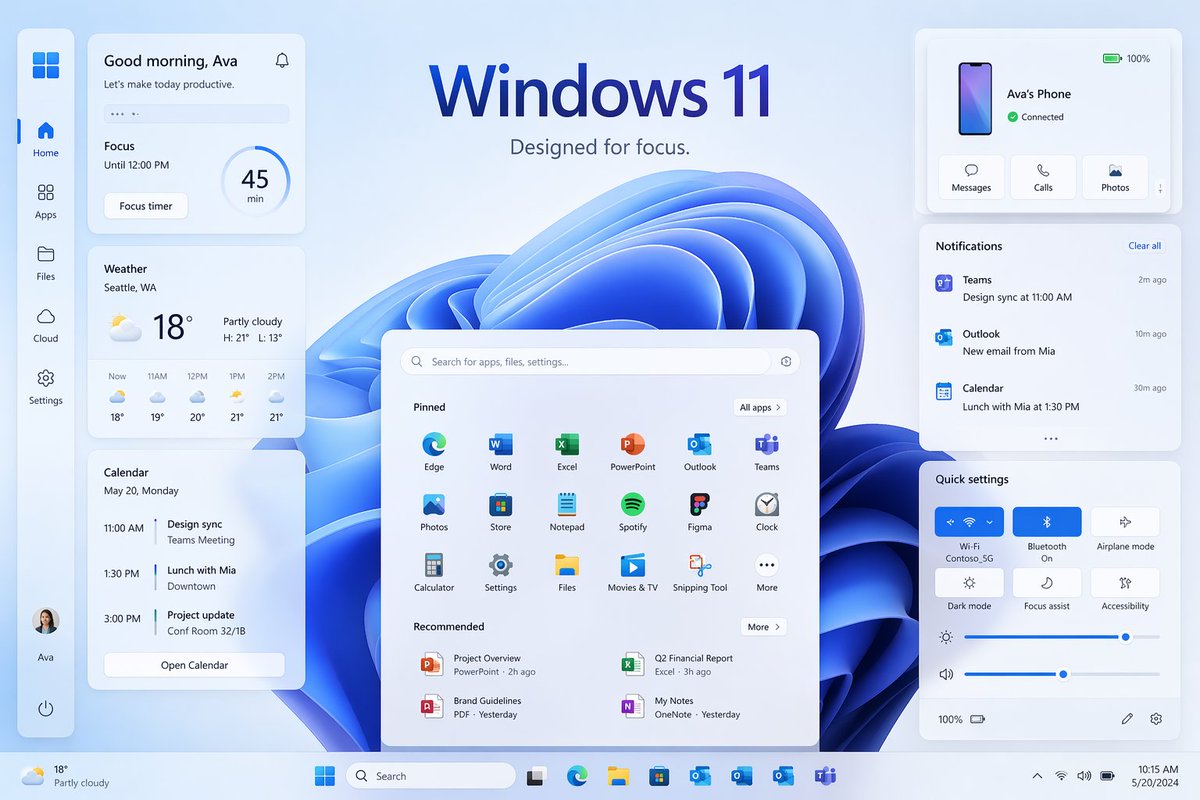
Windows 11 Focus UI Showcase
A polished Windows 11-style promotional desktop mockup with multiple widgets and panels, ideal for recreating a modern operating system marketing visual.
This is a gpt-image-2 prompt case for Product & Commercial. Use the copy-ready prompt below to generate similar visuals, and review YouMind OpenLab awesome-gpt-image-2 attribution plus commercial-use rights before reuse.
Prompt
Copy-ready prompt
{
  "type": "Windows 11 promotional UI mockup",
  "style": "The product marketing presentation is clean and modern, featuring soft frosted glass cards, delicate shadows, rounded corners, a light blue and white color scheme, a clear vector-style interface, and exquisite presentation slides aesthetics.",
  "scene": {
    "background": "A light ice-blue gradient background sets off a large, abstract Windows 11 blue ribbon swirling wallpaper at the center of the interface.",
    "headline": {
      "text": "{argument name=\"headline text\" default=\"Windows 11\"}",
      "subtext": "{argument name=\"tagline\" default=\"Designed for focused attention.\"}",
      "position": "Centered at the top"
    }
  },
  "layout": {
    "type": "Desktop UI Display",
    "sections": [
      {
        "title": "Left sidebar",
        "position": "Leftmost vertical parking bar",
        "count": 8,
        "labels": [
          "Windows logo",
          "Homepage",
          "application",
          "document",
          "cloud",
          "set up",
          "Ava's Profile",
          "power supply"
        ]
      },
      {
        "title": "Efficiency Widgets",
        "position": "Left column cards",
        "count": 3,
        "labels": [
          "Good morning, Ava",
          "weather",
          "calendar"
        ]
      },
      {
        "title": "Center Start Menu",
        "position": "Centered at the bottom",
        "count": 3,
        "labels": [
          "Search bar",
          "Fixed",
          "recommend"
        ]
      },
      {
        "title": "Right column cards",
        "position": "upper right, middle, and lower right",
        "count": 3,
        "labels": [
          "Ava's phone",
          "notify",
          "Quick Setup"
        ]
      },
      {
        "title": "task bar",
        "position": "Bottom full width",
        "count": 10,
        "labels": [
          "Weather Summary",
          "start",
          "search",
          "Task View",
          "Microsoft Edge",
          "File Explorer",
          "Microsoft Store",
          "Outlook",
          "OneDrive",
          "Teams"
        ]
      }
    ],
    "centerpiece": "A huge Windows 11 Start Menu floats in front of a blue abstract wallpaper."
  },
  "widgets": {
    "greeting_card": {
      "title": "Good morning, Ava",
      "subtitle": "Let's get today's work done efficiently.",
      "focus_block": {
        "label": "Focus",
        "time": "By 12:00 noon",
        "timer": "45 minutes",
        "button": "Focus timer"
      }
    },
    "weather_card": {
      "location": "{argument name=\"weather location\" default=\"Seattle, Washington\"}",
      "temperature": "18°",
      "condition": "Cloudy turning sunny",
      "range": "Highest: 21°C Lowest: 13°C",
      "forecast_count": 5,
      "forecast_labels": [
        "18°C now",
        "11:19 AM",
        "12:20 PM",
        "1:21 PM",
        "2:21 PM"
      ]
    },
    "calendar_card": {
      "date": "Monday, May 20th",
      "events_count": 3,
      "event_labels": [
        "Design synchronization at 11:00 AM, Teams meeting.",
        "Lunch with Mia at 1:30 PM, downtown.",
        "Project update at 3:00 PM, Meeting Room 32/1B"
      ],
      "button": "Open the calendar"
    },
    "phone_card": {
      "device_name": "{argument name=\"device name\" default=\"Ava's phone\"}",
      "status": "Connected",
      "actions_count": 3,
      "action_labels": [
        "information",
        "call",
        "photo"
      ],
      "battery": "100%"
    },
    "notifications_card": {
      "title": "notify",
      "action": "Clear all",
      "items_count": 3,
      "item_labels": [
        "Teams — 11:00 AM Design Synchronization — 2 minutes ago",
        "Outlook — New email from Mia — 10 minutes ago",
        "Calendar — 1:30 PM Lunch with Mia — 30 minutes ago"
      ]
    },
    "quick_settings_card": {
      "title": "Quick Setup",
      "toggles_count": 6,
      "toggle_labels": [
        "Wi‑Fi",
        "Bluetooth",
        "Flight mode",
        "Dark mode",
        "Focus Assistant",
        "Accessibility"
      ],
      "active_toggles": [
        "Wi‑Fi",
        "Bluetooth"
      ],
      "sliders_count": 2,
      "slider_labels": [
        "brightness",
        "volume"
      ],
      "wifi_network": "Contoso_5G"
    },
    "start_menu": {
      "search_placeholder": "Search apps, files, settings...",
      "pinned_count": 18,
      "pinned_labels": [
        "Edge",
        "Word",
        "Excel",
        "PowerPoint",
        "Outlook",
        "Teams",
        "photo",
        "shop",
        "Notepad",
        "Spotify",
        "Figma",
        "clock",
        "calculator",
        "set up",
        "document",
        "Movies and television",
        "Screenshot tool",
        "More"
      ],
      "recommended_count": 4,
      "recommended_labels": [
        "Project Overview",
        "Second Quarter Financial Report",
        "Brand Guide",
        "My Notes"
      ]
    }
  },
  "composition": "The product display is symmetrical, with the start menu centered, three cards stacked on the left and three cards on the right, with ample spacing. All elements appear to float slightly above the background, and the bottom taskbar spans the edge.",
  "rendering": "High-resolution UI concept art for desktop operating system launch pages, featuring perfect typography, Microsoft-inspired icon design, and a clean, minimalist branding."
}
Prompt variables
Editable argument placeholders found in the prompt, with their default values.
Variable
headline text
Default
Windows 11
Variable
tagline
Default
Designed for focused attention.
Variable
weather location
Default
Seattle, Washington
Variable
device name
Default
Ava's phone
Reuse and source notes
Use this prompt safely after previewing the case.
- 1.Copy the prompt or open it directly in Dovoo with the generation button.
- 2.Adjust variables, aspect ratio, and reference images for your own use case.
- 3.Before publishing or paid usage, verify source rights, attribution requirements, and brand or likeness risks.
Can I use this prompt commercially?
Commercial-use status is unknown. Review the original source, license, brand constraints, and legal requirements before paid usage.
Where does this case come from?
This case is imported from YouMind OpenLab awesome-gpt-image-2; keep attribution visible and check the source URL before reuse.