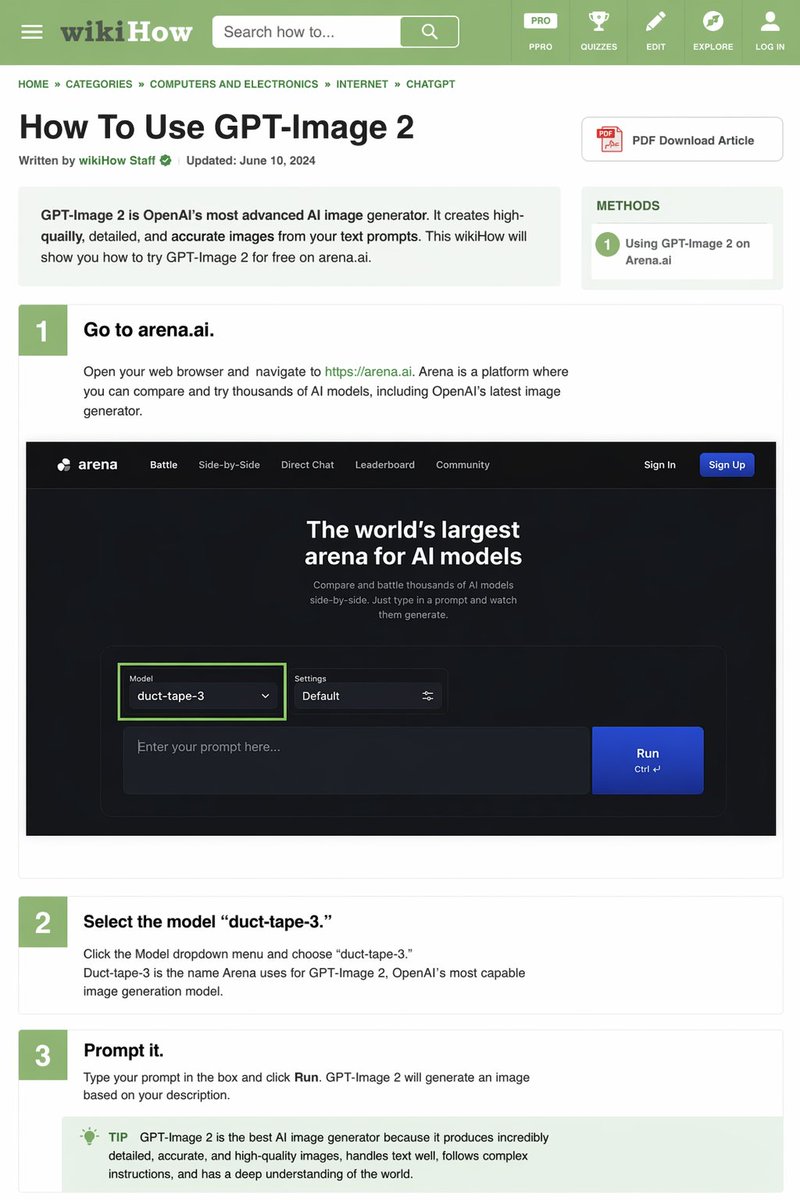
wikiHow Article Mockup
Generates a detailed, text-heavy tutorial webpage mimicking the wikiHow layout, complete with instructional steps and embedded UI mockups.
This is a gpt-image-2 prompt case for 平面海报. Use the copy-ready prompt below to generate similar visuals, and review YouMind OpenLab awesome-gpt-image-2 attribution plus commercial-use rights before reuse.

Prompt
Copy-ready prompt
{
  "type": "wikiHow article simulation",
  "header": {
    "background": "green",
    "elements": [
      "Hamburger menu icon",
      "wikiHow logo",
      "Search bar with text \"Search method...\"",
      "5 navigation icons: PRO/PPRO, Quiz, Edit, Explore, Log In"
    ]
  },
  "breadcrumbs": "Home » Categories » Computers & Electronics » Internet » CHATGPT",
  "article_info": {
    "title": "{argument name=\"article title\" default=\"How to use GPT-Image 2\"}",
    "metadata": "Written by wikiHow staff | Updated: June 10, 2024",
    "sidebar": [
      "PDF Download Article Button",
      "Method box: 1. Use GPT-Image on Arena.ai 2."
    ]
  },
  "intro_box": "GPT-Image 2 is OpenAI's most advanced AI image generator. It can create high-quality, detailed, and accurate images based on your text prompts. This wikiHow will show you how to try GPT-Image 2 for free on arena.ai.",
  "steps": [
    {
      "number": 1,
      "title": "{argument name=\"step 1 title\" default=\"Go to arena.ai.\"}",
      "description": "Open your web browser and visit https://arena.ai. Arena is a platform where you can compare and try out thousands of AI models, including OpenAI's latest image generator.",
      "embedded_image": {
        "type": "Dark Mode Website UI Simulation",
        "logo": "arena",
        "navigation": [
          "battle",
          "Side-by-side comparison",
          "direct dialogue",
          "Rankings",
          "Community",
          "Log in",
          "Register button"
        ],
        "hero_text": "The world's largest AI model arena",
        "input_ui": {
          "model_dropdown": "Model:{argument name=\"model name\" default=\"duct-tape-3\"}",
          "settings": "default",
          "text_input": "Enter your prompt here...",
          "button": "run"
        }
      }
    },
    {
      "number": 2,
      "title": "{argument name=\"step 2 title\" default=\"Select model 'duct-tape-3'.\"}",
      "description": "Click the model drop-down menu and select \"duct-tape-3\". Duct-tape-3 is the name Arena uses for OpenAI's most powerful image generation model, GPT-Image 2."
    },
    {
      "number": 3,
      "title": "{argument name=\"step 3 title\" default=\"Enter the prompt word.\"}",
      "description": "Enter your prompt in the box and click \"Run\". GPT-Image 2 will generate an image based on your description.",
      "tip_box": "Tip: GPT-Image 2 is currently the best AI image generator because it can generate extremely detailed, accurate and high-quality images, excels at text processing, can follow complex instructions, and has a deep understanding of the world."
    }
  ]
}
Prompt variables
Editable argument placeholders found in the prompt, with their default values.
More cases in this category
Prioritized by category, input mode compatibility, quality, and lower risk.






Reuse and source notes
Use this prompt safely after previewing the case.
- 1.Copy the prompt or open it directly in Dovoo with the generation button.
- 2.Adjust variables, aspect ratio, and reference images for your own use case.
- 3.Before publishing or paid usage, verify source rights, attribution requirements, and brand or likeness risks.
Can I use this prompt commercially?
Commercial-use status is unknown. Review the original source, license, brand constraints, and legal requirements before paid usage.
Where does this case come from?
This case is imported from YouMind OpenLab awesome-gpt-image-2; keep attribution visible and check the source URL before reuse.