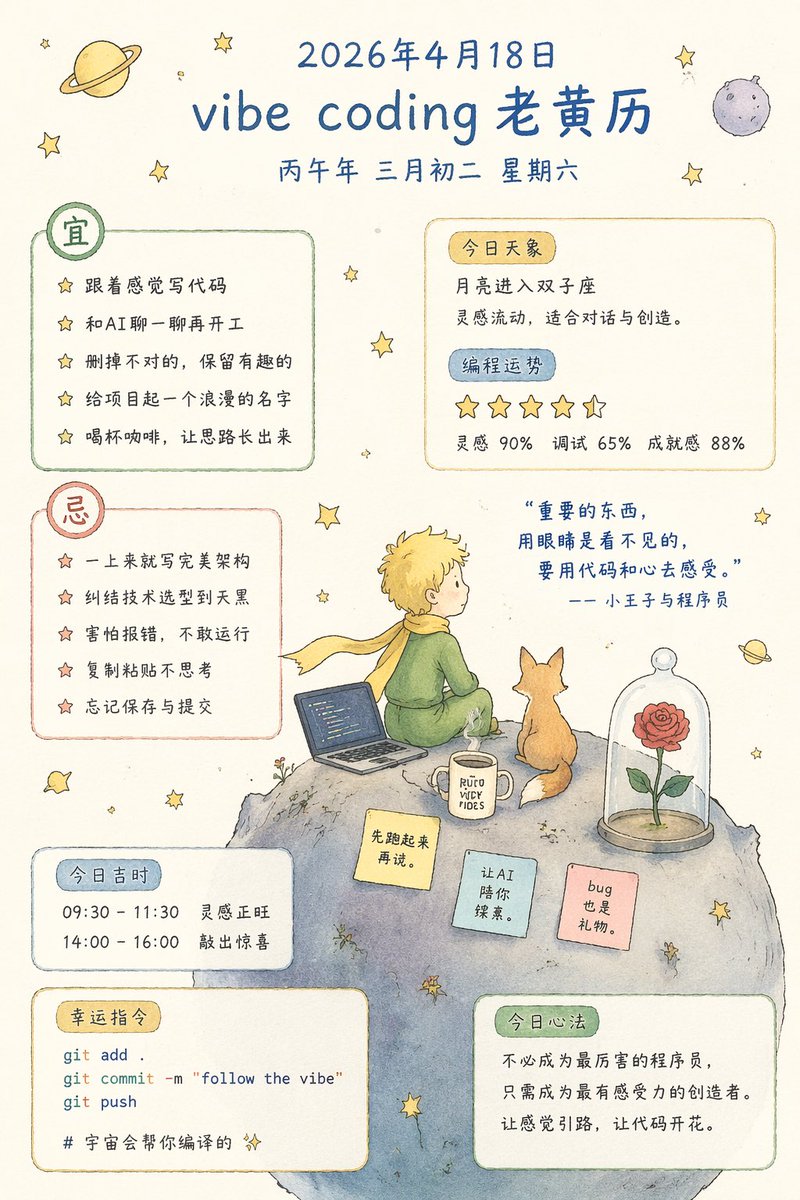
Whimsical Programmer Almanac Infographic
Generates a watercolor-style daily almanac for programmers featuring a Little Prince theme, complete with do/don't lists, lucky commands, and inspirational quotes.
This is a gpt-image-2 prompt case for Graphic & Poster. Use the copy-ready prompt below to generate similar visuals, and review YouMind OpenLab awesome-gpt-image-2 attribution plus commercial-use rights before reuse.
Prompt
Copy-ready prompt
{
"type": "Watercolor infographic Chinese calendar",
"style": "Hand-drawn style, The Little Prince theme, cream background, scattered stars.",
"header": {
"date": "{argument name=\"date\" default=\"April 18, 2026\"}",
"title": "{argument name=\"main title\" default=\"vibe coding Old Almanac\"}",
"subtitle": "Saturday, the second day of the third month of the Bingwu year"
},
"layout": {
"sections": [
{
"title": "should",
"position": "top-left",
"count": 5,
"labels": [
"{argument name=\"first do item\" default=\"Write code based on your intuition\"}",
"Let's talk to the AI before we start working.",
"Delete the wrong parts, keep the interesting ones.",
"Give the project a romantic name",
"Have a cup of coffee and let your thoughts flow."
]
},
{
"title": "Today's celestial phenomena & programming horoscope",
"position": "top-right",
"count": 4,
"labels": [
"The Moon enters Gemini",
"A place where inspiration flows, ideal for dialogue and creation.",
"5 stars",
"Inspiration 90%, Debugging 65%, Sense of Accomplishment 88%"
]
},
{
"title": "avoid",
"position": "mid-left",
"count": 5,
"labels": [
"{argument name=\"first dont item\" default=\"Write a perfect architecture right away\"}",
"agonizing over technology selection until dark",
"Afraid of errors, I dare not run it.",
"Copy and paste without thinking",
"Forgot to save and submit"
]
},
{
"title": "Auspicious time today",
"position": "bottom-left",
"count": 2,
"labels": [
"09:30 - 11:30 Inspiration is at its peak",
"14:00 - 16:00 Knock out a surprise"
]
},
{
"title": "Lucky Command",
"position": "bottom-left",
"count": 4,
"labels": [
"git add .",
"git commit -m \"follow the vibe\"",
"git push",
"# The universe will help you compile it."
]
},
{
"title": "Today's Mindset",
"position": "bottom-right",
"count": 1,
"labels": [
"You don't need to be the best programmer, just the most perceptive creator. Let your feelings guide you, and let your code blossom."
]
}
],
"illustration": {
"position": "center-right",
"subject": "The Little Prince is using a laptop on an asteroid, with a fox, a rose in a glass dome, and a mug nearby.",
"quote": "{argument name=\"quote\" default=\"What is important cannot be seen with the eyes; it must be felt with code and the heart.\"} The Little Prince and the Programmer",
"sticky_notes": {
"count": 3,
"labels": [
"Let's get running first.",
"Let AI accompany you on your exploration.",
"A bug can be a gift."
]
}
}
}
}Prompt variables
Editable argument placeholders found in the prompt, with their default values.
Variable
date
Default
April 18, 2026
Variable
main title
Default
vibe coding Old Almanac
Variable
first do item
Default
Write code based on your intuition
Variable
first dont item
Default
Write a perfect architecture right away
Variable
quote
Default
What is important cannot be seen with the eyes; it must be felt with code and the heart.
Reuse and source notes
Use this prompt safely after previewing the case.
- 1.Copy the prompt or open it directly in Dovoo with the generation button.
- 2.Adjust variables, aspect ratio, and reference images for your own use case.
- 3.Before publishing or paid usage, verify source rights, attribution requirements, and brand or likeness risks.
Can I use this prompt commercially?
Commercial-use status is unknown. Review the original source, license, brand constraints, and legal requirements before paid usage.
Where does this case come from?
This case is imported from YouMind OpenLab awesome-gpt-image-2; keep attribution visible and check the source URL before reuse.