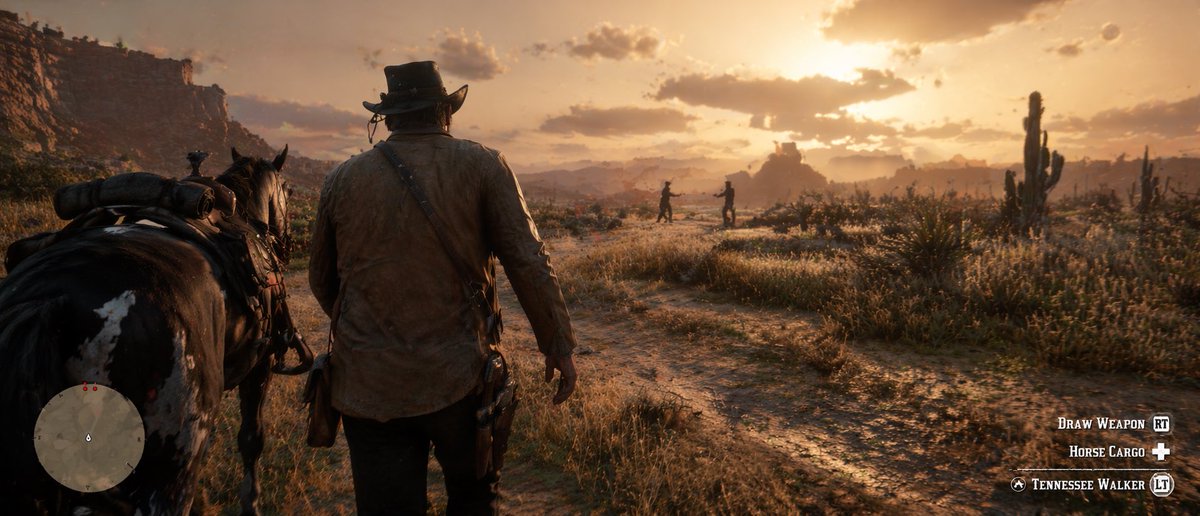
Western Open-World Game Screenshot
Generates a realistic third-person video game screenshot of a cowboy and his horse in a desert landscape, complete with HUD elements.
This is a gpt-image-2 prompt case for Anime & Game. Use the copy-ready prompt below to generate similar visuals, and review YouMind OpenLab awesome-gpt-image-2 attribution plus commercial-use rights before reuse.
Prompt
Copy-ready prompt
A highly realistic screenshot from a video game, in a style that is {argument name="game style" default="Western Open World Games"} The image is shot from a third-person, over-the-shoulder perspective. A rugged cowboy walks with his back to the camera, wearing a worn brown jacket, dark trousers, a holster at his waist, and a classic cowboy hat. To his left is a pair of horses with saddles.{argument name="horse type" default="Black horse with white spots"} The scene is set in{argument name="time of day" default="A vibrant golden hour sunset"} Below{argument name="environment" default="The dusty desert landscape is dotted with withered tall grass, dirt paths, cacti, and towering red rock terraces."} Against a hazy background, two silhouettes stand on a dirt path in the distance. The image contains a video game HUD overlay: a small circular map with a player arrow and two red dots in the lower left corner; and three lines of white text and button icons in the lower right corner, displaying "DRAW WEAPON [RT]", "HORSE CARGO [Cross D-pad]", and "TENNESSEE WALKER [LT]".Prompt variables
Editable argument placeholders found in the prompt, with their default values.
Variable
game style
Default
Western Open World Games
Variable
horse type
Default
Black horse with white spots
Variable
time of day
Default
A vibrant golden hour sunset
Variable
environment
Default
The dusty desert landscape is dotted with withered tall grass, dirt paths, cacti, and towering red rock terraces.
Reuse and source notes
Use this prompt safely after previewing the case.
- 1.Copy the prompt or open it directly in Dovoo with the generation button.
- 2.Adjust variables, aspect ratio, and reference images for your own use case.
- 3.Before publishing or paid usage, verify source rights, attribution requirements, and brand or likeness risks.
Can I use this prompt commercially?
Commercial-use status is unknown. Review the original source, license, brand constraints, and legal requirements before paid usage.
Where does this case come from?
This case is imported from YouMind OpenLab awesome-gpt-image-2; keep attribution visible and check the source URL before reuse.