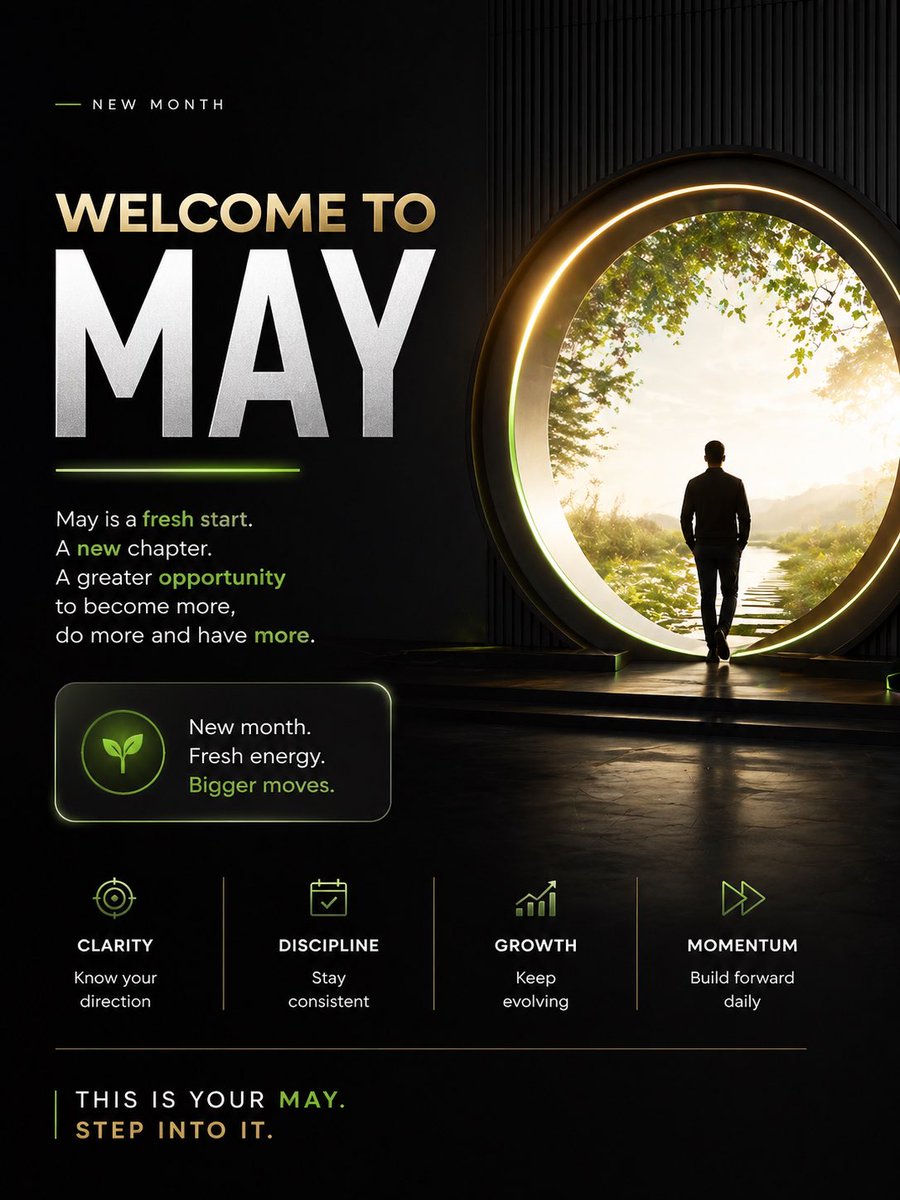
Motivational Welcome to May Poster
A cinematic dark-themed inspirational poster for new-month motivation, ideal for social media posts, personal branding, and mindset content.
This is a gpt-image-2 prompt case for 平面海报. Use the copy-ready prompt below to generate similar visuals, and review YouMind OpenLab awesome-gpt-image-2 attribution plus commercial-use rights before reuse.
Prompt
Copy-ready prompt
Design a high-end inspirational social media poster with a dark, cinematic editing style, in a 4:5 vertical aspect ratio. The image is divided into two main areas: the left side for typography and the right side for the vision visuals. The background uses black to deep charcoal gray with subtle textures, featuring subtle vertical striped wall details on the right, a glossy reflective floor, and elegant neon lime accents with warm gold highlights. On the right, depict a figure: a man in a fitted dark jacket and trousers, walking towards a large circular portal. The portal should be large enough to radiate a warm gold halo and soft internal light, positioned slightly to the right. Behind the portal is a tranquil and bright natural scene, with a narrow stepping stone path extending forward through the grass, accompanied by soft sunlight, distant mist, and an upper edge surrounded by green foliage. The figure should appear resolute and contemplative, stepping towards a new beginning. On the left, create a clean and inspirational typography. The top features a subheading "NEW MONTH" in a widely spaced, uppercase sans-serif font, with a short, thin lime-colored line on the left. Below this are two main headings: "WELCOME TO" in a large, warm beige uppercase font, and "..."{argument name="headline text" default="MAY"} "Use extra-large, bold white capital font to dominate the left half. Add a glowing lime-colored short underline below the large month word. Below the title, add an inspirational paragraph in white sans-serif font, highlighting some words in lime: 'May is a fresh start. A new chapter. A greater opportunity to become more, do more and have more.' Highlight 'fresh start,' 'new,' 'opportunity,' and 'more' in lime. Below this, place a rounded rectangular label card with a subtle glowing border. The card contains a circular icon badge with a simple lime-colored leaf symbol. Add three lines of stacked text to the right of the icon: 'New month.', 'Fresh energy.', and 'Bigger moves.' The last line is in lime. In the lower center of the image, create four equally spaced value pillars separated by thin vertical lines. Each pillar contains a minimalist lime-colored icon, a capital title, and a short description. Use the following four items from left to right: 1)" 1) Target icon, titled "CLARITY," meaning "Know your direction." 2) Calendar icon, titled "DISCIPLINE," meaning "Stay consistent." 3) Rising bar chart icon, titled "GROWTH," meaning "Keep evolving." 4) Fast-forward arrow icon, titled "MOMENTUM," meaning "Build forward daily." Add a thin horizontal dividing line at the bottom. Below that, place a capitalized closing statement: "THIS IS YOUR..."{argument name="month name" default="MAY"} ".", the next line should contain "".{argument name="closing line" default="STEP INTO IT."} The majority of the text is white or warm beige, with "MAY" and some emphasized content in lime green. The overall atmosphere is inspirational, modern, luxurious, focused, and proactive, suitable for social media posting, featuring clear sans-serif typography, high contrast, cinematic lighting effects, and a sophisticated personal growth brand aesthetic.Prompt variables
Editable argument placeholders found in the prompt, with their default values.
More cases in this category
Prioritized by category, input mode compatibility, quality, and lower risk.






Reuse and source notes
Use this prompt safely after previewing the case.
- 1.Copy the prompt or open it directly in Dovoo with the generation button.
- 2.Adjust variables, aspect ratio, and reference images for your own use case.
- 3.Before publishing or paid usage, verify source rights, attribution requirements, and brand or likeness risks.
Can I use this prompt commercially?
Commercial-use status is unknown. Review the original source, license, brand constraints, and legal requirements before paid usage.
Where does this case come from?
This case is imported from YouMind OpenLab awesome-gpt-image-2; keep attribution visible and check the source URL before reuse.