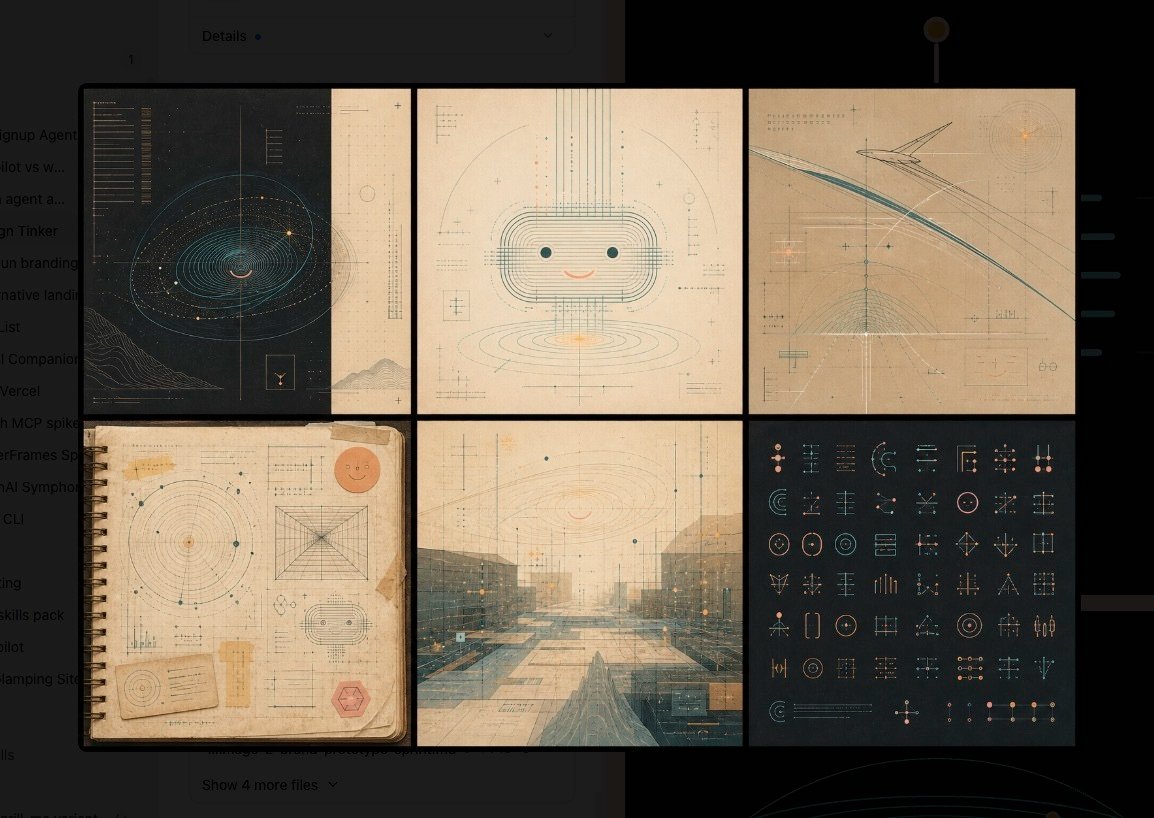
Warm Schematic Design System Board
Generates a six-panel warm technical mood board for exploring futuristic AI interface design systems.
This is a gpt-image-2 prompt case for 平面海报. Use the copy-ready prompt below to generate similar visuals, and review YouMind OpenLab awesome-gpt-image-2 attribution plus commercial-use rights before reuse.
Prompt
Copy-ready prompt
Objective: For{argument name="theme" default="User-friendly AI interface design"} Create a warm, sophisticated, and illustrative design system mood board, combining technical charts, vintage paper textures, and subtle futuristic UI symbols. Canvas: A wide, horizontal image, approximately 16:9 in aspect ratio, with a dark charcoal gray background. A 2x3 grid is placed in the center, containing six rectangular panels separated by thick black gaps. The overall atmosphere is warm, archival, precise, and slightly mysterious, like a design system exploration wall. Layout: Uses 6 panels: 1. Top Left Panel: A deep navy blue/black technical blueprint with an orbital spiral or galaxy-like outline, fine cyan lines, tiny amber glowing dots, vertical measurement lines, small unreadable annotations, and a small square icon near the bottom right. 2. Top Center Panel: A cute, rounded robot face illustration on cream-colored paper, composed of layered rounded rectangular outlines, with two cyan dot eyes, a small peach smile, vertical and horizontal construction lines, small crosshair markers, and blurred measurement annotations. 3. Top Right Panel: A warm beige abstract architectural flight path diagram with swept cyan and gray arcs, angular line structures, fine grid lines, crosshairs, orange glowing dots, and tiny technical labels. 4. Bottom Left Panel: An old spiral-bound notebook page with washi tape edges, containing a circular radar chart, geometric construction diagrams, small UI fonts, a peach smiley face sticker in the top right corner, a small card near the bottom left corner, and a red hexagonal stamp near the bottom right corner. 5. Bottom Center Panel: A hazy futuristic architectural landscape or plaza in soft cyan and tan, overlaid with perspective grids, fine UI measurement lines, subtle orange highlights, and semi-transparent schematic annotations. 6. Bottom Right Panel: A dark charcoal gray icon system table containing 54 neatly arranged small geometric UI fonts using thin cyan, peach, and beige lines; including circles, sliders, crosshairs, brackets, arrows, nodes, target symbols, grids, and abstract interface controls. Visual Style: A warm-toned interpretation of technical schematics; combining Bauhaus precision, medieval information design, old engineering drawings, soft futuristic interface graphics, and tactile simulated materials. Use soft colors: charcoal black, faded cream, parchment beige, gray-blue, light blue, peach, amber, and soft gray. Lines should be extremely fine and precise, with subtle glowing effects only in small highlights. Add paper textures, scanned textures, faint speckles, worn edges, and layered transparent drawing marks. Text and Markings: Include tiny pseudo-technical annotations and measurement scales, but keep all text largely unreadable and decorative. Avoid large, readable headings. Use minimal symbols such as plus signs, crosshairs, coordinates, micro-labels, and tiny ruler marks. Constraints: No portraits, no photorealistic objects except for paper/notebook textures, no logos, no watermarks, and no additional panels beyond the designated 6 panels. Maintain a refined sense of exploration within the design system, rather than a chaotic collage.Prompt variables
Editable argument placeholders found in the prompt, with their default values.
Variable
theme
Default
User-friendly AI interface design
More cases in this category
Prioritized by category, input mode compatibility, quality, and lower risk.

Premium Sports Editorial Poster
Text to Imageunknown

Hyper Realistic FIFA Football Poster
Text to Imageunknown

Hand-Drawn Sketch Photo Annotation
Text to Imageunknown

Vintage Film Projection Portrait
Image to Imageunknown

Cosmic Big Bang Snooze Comic
Text to Imageunknown

Direct Flash Editorial Portrait
Text to Imageunknown
Reuse and source notes
Use this prompt safely after previewing the case.
- 1.Copy the prompt or open it directly in Dovoo with the generation button.
- 2.Adjust variables, aspect ratio, and reference images for your own use case.
- 3.Before publishing or paid usage, verify source rights, attribution requirements, and brand or likeness risks.
Can I use this prompt commercially?
Commercial-use status is unknown. Review the original source, license, brand constraints, and legal requirements before paid usage.
Where does this case come from?
This case is imported from YouMind OpenLab awesome-gpt-image-2; keep attribution visible and check the source URL before reuse.