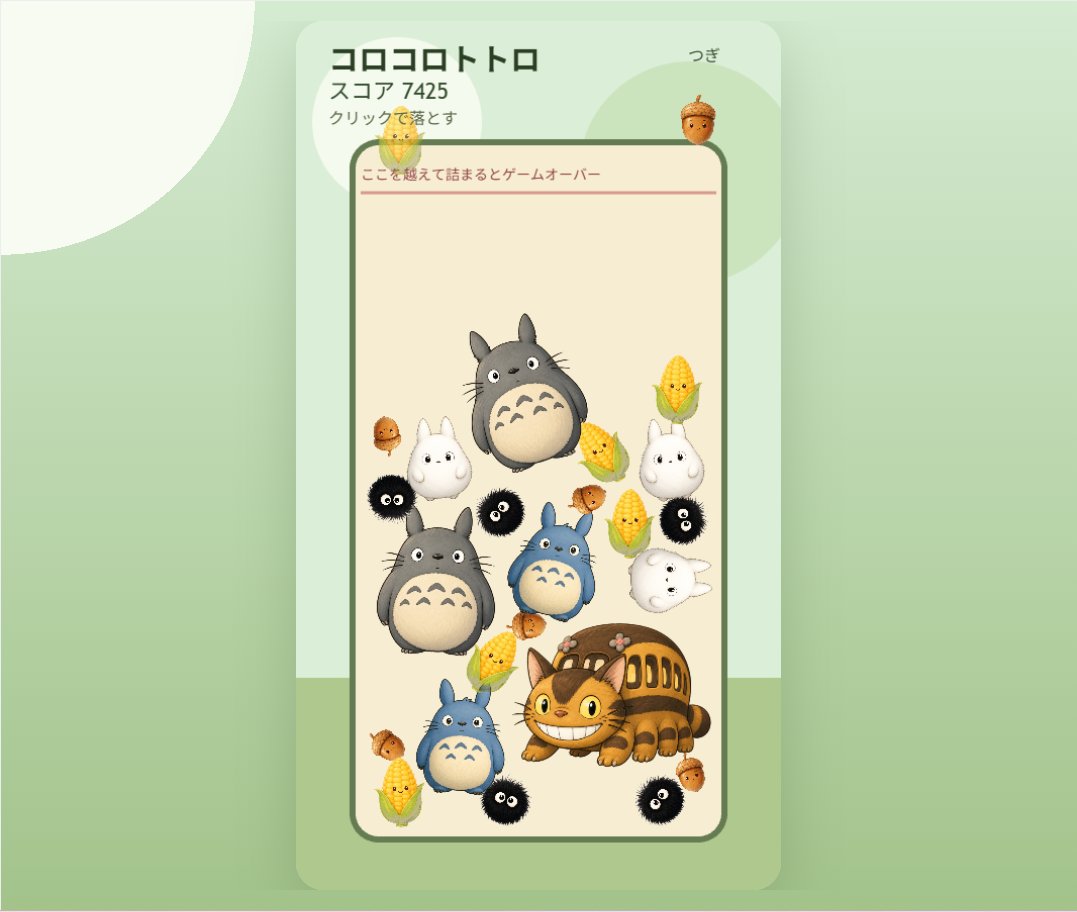
Cute Totoro Puzzle Game UI
Generates a pastel mobile falling-merge puzzle game mockup with Ghibli-inspired character pieces and Japanese UI labels.
This is a gpt-image-2 prompt case for 动漫游戏. Use the copy-ready prompt below to generate similar visuals, and review YouMind OpenLab awesome-gpt-image-2 attribution plus commercial-use rights before reuse.
Prompt
Copy-ready prompt
{
  "type": "cute vertical mobile puzzle game screen mockup",
  "style": "soft Studio Ghibli-inspired kawaii 3D clay-toy illustration, rounded UI, pastel colors, gentle shadows, clean app screenshot composition",
  "canvas": {
    "aspect": "landscape frame containing a centered portrait phone game panel",
    "background": "pale mint green with large translucent circular shapes and a soft darker green floor band near the bottom"
  },
  "ui": {
    "outer_panel": "tall rounded rectangle card in very light mint with subtle drop shadow, centered",
    "header": {
      "position": "top of card",
      "components_count": 4,
      "components": [
        {
          "text": "{argument name=\"game title\" default=\"コロコロトトロ\"}",
          "position": "top left",
          "style": "bold dark green Japanese sans serif"
        },
        {
          "text": "{argument name=\"score text\" default=\"スコア 7425\"}",
          "position": "under title",
          "style": "smaller dark green"
        },
        {
          "text": "{argument name=\"instruction text\" default=\"Click to download\"}",
          "position": "under score",
          "style": "small dark green"
        },
        {
          "text": "{argument name=\"next label\" default=\"つぎ\"}",
          "position": "top right",
          "style": "small dark green with an acorn preview beneath it"
        }
      ]
    },
    "playfield": {
      "position": "center",
      "shape": "tall cream-colored rounded rectangle bordered by a thick muted forest-green outline",
      "warning_line": {
        "text": "{argument name=\"game over warning\" default=\"If you get stuck beyond this point, it's game over.\"}",
        "position": "near top inside playfield",
        "style": "thin red horizontal line with small red Japanese text above it"
      }
    }
  },
  "game_pieces": {
    "total_visible_count": 25,
    "counts_by_type": [
      {
        "type": "gray Totoro pieces",
        "count": 2,
        "descriptions": [
          "large gray Totoro floating near upper center",
          "large gray Totoro resting mid-left"
        ]
      },
      {
        "type": "blue Totoro pieces",
        "count": 2,
        "descriptions": [
          "small blue Totoro near center",
          "small blue Totoro near lower left"
        ]
      },
      {
        "type": "white small Totoro ghost pieces",
        "count": 4,
        "descriptions": [
          "upright white Totoro at left middle",
          "upright white Totoro at right middle",
          "sideways white Totoro at right center",
          "tiny white Totoro near upper left under the warning line"
        ]
      },
      {
        "type": "Catbus piece",
        "count": 1,
        "descriptions": [
          "large smiling orange Catbus crouched at lower right"
        ]
      },
      {
        "type": "black soot sprite pieces",
        "count": 5,
        "descriptions": [
          "black soot sprite at left middle edge",
          "black soot sprite near center-left",
          "black soot sprite at right middle",
          "black soot sprite near bottom center",
          "black soot sprite at bottom right"
        ]
      },
      {
        "type": "corn cob pieces",
        "count": 5,
        "descriptions": [
          "corn cob at upper right",
          "corn cob at right of center",
          "corn cob near center-left above Catbus",
          "corn cob at bottom left",
          "corn cob near mid-right beside blue Totoro"
        ]
      },
      {
        "type": "acorn pieces",
        "count": 6,
        "descriptions": [
          "large acorn preview above playfield near next label",
          "small acorn at upper left inside playfield",
          "small acorn at left middle",
          "small acorn at center-right",
          "small acorn at lower left edge",
          "small acorn at lower right beside Catbus"
        ]
      }
    ]
  },
  "composition": "The pieces are arranged like a Suika-style falling merge puzzle: round character tokens pile up in the lower two-thirds of the playfield, with open empty space at the top and a red game-over threshold line. Make everything soft, collectible, toy-like, cheerful, and polished, with no realistic harsh edges."
}
Prompt variables
Editable argument placeholders found in the prompt, with their default values.
More cases in this category
Prioritized by category, input mode compatibility, quality, and lower risk.






Reuse and source notes
Use this prompt safely after previewing the case.
- 1.Copy the prompt or open it directly in Dovoo with the generation button.
- 2.Adjust variables, aspect ratio, and reference images for your own use case.
- 3.Before publishing or paid usage, verify source rights, attribution requirements, and brand or likeness risks.
Can I use this prompt commercially?
Commercial-use status is unknown. Review the original source, license, brand constraints, and legal requirements before paid usage.
Where does this case come from?
This case is imported from YouMind OpenLab awesome-gpt-image-2; keep attribution visible and check the source URL before reuse.