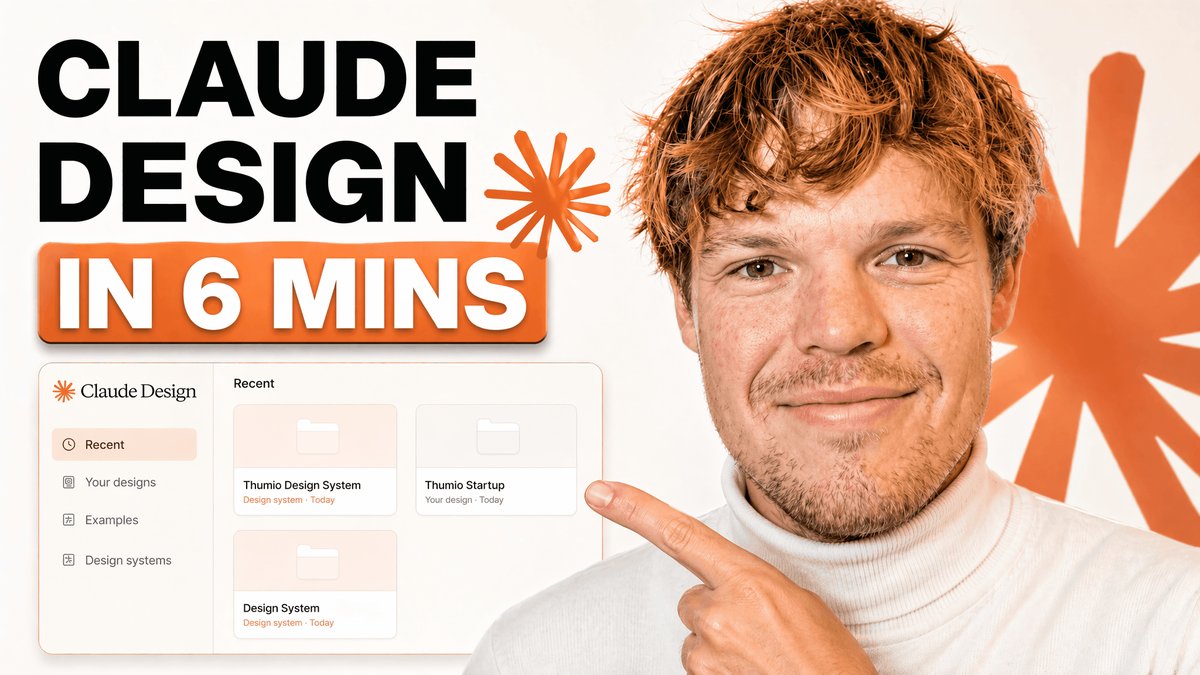
Tech Tutorial Thumbnail with UI Mockup
A bold YouTube-style thumbnail featuring a tutorial headline, a design app dashboard mockup, and a presenter pointing at the interface for branding or design-system content.
This is a gpt-image-2 prompt case for Graphic & Poster. Use the copy-ready prompt below to generate similar visuals, and review YouMind OpenLab awesome-gpt-image-2 attribution plus commercial-use rights before reuse.
Prompt
Copy-ready prompt
A clean, modern YouTube thumbnail with a bright white background, visually divided into bold text on the left and a half-body presenter on the right. On the left, a large, stacked title is placed in bold black sans-serif capital letters, containing the following text:{argument name="headline text" default="CLAUDE DESIGN"} The text is left-aligned and displayed in two lines. Below it, a large, rounded orange banner with a subtle shadow is added, containing bold white capital text with an orange outline, the content of which is:{argument name="subheadline text" default="IN 6 MINS"} Near the title, add two orange starburst shapes, one smaller next to the text and the other larger against the background on the right. In the lower left quadrant, display a floating application mockup of a design tools dashboard, with a soft gray-white panel featuring thin borders, rounded corners, and subtle shadows. The left sidebar should contain four menu items labeled "Recent," "Your designs," "Examples," and "Design systems." The main panel title should read "Recent" and include three grid-arranged "Project" cards labeled "Thumio Design System," "Thumio Startup," and "Design System." In the right half, display a realistic young man from the chest up, wearing a white turtleneck sweater, with messy light brown hair and a light stubble, positioned close to the camera. His face is deliberately obscured by a solid brown rectangular placeholder covering most of the area. One of his fingers points towards the left-hand panel, the finger extended. Featuring a warm orange and white brand color scheme, high contrast, minimalist layout, and sophisticated creator economy thumbnail style with subtle shadows, the composition is designed specifically for technology tutorial content.Prompt variables
Editable argument placeholders found in the prompt, with their default values.
Reuse and source notes
Use this prompt safely after previewing the case.
- 1.Copy the prompt or open it directly in Dovoo with the generation button.
- 2.Adjust variables, aspect ratio, and reference images for your own use case.
- 3.Before publishing or paid usage, verify source rights, attribution requirements, and brand or likeness risks.
Can I use this prompt commercially?
Commercial-use status is unknown. Review the original source, license, brand constraints, and legal requirements before paid usage.
Where does this case come from?
This case is imported from YouMind OpenLab awesome-gpt-image-2; keep attribution visible and check the source URL before reuse.