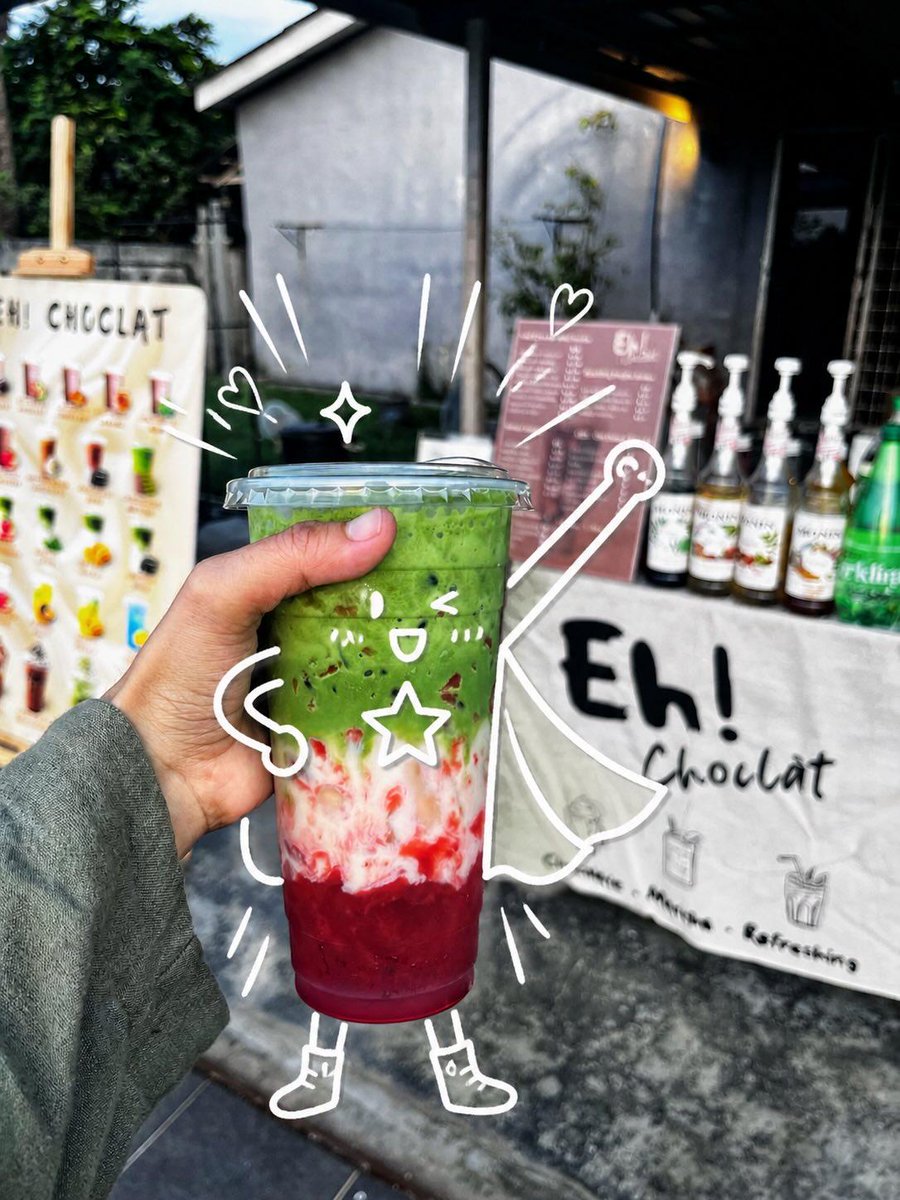
Cute Superhero Drink Doodle Photo
Generates a realistic handheld café drink photo enhanced with playful white doodles that turn the cup into a whimsical superhero character.
This is a gpt-image-2 prompt case for Food & Beverage. Use the copy-ready prompt below to generate similar visuals, and review YouMind OpenLab awesome-gpt-image-2 attribution plus commercial-use rights before reuse.
Prompt
Copy-ready prompt
Create a realistic handheld street-food photo of a layered iced drink in a clear plastic takeaway cup with a domed flat lid, held close to the camera by a left hand wearing a muted gray-green long sleeve. The drink has three vivid layers: a deep ruby-red fruit base at the bottom, a cloudy white creamy middle with red streaks, and a thick bright matcha-green top with small dark specks. Set the scene outdoors in front of a small dessert drink stall, with shallow depth of field and natural daylight; the background should be softly blurred but still show a white sign reading “Eh! Chocolat,” a pink menu board, syrup bottles lined up on the counter, a green bottle at the right, and a colorful menu display at the left. Add playful white hand-drawn doodles directly over the photo so the cup becomes a cute superhero character: one kawaii face on the cup with two eyes, one open smile, two blush-mark groups, and one outlined star on its body; two noodle-like arms, two simple legs, and two small boots; one flowing cape extending to the right; one wand or magic staff with a circular tip; two small hearts, one four-point sparkle, and nine short motion/emphasis strokes around the cup. Keep the doodles casual, imperfect, bright white, and integrated with the subject as if sketched on top of the photograph. Use a vibrant candid smartphone photography look, high contrast, crisp focus on the drink and hand, blurred café-stall background, and a cheerful whimsical mood. Customize the stall sign text as {argument name="stall sign text" default="Eh! Chocolat"}, the drink top color as {argument name="drink top color" default="bright matcha green"}, the drink bottom color as {argument name="drink bottom color" default="deep ruby red"}, the doodle color as {argument name="doodle color" default="white"}, and the sleeve color as {argument name="sleeve color" default="muted gray-green"}.Prompt variables
Editable argument placeholders found in the prompt, with their default values.
Variable
stall sign text
Default
Eh! Chocolat
Variable
drink top color
Default
bright matcha green
Variable
drink bottom color
Default
deep ruby red
Variable
doodle color
Default
white
Variable
sleeve color
Default
muted gray-green
Reuse and source notes
Use this prompt safely after previewing the case.
- 1.Copy the prompt or open it directly in Dovoo with the generation button.
- 2.Adjust variables, aspect ratio, and reference images for your own use case.
- 3.Before publishing or paid usage, verify source rights, attribution requirements, and brand or likeness risks.
Can I use this prompt commercially?
Commercial-use status is unknown. Review the original source, license, brand constraints, and legal requirements before paid usage.
Where does this case come from?
This case is imported from YouMind OpenLab awesome-gpt-image-2; keep attribution visible and check the source URL before reuse.