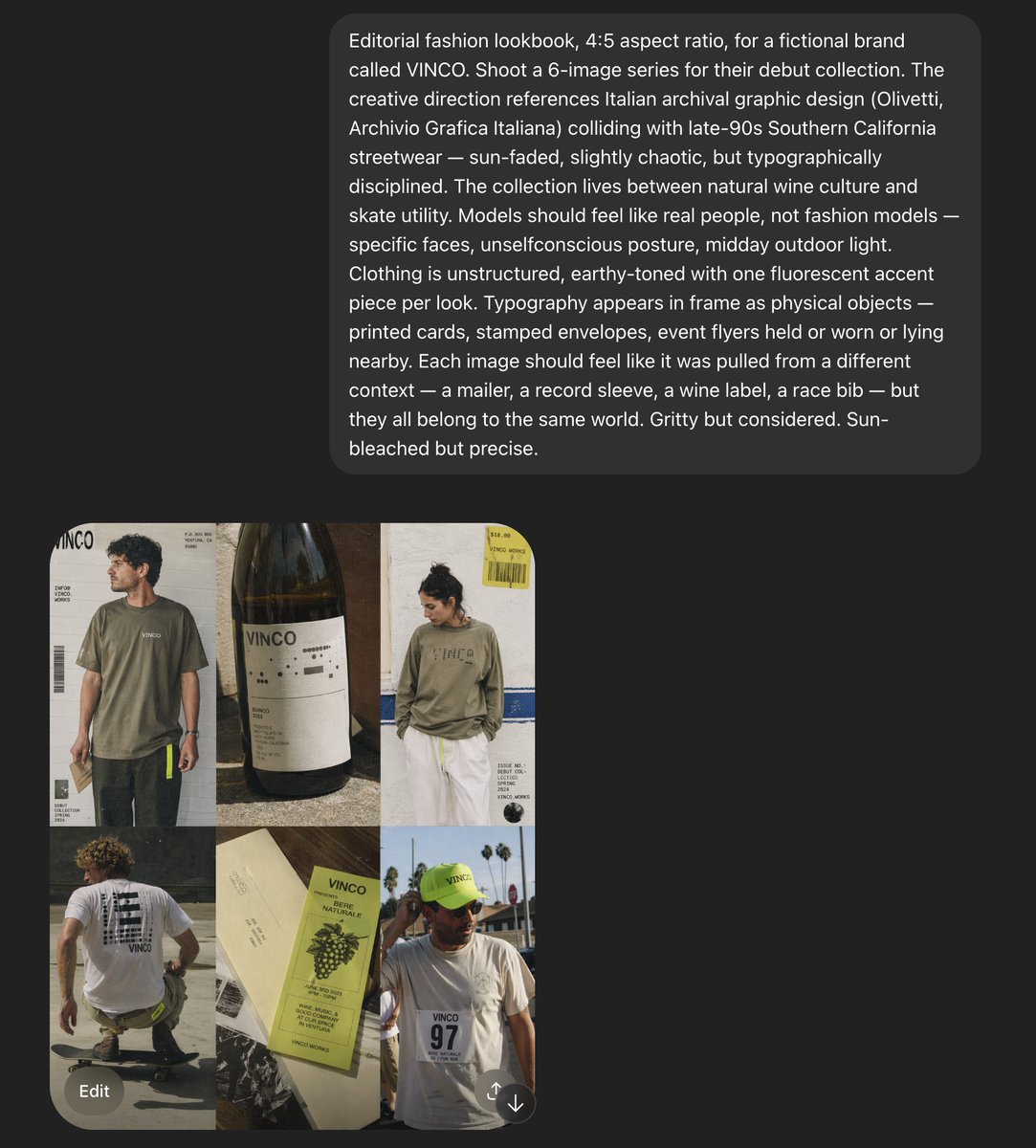
VINCO Editorial Moodboard Screenshot
A screenshot-style AI moodboard showing a six-image editorial fashion concept for a fictional streetwear and natural-wine brand, useful for recreating art direction decks or campaign reference boards.
This is a gpt-image-2 prompt case for 时尚美妆. Use the copy-ready prompt below to generate similar visuals, and review YouMind OpenLab awesome-gpt-image-2 attribution plus commercial-use rights before reuse.

Prompt
Copy-ready prompt
Create a 4:5 editable fashion catalog project for use in a format called{argument name="brand name" default="VINCO"} The fictional brand. The images employ a dark, screenshot-style aesthetic, with a large, rounded charcoal gray text panel at the top and a 2x3 six-image fashion/editing grid in the lower left quadrant. The overall aesthetic blends Italian archival graphic design with late 1990s Southern California streetwear, mixing natural wine culture, skateboarding pragmatism, and sun-faded documentary fashion photography. It features rough yet precise art direction, midday outdoor lighting, slightly chaotic yet rigorous typography, and uses real people rather than glamorous fashion models. The top text panel displays a long, white sans-serif creative direction paragraph describing the shoot, containing multiple lines of text, much like AI prompts or design briefs displayed on a near-black background within rounded dark gray bubbles. The image grid contains six tiles: Tile 1 shows a young man in an oversized, faded olive green T-shirt and dark trousers standing against a poster-like gray-white background, with a striking {argument name="logo text" default="VINCO"} Brand logo, barcode graphic, and small-print edited text; Tile 2 is a close-up still life of a dark wine bottle with a minimalist white label that reads {argument name="bottle label" default="VINCO"} Shot in warm sunlight, it has a realistic paper texture and shadows; Tile 3 shows a person with their back to the camera, wearing a washed olive green long-sleeved shirt with a prominent but understated brand logo on the chest or back, paired with white shorts, and a yellow hangtag or sticker element in the upper right corner, against a background of light-colored walls with blue stripe details and editorial typography text; Tile 4 shows a skateboarder crouching or gliding, shot from behind, wearing a white T-shirt with a large black graphic on the back and dark shorts, on a pavement in golden sunlight; Tile 5 is a printed flat lay of wine-related merchandise, using cream-colored paper and a light yellow-green label or brochure, with the words {argument name="product text" default="Vino Naturale"} The six images, featuring grape illustrations, small bold text, and layered paper scraps, include a white T-shirt with a race number "97" printed on the chest, a fluorescent yellow-green hat with small branding text, and an outdoor palm tree and bright sky in the background. The overall design maintains a slightly imperfect, collage-like feel, as if extracted from an event plan or saved reference material. Earth tones are used throughout: olive green, cream, charcoal gray, sun-bleached white, asphalt gray, and soft browns, with a fluorescent yellow-green repeated as an accent in the details. A visible interface frame surrounds the composition: a dark applied background, a left-aligned lower image grid, a rounded gray "Edit" button in the lower left corner, and a small circular icon in the lower right corner to emphasize that this is a screenshot of a generated project, not a clean standalone poster.Prompt variables
Editable argument placeholders found in the prompt, with their default values.
More cases in this category
Prioritized by category, input mode compatibility, quality, and lower risk.






Reuse and source notes
Use this prompt safely after previewing the case.
- 1.Copy the prompt or open it directly in Dovoo with the generation button.
- 2.Adjust variables, aspect ratio, and reference images for your own use case.
- 3.Before publishing or paid usage, verify source rights, attribution requirements, and brand or likeness risks.
Can I use this prompt commercially?
Commercial-use status is unknown. Review the original source, license, brand constraints, and legal requirements before paid usage.
Where does this case come from?
This case is imported from YouMind OpenLab awesome-gpt-image-2; keep attribution visible and check the source URL before reuse.