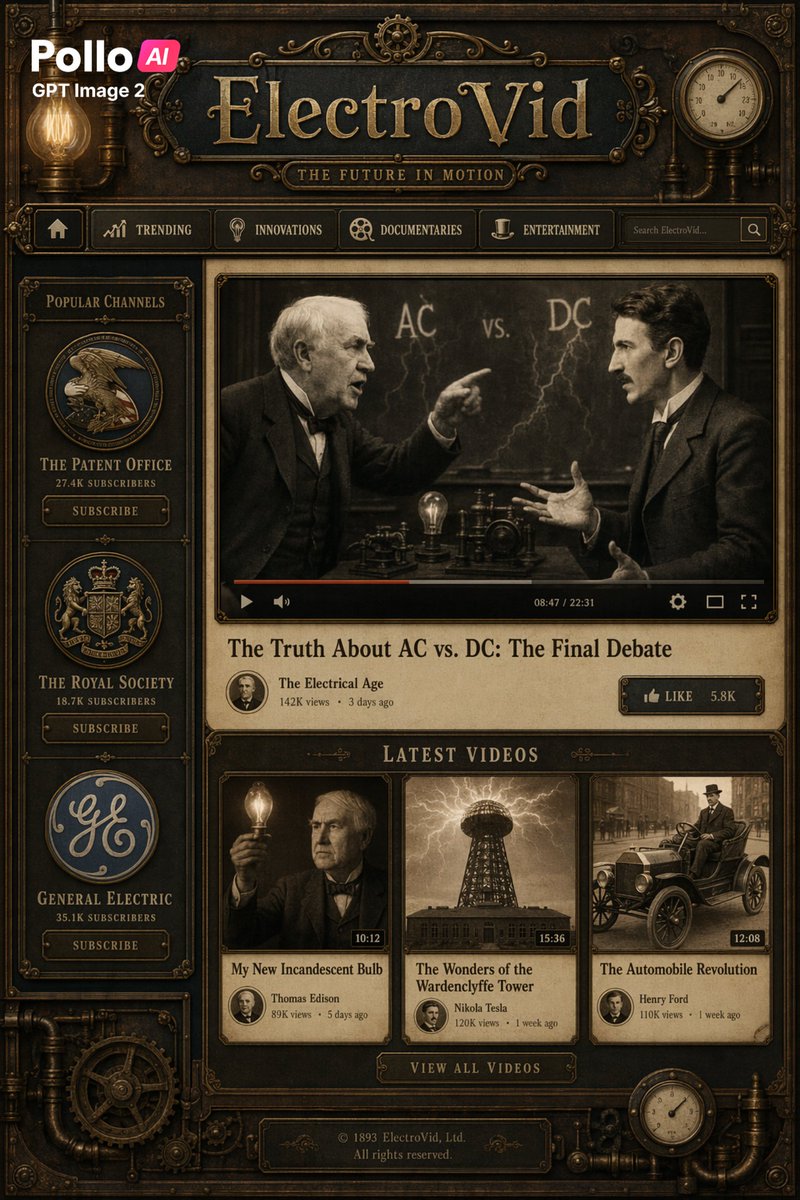
Steampunk Vintage Video Platform UI
A detailed steampunk streaming-site mockup styled like a Victorian brass machine interface, ideal for retro-futurist web concepts and text-heavy UI showcases.
This is a gpt-image-2 prompt case for Graphic & Poster. Use the copy-ready prompt below to generate similar visuals, and review YouMind OpenLab awesome-gpt-image-2 attribution plus commercial-use rights before reuse.
Prompt
Copy-ready prompt
Create a full-screen fictional video platform homepage in a richly detailed steampunk Victorian style, designed with an antique brass and wood web interface featuring a dark bronze metal border, carved decorations, rivets, pipes, exposed gears, glowing Edison light bulbs, and a brown texture throughout. At the top center, a large embossed title is displayed as {argument name="site name" default="ElectroVid"} The logo features a bold gold serif font on a dark plaque, below which is a smaller subtitle plaque that reads "THE FUTURE IN MOTION". In the upper left corner, a modern brand logo is overlaid, displaying "Pollo AI" and "GPT Image 2" in a clean, contemporary font, contrasting with the vintage interface. A circular analog gauge is added in the upper right corner. Below the header is a navigation bar containing six items: a homepage icon, "TRENDING", "INNOVATIONS", "DOCUMENTARIES", "ENTERTAINMENT", and a display {argument name="search placeholder" default="Search ElectroVid..."} The layout features a search box and a search icon. The main layout is a two-column design: a narrow left sidebar and a larger main content area. In the left sidebar, a section titled "POPULAR CHANNELS" is added, containing three vertically stacked channel cards, each with a circular logo, channel name, number of subscribers, and a "SUBSCRIBE" button: "THE PATENT OFFICE" with "27.4K SUBSCRIBERS," "THE ROYAL SOCIETY" with "18.7K SUBSCRIBERS," and "GENERAL ELECTRIC" with "35.1K SUBSCRIBERS." In the main content area, a large central video player is positioned, framed by an ornate brass border. The paused video feed is a sepia-toned historical scene: two men in suits debating in front of a blackboard labeled "AC vs. DC" and a lightning bolt sketch; one points, the other gestures, both faces softly blurred. The bottom edge of the player includes a video progress bar and controls, along with a timestamp displayed as "08:47 / 22:31". Below the player, the title is displayed in a large serif font.{argument name="featured video title" default="The Truth About AC vs. DC: The Final Debate"} This is followed by the channel metadata for "The Electrical Age," "142K views," "3 days ago," and "LIKE" buttons labeled "LIKE" and "5.8K" on the right. Below this, create a section titled "LATEST VIDEOS" and display three thumbnail cards on the same line. Card 1 shows a sepia-toned portrait of Thomas Edison holding a glowing light bulb, duration "10:12," title "My New Incandescent Bulb," metadata "Thomas Edison," "89K views," "5 days ago." Card 2 shows a dramatic sepia-toned image of the Tesla Coil Tower under an electric arc, duration "15:36," title "The Wonders of the Wardenclyffe Tower," metadata "Nikola Tesla," "120K views," "1 week ago." Card 3 shows an antique car on the street, duration "12:08," title "The Automobile Revolution," metadata "Henry Ford," "110K views," "1 week ago." Below the line, center a button that reads "VIEW ALL VIDEOS." At the bottom center, a copyright plaque is added that reads "© 1893 ElectroVid, Ltd. All rights reserved." The interface is symmetrical and meticulously crafted, featuring realistic depth, embossed typography, soft warm lighting, old parchment panels, Victorian engraving aesthetics, and a sophisticated cinematic sepia tone composed of brass, copper, dark wood, black steel, and antique gold.Prompt variables
Editable argument placeholders found in the prompt, with their default values.
Variable
site name
Default
ElectroVid
Variable
search placeholder
Default
Search ElectroVid...
Variable
featured video title
Default
The Truth About AC vs. DC: The Final Debate
Reuse and source notes
Use this prompt safely after previewing the case.
- 1.Copy the prompt or open it directly in Dovoo with the generation button.
- 2.Adjust variables, aspect ratio, and reference images for your own use case.
- 3.Before publishing or paid usage, verify source rights, attribution requirements, and brand or likeness risks.
Can I use this prompt commercially?
Commercial-use status is unknown. Review the original source, license, brand constraints, and legal requirements before paid usage.
Where does this case come from?
This case is imported from YouMind OpenLab awesome-gpt-image-2; keep attribution visible and check the source URL before reuse.