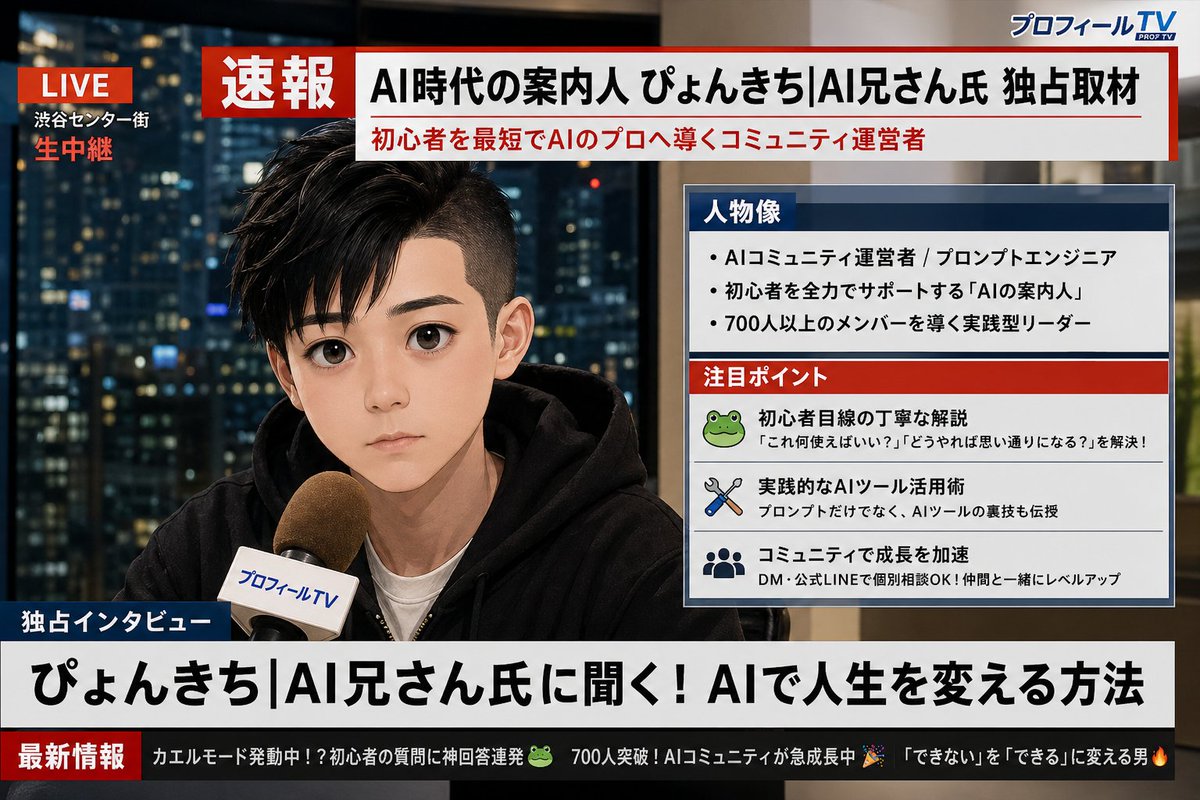
Social Media Profile News Broadcast Transformation
A detailed prompt that analyzes a user's X (Twitter) profile screenshot and generates a realistic Japanese TV breaking news screen featuring the user.
This is a gpt-image-2 prompt case for 人像角色. Use the copy-ready prompt below to generate similar visuals, and review YouMind OpenLab awesome-gpt-image-2 attribution plus commercial-use rights before reuse.
Prompt
Copy-ready prompt
Analyze the uploaded screenshot of X (Twitter) profile. First, extract my profile picture, display name, and bio text. Then, based on my bio and overall style, generate a realistic Japanese TV breaking news broadcast featuring me. The image should closely resemble the person in the profile picture, appearing as if being interviewed live. The design style should mimic Japanese news programs (similar to NHK News or News Zero). All text must be in Japanese. Include the following elements: 1. A red "Breaking News" banner at the top of the screen. 2. A prominent Japanese headline summarizing who I am based on my bio (e.g., "Exclusive Interview with Mr. ○○, the Pioneer of the AI Era"). 3. A profile information box on the side of the screen (similar to a Japanese news information panel), containing: - "Portrait" section: Three brief points about my personality or profession based on my bio. - "Focus" section: Three small items representing my interests or skills, inferred from my profile. 4. A scrolling news bar at the bottom of the screen containing 2-3 short, humorous updates generated based on my profile and interests, written in Japanese. 5. A fictional Japanese news channel logo in the corner (e.g., "Profile TV" or "X News Channel"). 6. A red "LIVE" indicator in the upper right corner. The overall look should resemble photorealistic Japanese television news broadcasts, with clear, modern Japanese typography. Ensure all Japanese text is legible and accurately reflects the information on my profile page.
More cases in this category
Prioritized by category, input mode compatibility, quality, and lower risk.

Direct Flash Editorial Portrait
Text to Imageunknown

Vintage Film Projection Portrait
Image to Imageunknown

Premium Sports Editorial Poster
Text to Imageunknown

Hyper Realistic FIFA Football Poster
Text to Imageunknown

Cosmic Big Bang Snooze Comic
Text to Imageunknown

Hand-Drawn Sketch Photo Annotation
Text to Imageunknown
Reuse and source notes
Use this prompt safely after previewing the case.
- 1.Copy the prompt or open it directly in Dovoo with the generation button.
- 2.Adjust variables, aspect ratio, and reference images for your own use case.
- 3.Before publishing or paid usage, verify source rights, attribution requirements, and brand or likeness risks.
Can I use this prompt commercially?
Commercial-use status is unknown. Review the original source, license, brand constraints, and legal requirements before paid usage.
Where does this case come from?
This case is imported from YouMind OpenLab awesome-gpt-image-2; keep attribution visible and check the source URL before reuse.