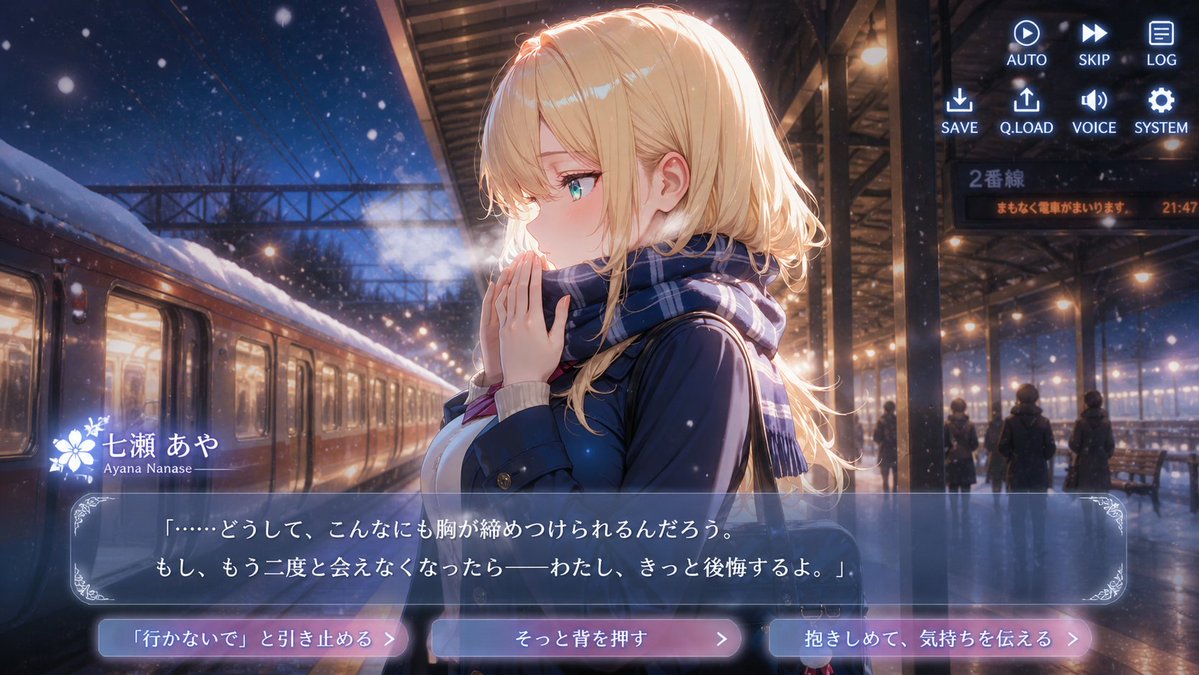
Snowy Station Visual Novel Scene
Generates a cinematic anime dating-sim screenshot of a blonde girl at a snowy train station with dialogue UI and three emotional choice buttons.
This is a gpt-image-2 prompt case for 动漫游戏. Use the copy-ready prompt below to generate similar visuals, and review YouMind OpenLab awesome-gpt-image-2 attribution plus commercial-use rights before reuse.

Prompt
Copy-ready prompt
{
  "type": "Screenshots from a cinematic anime visual novel",
  "aspect_ratio": "16:9 widescreen",
  "setting": {
    "location": "The train platform in the snow at night",
    "atmosphere": "A romantic, melancholic winter night, falling snowflakes, visible white breath, and the warm station lights contrasting against the deep blue night sky.",
    "background_details": "A train was parked on the left, its windows letting in light. The roof was covered in snow, with a steel canopy and overhead power lines. In the distance, there were silhouettes of passengers, benches, and a wet, reflective platform. A glowing sign read \"Line 2,\" and an orange notice board read, \"The train is here. 21:47.\""
  },
  "main_character": {
    "name": "{argument name=\"character name\" default=\"Aya Nanase\"}",
    "romanized_name": "Ayana Nanase",
    "position": "Center right foreground, turned sideways to the left",
    "appearance": "A beautiful anime girl with fair skin, turquoise eyes, a faint blush, and delicate features.",
    "hair": "{argument name=\"hair color\" default=\"Long, wavy blonde hair with side-swept bangs and a shimmering silhouette.\"}",
    "outfit": "{argument name=\"outfit\" default=\"A dark blue winter school uniform-style coat, worn over a light-colored sweater, and a blue plaid scarf around the neck.\"}",
    "pose_expression": "He clasped his hands together near his mouth, as if warming them or hesitating; his expression was thoughtful and vulnerable, and the white mist of his breath could be seen in the cold air."
  },
  "visual_style": "High-resolution key visuals from Japanese anime, premium romance simulation visual novel CG, soft lighting, cinematic lighting, shallow depth of field, shimmering snowflake particles, glossy reflections, and exquisite game UI overlays.",
  "layout": {
    "ui_overlay": {
      "count": 4,
      "components": [
        {
          "component": "upper right corner command menu",
          "position": "Top right corner",
          "count": 8,
          "labels": [
            "AUTO",
            "SKIP",
            "LOG",
            "SAVE",
            "Q.LOAD",
            "VOICE",
            "SYSTEM",
            "Play, Fast Forward, Document, Download, Upload, Speaker, Gear Icon"
          ]
        },
        {
          "component": "Character name tag",
          "position": "lower left of the dialog box",
          "count": 2,
          "labels": [
            "Aya Nanase",
            "Ayana Nanase"
          ],
          "decoration": "A white floral emblem next to the name"
        },
        {
          "component": "dialog box",
          "position": "bottom third",
          "count": 1,
          "text": "{argument name=\"dialogue text\" default=\""...Why is my heart so tight? If I never see you again—I will definitely regret it."\"}",
          "appearance": "A semi-transparent blue-gray rectangular frame with a thin border and ornate corner decorations."
        },
        {
          "component": "Option button",
          "position": "bottom",
          "count": 3,
          "labels": [
            "He pleaded with her, \"Don't go.\"",
            "Give her a gentle push",
            "Hug her and convey your feelings"
          ],
          "appearance": "Three rounded, glowing, pink-blue gradient buttons with a right arrow symbol."
        }
      ]
    },
    "composition": "The character occupies the right half, while the train and snow-covered platform extend from the left into the background, creating a strong sense of perspective. The UI remains clear and does not obscure the face.",
    "mood": "A bittersweet farewell scene, a romantic atmosphere brimming with emotional tension before the train departs."
  },
  "generation_instructions": "Create a complete final screenshot, not a reference image. Include all visible game interface elements, ensure clear and legible Japanese text, present realistic snow scenes and lighting, and showcase high-quality anime visual novel aesthetics."
}
Prompt variables
Editable argument placeholders found in the prompt, with their default values.
More cases in this category
Prioritized by category, input mode compatibility, quality, and lower risk.






Reuse and source notes
Use this prompt safely after previewing the case.
- 1.Copy the prompt or open it directly in Dovoo with the generation button.
- 2.Adjust variables, aspect ratio, and reference images for your own use case.
- 3.Before publishing or paid usage, verify source rights, attribution requirements, and brand or likeness risks.
Can I use this prompt commercially?
Commercial-use status is unknown. Review the original source, license, brand constraints, and legal requirements before paid usage.
Where does this case come from?
This case is imported from YouMind OpenLab awesome-gpt-image-2; keep attribution visible and check the source URL before reuse.