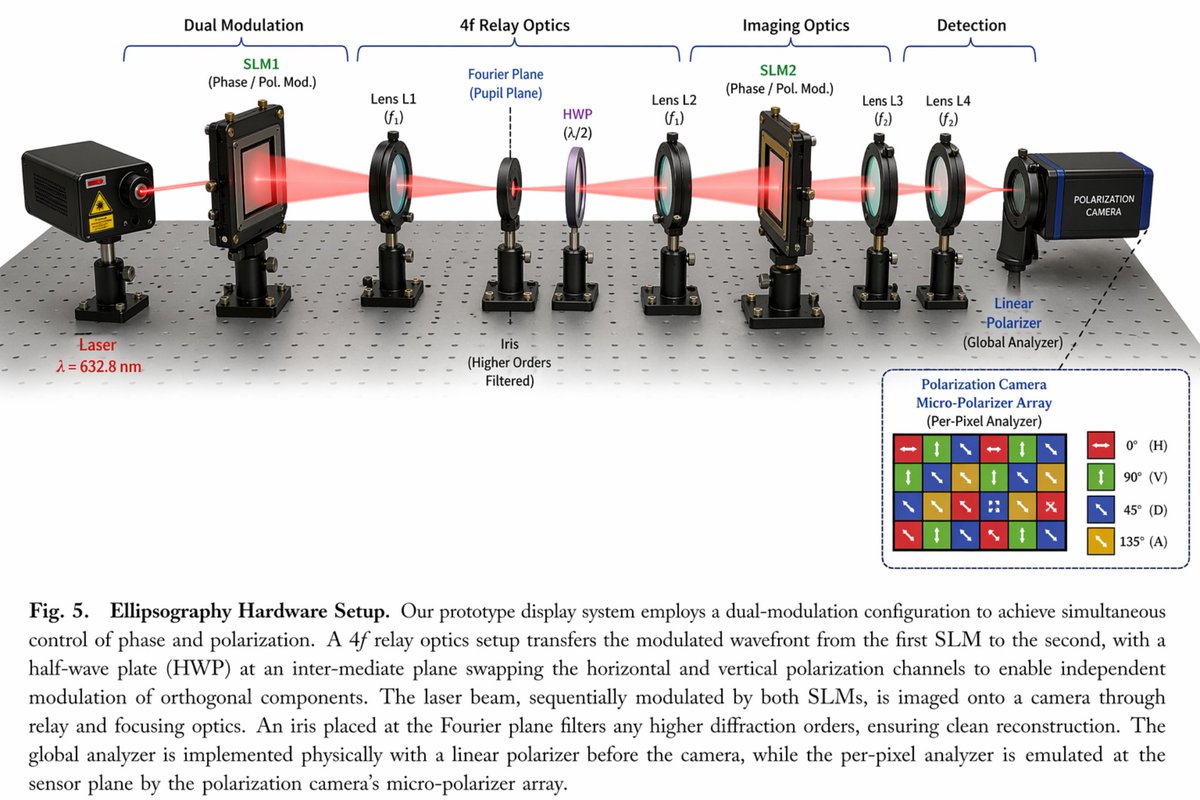
Scientific Optical Hardware Diagram
A detailed 3D schematic of an optical table setup with labeled components, an inset legend, and a descriptive caption.
This is a gpt-image-2 prompt case for 平面海报. Use the copy-ready prompt below to generate similar visuals, and review YouMind OpenLab awesome-gpt-image-2 attribution plus commercial-use rights before reuse.
Prompt
Copy-ready prompt
{
  "type": "Scientific hardware schematic diagram",
  "layout": {
    "main_scene": "A 3D rendering of the optical platform, showing a red laser beam passing through 11 aligned optical components mounted on a black pillar.",
    "top_brackets": [
      {
        "label": "Dual modulation",
        "span": "SLM1"
      },
      {
        "label": "4f relay optical system",
        "span": "Lens L1 to Lens L2"
      },
      {
        "label": "Imaging Optical System",
        "span": "SLM2 to Lens L4"
      },
      {
        "label": "Detection",
        "span": "camera"
      }
    ],
    "optical_components_left_to_right": [
      {
        "name": "laser",
        "labels": [
          "laser",
          "λ = {argument name=\"laser wavelength\" default=\"632.8 nm\"}"
        ]
      },
      {
        "name": "SLM1",
        "labels": [
          "SLM1",
          "(Phase/Polarization Modulation)"
        ]
      },
      {
        "name": "Lens L1",
        "labels": [
          "Lens L1",
          "(f1)"
        ]
      },
      {
        "name": "Aperture",
        "labels": [
          "Fourier plane",
          "(Pupillary plane)",
          "Aperture",
          "(Filter out higher-order terms)"
        ]
      },
      {
        "name": "Half-wave plate (HWP)",
        "labels": [
          "HWP",
          "(λ/2)"
        ]
      },
      {
        "name": "Lens L2",
        "labels": [
          "Lens L2",
          "(f1)"
        ]
      },
      {
        "name": "SLM2",
        "labels": [
          "SLM2",
          "(Phase/Polarization Modulation)"
        ]
      },
      {
        "name": "Lens L3",
        "labels": [
          "Lens L3",
          "(f2)"
        ]
      },
      {
        "name": "Lens L4",
        "labels": [
          "Lens L4",
          "(f2)"
        ]
      },
      {
        "name": "Linear polarizer",
        "labels": [
          "linear",
          "-Polarizer",
          "(Global Analyzer)"
        ]
      },
      {
        "name": "polarization camera",
        "labels": [
          "polarization camera"
        ]
      }
    ],
    "inset_box": {
      "position": "bottom right corner",
      "title": "Polarization camera micro-polarizer array (pixel-level analyzer)",
      "grid": "4x4 Colored Square Grid with Directional Arrows",
      "legend_count": 4,
      "legend_items": [
        "Red square, horizontal arrow, 0° (H)",
        "Green square, vertical arrow, 90° (V)",
        "Blue square, diagonal arrow, 45° (D)",
        "Yellow square, diagonal arrow, 135° (A)"
      ]
    },
    "bottom_caption": {
      "figure_prefix": "{argument name=\"figure number\" default=\"Figure 5.\"}",
      "title": "{argument name=\"system name\" default=\"Elliptic polarization imaging hardware settings.\"}",
      "text": "Scientific paragraphs explaining dual modulation configurations, 4f relay optics systems, and polarization cameras."
    }
  }
}
Prompt variables
Editable argument placeholders found in the prompt, with their default values.
More cases in this category
Prioritized by category, input mode compatibility, quality, and lower risk.






Reuse and source notes
Use this prompt safely after previewing the case.
- 1.Copy the prompt or open it directly in Dovoo with the generation button.
- 2.Adjust variables, aspect ratio, and reference images for your own use case.
- 3.Before publishing or paid usage, verify source rights, attribution requirements, and brand or likeness risks.
Can I use this prompt commercially?
Commercial-use status is unknown. Review the original source, license, brand constraints, and legal requirements before paid usage.
Where does this case come from?
This case is imported from YouMind OpenLab awesome-gpt-image-2; keep attribution visible and check the source URL before reuse.