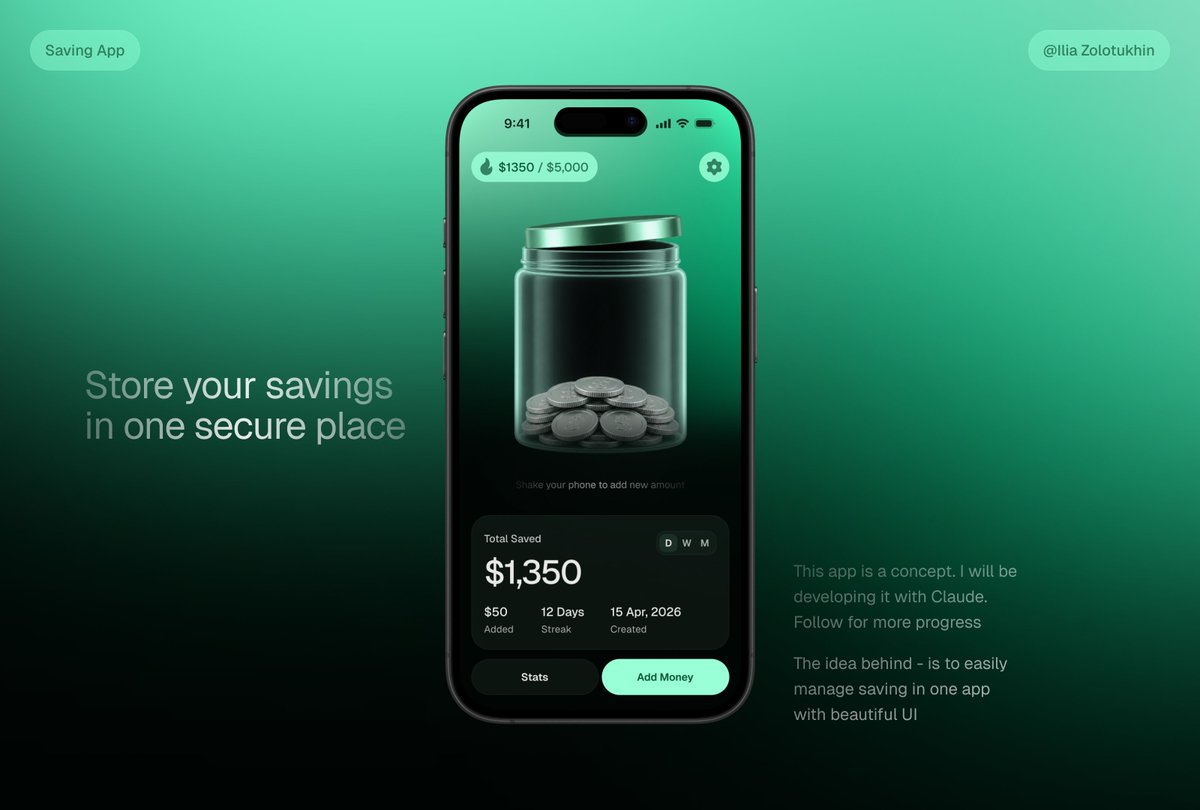
3D Savings App Jar UI Mockup
Generates a polished fintech savings app concept featuring a smartphone UI with a glass coin jar and marketing text for portfolio or launch visuals.
This is a gpt-image-2 prompt case for 产品商业. Use the copy-ready prompt below to generate similar visuals, and review YouMind OpenLab awesome-gpt-image-2 attribution plus commercial-use rights before reuse.
Prompt
Copy-ready prompt
{
  "type": "Advanced Fintech Application Concept Main Visual Model",
  "style": "Stylish 3D glass-like UI, deep mint green gradient, realistic smartphone rendering, soft studio lighting, high contrast, exquisite product design display, delicate blur and halo effects, and cinematic shadows.",
  "canvas": {
    "aspect_ratio": "16:9 Landscape",
    "background": "A smooth gradient from cyan to emerald green, fading to near black at the bottom, creating a minimalist, technologically advanced display background."
  },
  "layout": {
    "centerpiece": "A large, black iPhone-style smartphone, centered slightly to the right, facing forward, with rounded corners, a dynamic island-style camera cutout, a slim black bezel, realistic side buttons, and reflective effects.",
    "left_text_block": {
      "position": "Left and Middle",
      "headline": "{argument name=\"headline text\" default=\"Store your savings in a safe place\"}",
      "style": "Large light gray sans-serif font, two lines, soft transparency"
    },
    "right_text_block": {
      "position": "Bottom right",
      "paragraph_count": 2,
      "text": [
        "This application is a conceptual design. I will be using Claude for development. Stay tuned for further updates.",
        "The concept aims to make managing savings easy within a single application through a beautiful UI."
      ],
      "style": "Small soft gray sans-serif font"
    },
    "top_badges": {
      "count": 2,
      "items": [
        {
          "position": "Top left",
          "text": "Savings Application",
          "shape": "Rounded corner translucent mint-colored capsules"
        },
        {
          "position": "Top right",
          "text": "{argument name=\"creator handle\" default=\"@Ilia Zolotukhin\"}",
          "shape": "Rounded corner translucent mint-colored capsules"
        }
      ]
    }
  },
  "phone_screen": {
    "status_bar": {
      "time": "9:41",
      "icons": "Signal, Wi-Fi, Battery",
      "count": 4
    },
    "top_controls": {
      "count": 2,
      "items": [
        {
          "position": "Top left",
          "text": "{argument name=\"savings progress\" default=\"$1350 / $5,000\"}",
          "icon": "Small flame or water droplet icon",
          "shape": "Mint-colored translucent rounded capsules"
        },
        {
          "position": "Top right",
          "icon": "Set gears",
          "shape": "Mint green round button"
        }
      ]
    },
    "main_visual": "A large, translucent glass jar with a metallic mint-colored lid is positioned in the center of the screen, with stacked silver coins at the bottom; it features a glossy, refractive effect, vertical highlights, 3D depth, and a deep green interior background.",
    "micro_instruction": "Shake your phone to add new amount",
    "stats_card": {
      "position": "bottom of phone screen",
      "shape": "Large dark rounded glass card",
      "title": "Total Savings",
      "main_amount": "{argument name=\"saved amount\" default=\"$1,350\"}",
      "time_toggle": {
        "count": 3,
        "labels": [
          "day",
          "week",
          "moon"
        ],
        "active": "day"
      },
      "metrics": {
        "count": 3,
        "items": [
          {
            "value": "$50",
            "label": "Added"
          },
          {
            "value": "12 days",
            "label": "Continuous recording"
          },
          {
            "value": "April 15, 2026",
            "label": "Creation Date"
          }
        ]
      }
    },
    "bottom_buttons": {
      "count": 2,
      "items": [
        {
          "text": "statistics",
          "style": "Dark rounded corner buttons"
        },
        {
          "text": "Saving money",
          "style": "Bright mint green rounded corner buttons"
        }
      ]
    }
  },
  "rendering_notes": "Make the piggy bank the visual focal point, showcasing realistic glass transparency and coin geometry. The clean, modern layout, balanced white space, and uncluttered design deliver product-photo quality, making it suitable for landing page previews of savings apps."
}
Prompt variables
Editable argument placeholders found in the prompt, with their default values.
More cases in this category
Prioritized by category, input mode compatibility, quality, and lower risk.






Reuse and source notes
Use this prompt safely after previewing the case.
- 1.Copy the prompt or open it directly in Dovoo with the generation button.
- 2.Adjust variables, aspect ratio, and reference images for your own use case.
- 3.Before publishing or paid usage, verify source rights, attribution requirements, and brand or likeness risks.
Can I use this prompt commercially?
Commercial-use status is unknown. Review the original source, license, brand constraints, and legal requirements before paid usage.
Where does this case come from?
This case is imported from YouMind OpenLab awesome-gpt-image-2; keep attribution visible and check the source URL before reuse.