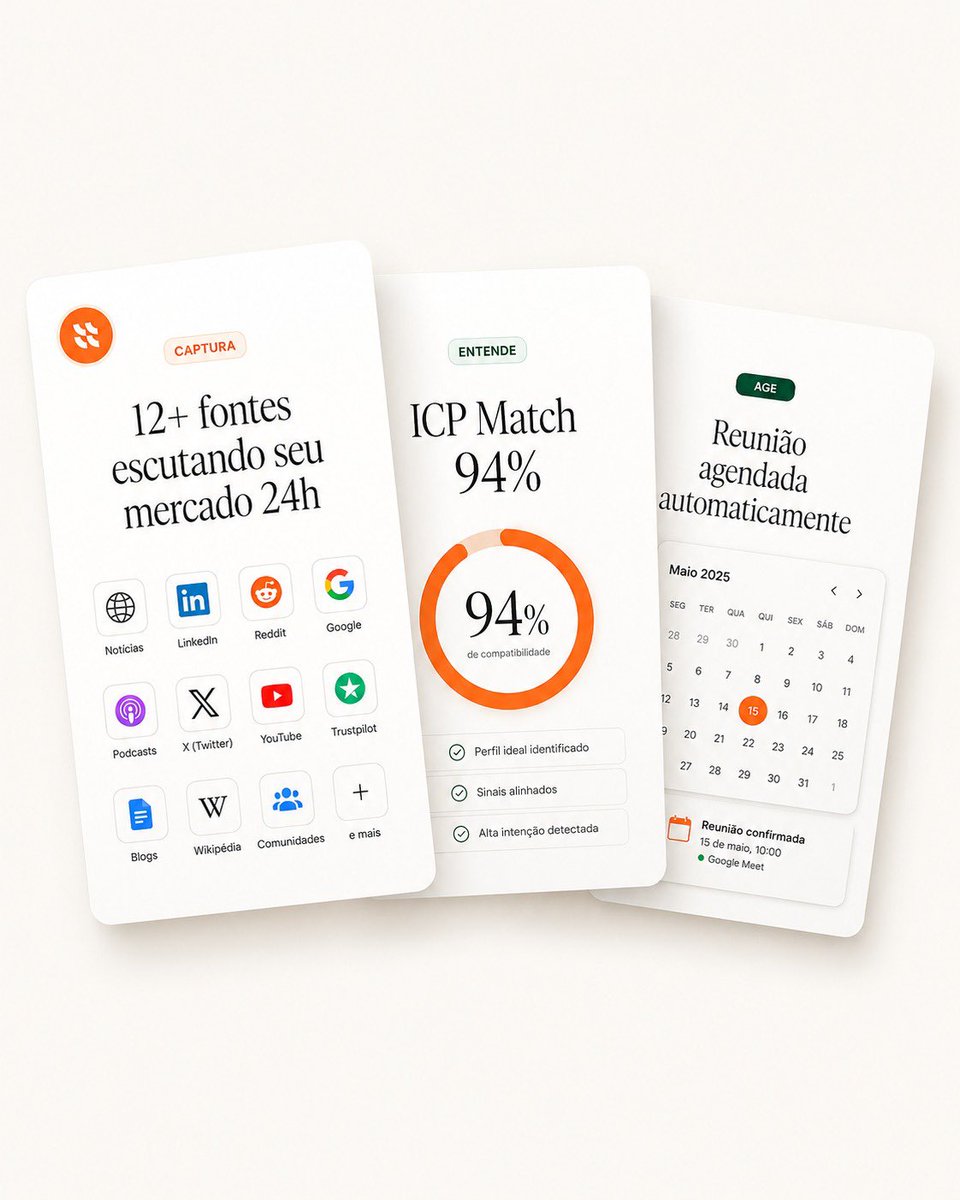
Overlapping SaaS Feature Cards
A polished landing-page hero mockup with three overlapping SaaS feature cards for capture, match scoring, and automated scheduling.
This is a gpt-image-2 prompt case for 产品商业. Use the copy-ready prompt below to generate similar visuals, and review YouMind OpenLab awesome-gpt-image-2 attribution plus commercial-use rights before reuse.

Prompt
Copy-ready prompt
Objective: Create a clean landing page homepage visual showcasing three overlapping white SaaS feature cards for a sales intelligence/lead monitoring product, using a sophisticated minimalist Figma-style mockup. Canvas: 1:1 square composition, warm beige white background with a very soft beige gradient and subtle vignetting, and realistic soft shadows below the cards. The cards are rounded rectangles with a slight perspective tilt and depth, floating in the center. The main heading uses an elegant serif font, while the smaller labels use a sans-serif font. Layout: Arrange three vertical cards, horizontally overlapping. The left card is at the forefront, slightly tilted to the left; the middle card is centered and almost vertical; the right card is at the back, slightly tilted to the right. Maintain ample white space and rounded corners. Card 1 (left) — Capture Source: A small orange circular icon with an abstract white marker is placed in the upper left corner. A light peach capsule label with the text "CAPTURA" is placed near the top center. Portuguese main heading:{argument name="left card headline" default="12+ fontes escutando seu mercado 24h"} Below are 12 small, rounded source tiles arranged in 3 columns and 4 rows. Each tile contains an icon and a label. The 12 labels are: “Notícias”, “LinkedIn”, “Reddit”, “Google”, “Podcasts”, “X (Twitter)”, “YouTube”, “Trustpilot”, “Blogs”, “Wikipédia”, “Comunidades”, and “e mais”. Use easily recognizable simplified icons: Earth, LinkedIn logo, Reddit alien, Google G, podcast symbol, X logo, YouTube play button, green trust star, document/blog icon, W, community dot matrix, and plus sign. Card 2 (middle) — Matching Rating: Place a light green capsule label with the text “ENTENDE”. Main title text:{argument name="match headline" default="ICP Match 94%"} A bright orange, thick circular progress bar is placed in the center, indicating that the project is nearing completion; the remaining portion is light peach. Inside the circle, large serif font displays "...".{argument name="match percentage" default="94%"} Below this is a small subtitle, "de compatibilidade" (compare your work). Below the circle are three lines of thin, rounded checklists with small green checkmarks, labeled: "Perfil ideal identificado" (Identify your work), "Sinais alinhados" (Identify your work), "Alta intenção detectada" (Detect your work). Card 3 (right) – Action Schedule: A dark green capsule label is placed with the text "AGE". The main Portuguese title reads:{argument name="right card headline" default="Reunião agendada automaticamente"} Below is a compact calendar widget titled "Maio 2025" with Portuguese weekday labels: "SEG", "TER", "QUA", "QUI", "SEX", "SÁB", "DOM". A monthly date grid is displayed, with the 15th highlighted in an orange circle. Left and right arrows are added near the calendar title. At the bottom is a confirmation block with an orange calendar icon, the text "Reunião confirmada", "15 de maio, 10:00", and a green dot followed by "Google Meet". Visual Style: High-end SaaS landing page aesthetics, soft 3D paper cards, off-white surface, thin light gray dividing lines, soft green and orange accents, subtle shadows, clean vector UI icons, exquisite typography, and a realistic and clean product mockup. Limitations: Uses 3 cards; the left card contains 12 source tiles, and the middle card contains 3. The checklist is displayed, with a calendar widget on the right-hand card. All text is kept legible, excluding people, additional logos except for the specified source icon, watermarks, and browser borders.Prompt variables
Editable argument placeholders found in the prompt, with their default values.
More cases in this category
Prioritized by category, input mode compatibility, quality, and lower risk.






Reuse and source notes
Use this prompt safely after previewing the case.
- 1.Copy the prompt or open it directly in Dovoo with the generation button.
- 2.Adjust variables, aspect ratio, and reference images for your own use case.
- 3.Before publishing or paid usage, verify source rights, attribution requirements, and brand or likeness risks.
Can I use this prompt commercially?
Commercial-use status is unknown. Review the original source, license, brand constraints, and legal requirements before paid usage.
Where does this case come from?
This case is imported from YouMind OpenLab awesome-gpt-image-2; keep attribution visible and check the source URL before reuse.