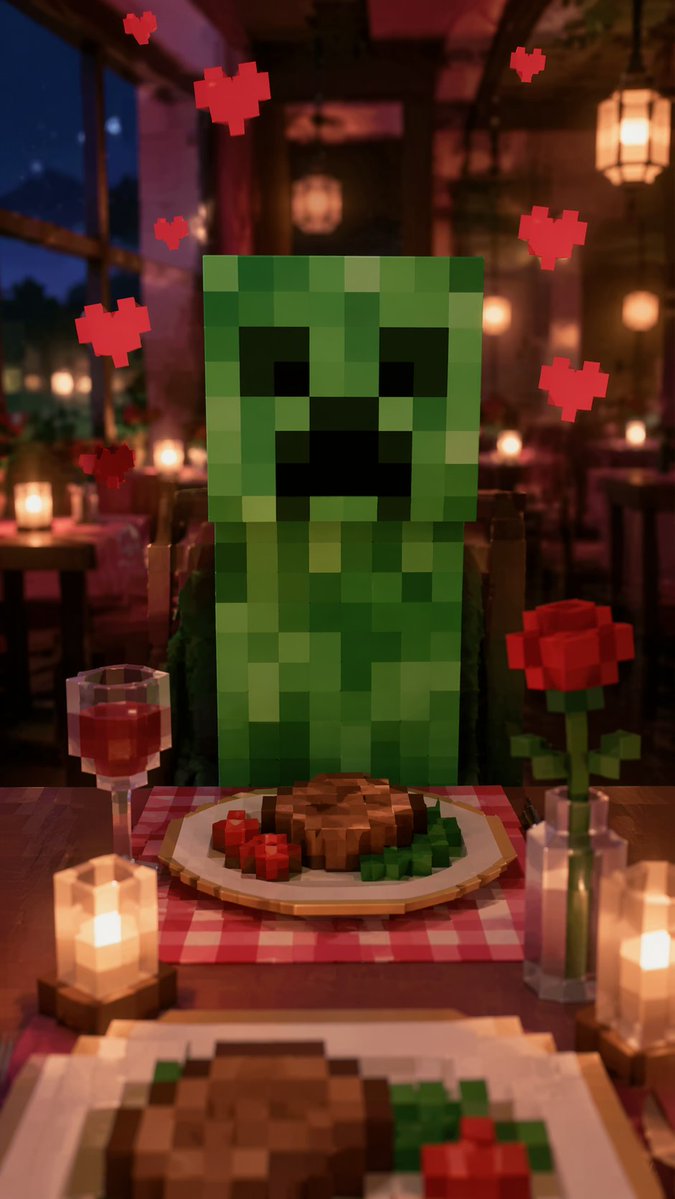
Romantic Voxel Dinner Date
Generates a humorous, first-person perspective of a romantic dinner date with a blocky video game character.
This is a gpt-image-2 prompt case for 动漫游戏. Use the copy-ready prompt below to generate similar visuals, and review YouMind OpenLab awesome-gpt-image-2 attribution plus commercial-use rights before reuse.
Prompt
Copy-ready prompt
A first-person POV perspective, and{argument name="character" default="Minecraft Creeper"} A scene depicting a romantic dinner date. The setting is a {argument name="setting" default="A romantic and dimly lit restaurant"} In the scene, the ambient light is warm, the background is blurred, and other dining tables and the night view outside the window can be seen. The character is sitting opposite at the table. Seven figures surround its head.{argument name="atmosphere effect" default="Floating 8-bit red heart"} On the wooden table between the viewer and the character, there was a red and white checkered placemat. On the placemat sat a voxel-style plate containing…{argument name="food" default="Square steaks, garnished with red and green garnish"} On the left is a transparent, cube-shaped wine glass filled with red wine. On the right is a transparent, cube-shaped vase containing a cube-shaped red rose. Two glowing cube candles sit in wooden candlesticks on the table. The foreground shows a blurred edge around the viewer's own plate. The entire image seamlessly blends realistic, cinematic lighting and depth-of-field effects with voxel-based 3D pixel art objects.Prompt variables
Editable argument placeholders found in the prompt, with their default values.
More cases in this category
Prioritized by category, input mode compatibility, quality, and lower risk.






Reuse and source notes
Use this prompt safely after previewing the case.
- 1.Copy the prompt or open it directly in Dovoo with the generation button.
- 2.Adjust variables, aspect ratio, and reference images for your own use case.
- 3.Before publishing or paid usage, verify source rights, attribution requirements, and brand or likeness risks.
Can I use this prompt commercially?
Commercial-use status is unknown. Review the original source, license, brand constraints, and legal requirements before paid usage.
Where does this case come from?
This case is imported from YouMind OpenLab awesome-gpt-image-2; keep attribution visible and check the source URL before reuse.