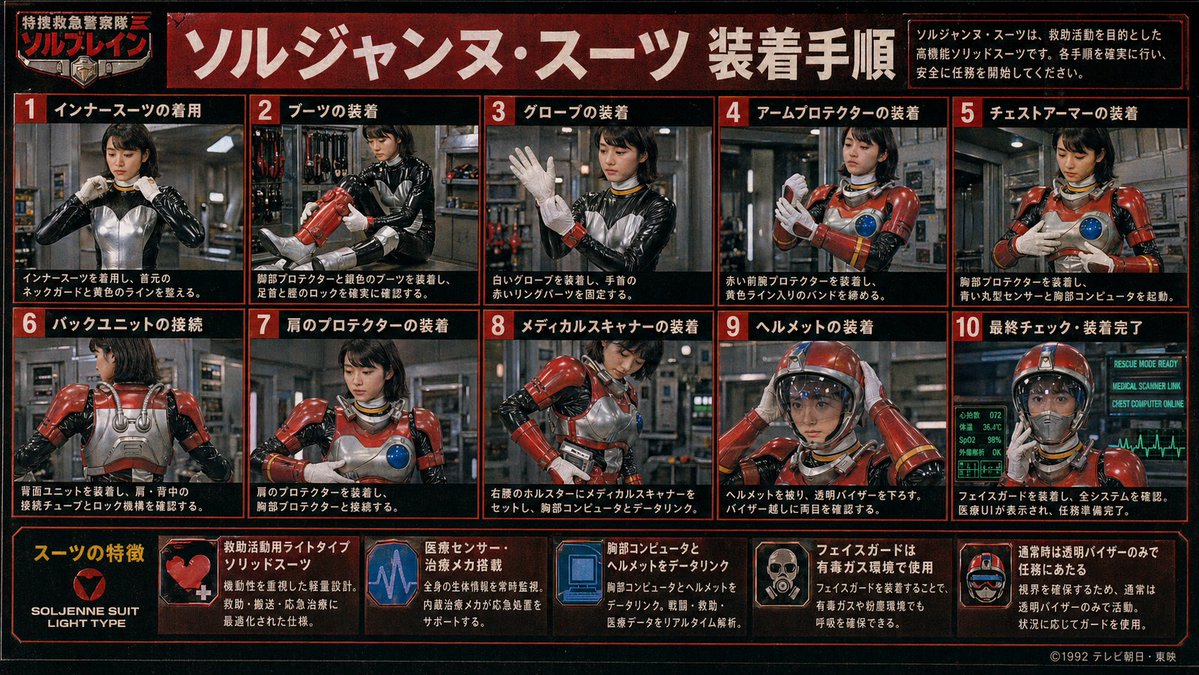
Retro Tokusatsu Suit Procedure Poster
A dense vintage Japanese hero-series instruction poster showing a female rescue operative putting on a red armored suit step by step, ideal for recreating retro tokusatsu manuals and fictional TV prop graphics.
This is a gpt-image-2 prompt case for Graphic & Poster. Use the copy-ready prompt below to generate similar visuals, and review YouMind OpenLab awesome-gpt-image-2 attribution plus commercial-use rights before reuse.
Prompt
Copy-ready prompt
{
  "type": "Retro Japanese tokusatsu (special effects) poster",
  "theme": "Emergency Rescue Hero Equipment Manual (1980s-1990s)",
  "subject": {
    "character": "Female rescuers wearing a black shiny undershirt with metallic silver torso panels, red armored rescue suit components, yellow decorative stripes, blue circular chest sensors, white gloves, and a red helmet with a transparent face shield.",
    "franchise_style": "Fictional TV Heroes Series Promotional Project",
    "organization_name": "Special Emergency Police Team Solbrain",
    "suit_name": "{argument name=\"suit name\" default=\"ソルジャンヌ・スーツ\"}"
  },
  "style": {
    "print": "Outdated TV magazines or studio props display projects",
    "color_palette": [
      "black",
      "Dark red",
      "Orange-red border",
      "White Japanese text",
      "Steel Gray",
      "Emergency Red Armor",
      "Blue display screen light effect"
    ],
    "texture": "Heavy film grain, slight blur, low-resolution analog broadcast quality, slight vignetting, and a worn poster surface.",
    "lighting": "Industrial indoor lighting with metallic reflection"
  },
  "layout": {
    "format": "Horizontal poster with red-bordered grid",
    "header": {
      "title": "{argument name=\"headline text\" default=\"Sol Jeanne Suit Installation Instructions\"}",
      "left_badge": "Special Emergency Police Team Solbrain",
      "right_note": "The Sol Jeanne Suit is a high-performance solid suit designed for rescue operations. Please follow each procedure carefully and begin your mission safely."
    },
    "sections": [
      {
        "title": "Installation Instructions",
        "position": "Two rows of grids in the upper and middle sections",
        "count": 10,
        "panels": [
          {
            "number": 1,
            "label": "Wearing an inner suit",
            "scene": "Frontal view: Operator adjusts the collar/neck bra of the black and silver undershirt."
          },
          {
            "number": 2,
            "label": "Putting on boots",
            "scene": "The operator put on red armored boots and checked the shin and ankle buckles."
          },
          {
            "number": 3,
            "label": "Putting on gloves",
            "scene": "The operator raises one hand, puts on a white glove, and secures the red wristband component."
          },
          {
            "number": 4,
            "label": "Wearing arm protectors",
            "scene": "The operator fastened the red forearm guards and tightened the yellow striped straps."
          },
          {
            "number": 5,
            "label": "Putting on chest armor",
            "scene": "The operator wears a chest armor plate, on which blue circular sensors are visible."
          },
          {
            "number": 6,
            "label": "Back unit connection",
            "scene": "Rear view showing the silver back unit, shoulder guides, and connecting latches."
          },
          {
            "number": 7,
            "label": "Wearing shoulder protectors",
            "scene": "From the front view, the red shoulder armor is mounted and aligned with the chest armor."
          },
          {
            "number": 8,
            "label": "Medical scanner attachment",
            "scene": "The operator places the medical scanner into the right lumbar holster and connects it to the chest computer."
          },
          {
            "number": 9,
            "label": "Wearing a helmet",
            "scene": "The operator put on a red helmet and lowered a transparent face mask."
          },
          {
            "number": 10,
            "label": "Final check and installation complete.",
            "scene": "The fully armed operator faces forward, with a glowing diagnostic monitor behind him indicating readiness."
          }
        ]
      },
      {
        "title": "Features of a suit",
        "position": "bottom strip",
        "count": 6,
        "items": [
          {
            "label": "SOLJENNE SUIT LIGHT TYPE",
            "icon": "Heart-shaped red badge on a black background"
          },
          {
            "label": "Lightweight solid suit for rescue operations",
            "icon": "Close-up of red armor with a white medical cross"
          },
          {
            "label": "Equipped with medical sensors and treatment mechanisms.",
            "icon": "Purple-blue electrocardiogram monitor graphics"
          },
          {
            "label": "Data link between chest computer and helmet",
            "icon": "Blue computer display graphics"
          },
          {
            "label": "Face guards are used in environments with toxic gases.",
            "icon": "A small portrait showing the mask unfolded."
          },
          {
            "label": "Normally, they carry out their duties using only a transparent visor.",
            "icon": "Helmet illustration with transparent face shield"
          }
        ]
      }
    ],
    "footer": {
      "left": "Function bar integrated at the bottom",
      "right": "{argument name=\"copyright text\" default=\"©1992 TV Asahi/Toei\"}"
    }
  },
  "environment": {
    "main_panels": "The interior of an industrial equipment room or rescue base with pipes, lockers, tools, and metal walls.",
    "final_panel": "A blue-green medical and system status monitor with ECG lines and status text such as RESCUE MODE READY."
  },
  "composition_notes": "All 10 process panels display the step-by-step actions of the same operator; faces are soft, with few details, and slightly blurred like a vintage printed guidebook; each panel is framed by a thick red border on a black background; bold white Japanese text is accompanied by red number boxes; a dense layout of charts fills the entire image.",
  "generation_notes": "Create a compelling poster for a Japanese tokusatsu hero handbook, rather than a modern, minimalist vector design; prioritize using tokusatsu stills arranged in an explanatory chart format, with authentic period typography and a prop-like realism."
}
Prompt variables
Editable argument placeholders found in the prompt, with their default values.
Reuse and source notes
Use this prompt safely after previewing the case.
- 1.Copy the prompt or open it directly in Dovoo with the generation button.
- 2.Adjust variables, aspect ratio, and reference images for your own use case.
- 3.Before publishing or paid usage, verify source rights, attribution requirements, and brand or likeness risks.
Can I use this prompt commercially?
Commercial-use status is unknown. Review the original source, license, brand constraints, and legal requirements before paid usage.
Where does this case come from?
This case is imported from YouMind OpenLab awesome-gpt-image-2; keep attribution visible and check the source URL before reuse.