Retro RPG Item Grid Prompt
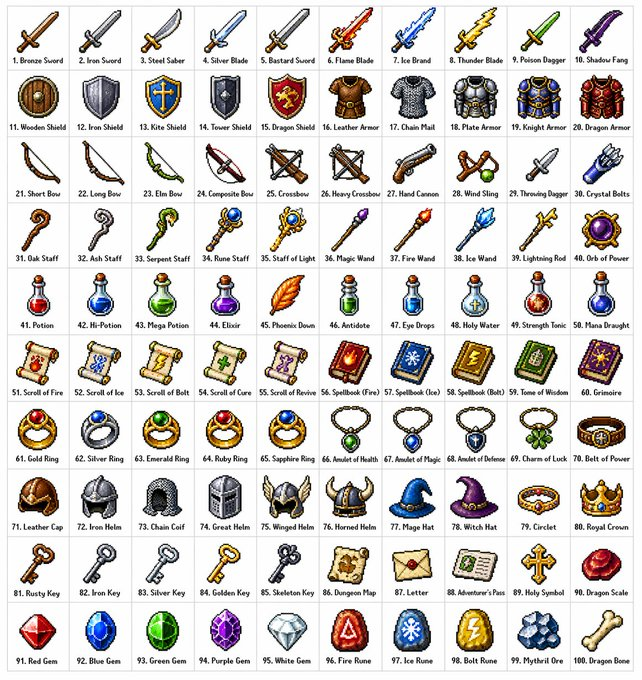
A detailed prompt for creating a 10x10 grid of 100 diverse fantasy RPG items in a classic 16-bit or 32-bit pixel art style, organized by category.
This is a gpt-image-2 prompt case for 动漫游戏. Use the copy-ready prompt below to generate similar visuals, and review YouMind OpenLab awesome-gpt-image-2 attribution plus commercial-use rights before reuse.
Prompt
Copy-ready prompt
Create{argument name="grid size" default="10x10"} A grid containing{argument name="item count" default="100"} Different fantasy role-playing game (RPG) items, in various styles{argument name="art style" default="Classic pixel art style"} (16-bit or 32-bit sprite sheet style, similar to Japanese RPGs from the SNES/GBA era). Each item should occupy a separate square grid with a clear, concise label below. The grid should be neatly arranged on a white background. Ensure each item is visually unique and each label is spelled correctly. Use sharp pixel edges, a limited color palette for each sprite sheet, and subtle dithering effects for shadows. Please use the following row themes: Row 1: Swords and Blades; Row 2: Shields and Armor; Row 3: Bows, Crossbows, and Ranged Weapons; Row 4: Staffs, Wands, and Magical Implements; Row 5: Potions, Elixirs, and Bottles; Row 6: Scrolls, Tomes, and Spellbooks; Row 7: Rings, Amulets, and Enchanted Trinkets; Row 8: Helmets, Crowns, and Headwear; Row 9: Keys, Relics, and Quest Items; Row 10: Gems, Runes, and Crafting Materials. Each cell is displayed as a centered item sprite on a clean background square, presented as a classic inventory icon—similar to what you'd see in a fantasy RPG menu. Maintaining overall style consistency and coherence evokes beloved retro fantasy RPGs—charming and refined, clearly visible even at small sizes.Prompt variables
Editable argument placeholders found in the prompt, with their default values.
More cases in this category
Prioritized by category, input mode compatibility, quality, and lower risk.






Reuse and source notes
Use this prompt safely after previewing the case.
- 1.Copy the prompt or open it directly in Dovoo with the generation button.
- 2.Adjust variables, aspect ratio, and reference images for your own use case.
- 3.Before publishing or paid usage, verify source rights, attribution requirements, and brand or likeness risks.
Can I use this prompt commercially?
Commercial-use status is unknown. Review the original source, license, brand constraints, and legal requirements before paid usage.
Where does this case come from?
This case is imported from YouMind OpenLab awesome-gpt-image-2; keep attribution visible and check the source URL before reuse.