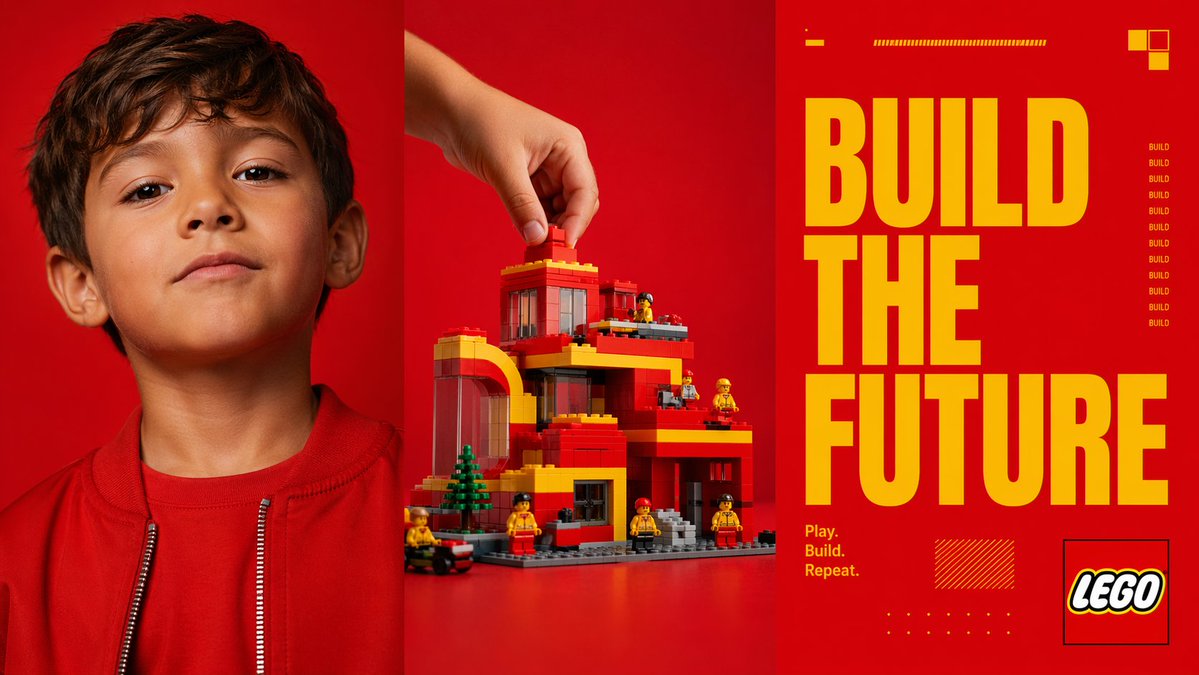
Red Triptych Build the Future Poster
This prompt generates a bold three-panel toy-brand style advertisement combining a child portrait, a hand-built brick structure, and oversized slogan typography for campaign mockups or editorial posters.
This is a gpt-image-2 prompt case for 产品商业. Use the copy-ready prompt below to generate similar visuals, and review YouMind OpenLab awesome-gpt-image-2 attribution plus commercial-use rights before reuse.
Prompt
Copy-ready prompt
{
  "type": "Triptych advertising poster",
  "style": "A bold and modern toy brand event style, combining high-contrast studio photography with graphic design.",
  "format": "Three vertical panels of equal width side by side",
  "color_palette": {
    "dominant_background": "Vibrant and saturated red",
    "accent": "Bright yellow",
    "secondary": "Orange-red, black, white, gray"
  },
  "subject": {
    "theme": "Creative construction and imagination",
    "brand_style": "Building block toy aesthetics",
    "headline": "{argument name=\"headline text\" default=\"BUILD THE FUTURE\"}",
    "tagline": "{argument name=\"tagline\" default=\"Play. Build. Repeat.\"}"
  },
  "layout": {
    "sections": [
      {
        "title": "left portrait panel",
        "position": "Left third",
        "count": 1,
        "labels": [
          "Children's portraits"
        ]
      },
      {
        "title": "Central Build Panel",
        "position": "The middle third",
        "count": 1,
        "labels": [
          "Place blocks onto the toy building with your hands"
        ]
      },
      {
        "title": "Right-side layout panel",
        "position": "right third",
        "count": 1,
        "labels": [
          "Title and Brand Graphics"
        ]
      }
    ],
    "panel_dividers": "There are thin, dark vertical dividing lines between the three panels."
  },
  "left_panel": {
    "subject": "Close-up portrait of a child from the chest up",
    "counted_elements": {
      "people": 1,
      "garments": 2,
      "visible_facial_features": 2
    },
    "appearance": {
      "age": "young children",
      "hair": "Short dark brown hair",
      "clothing": [
        "Red crew neck shirt",
        "Red zipper jacket with silver zipper teeth"
      ],
      "visible_features": [
        "Left ear visible",
        "The neck and lower half of the face are visible."
      ]
    },
    "framing": "The top is slightly trimmed and located in the center of the panel.",
    "background": "Solid color, vibrant red, seamless photography studio background"
  },
  "center_panel": {
    "subject": "Toy building scene being assembled",
    "counted_elements": {
      "hands": 1,
      "main_building": 1,
      "mini_figures": 6,
      "trees": 1,
      "vehicles": 1,
      "loose_bricks_being_placed": 1
    },
    "action": "A hand reaches in from the upper left and places a red block on the roof.",
    "building": {
      "style": "Modern multi-story residential or municipal buildings constructed from building blocks",
      "colors": [
        "red",
        "yellow",
        "grey",
        "Transparent dark window panel"
      ],
      "features": [
        "left arch structure",
        "Single-story roof",
        "Multiple balconies or terraces",
        "large windows",
        "gray baseboard",
        "Front steps"
      ]
    },
    "surroundings": {
      "mini_figures": "Six small toy figures shaped like construction workers are arranged around the structure, dressed in yellow and red clothes.",
      "trees": "A small green coniferous tree near the left front.",
      "vehicle": "A small black and red wheeled vehicle located on the lower left edge."
    },
    "background": "Solid color, vibrant red, seamless photography studio background",
    "surface": "Red desktop that blends into the background"
  },
  "right_panel": {
    "subject": "Graphic poster layout",
    "counted_elements": {
      "headline_words": 3,
      "small_repeated_word_instances": 9,
      "decorative_blocks_top_right": 3,
      "small_horizontal_bar_groups_top": 2,
      "tagline_lines": 3,
      "logo_boxes": 1,
      "decorative_hatched_boxes": 1,
      "decorative_dot_grids": 1
    },
    "typography": {
      "main_text": "{argument name=\"headline text\" default=\"BUILD THE FUTURE\"}",
      "arrangement": "Three lines stacked, one word per line, in very large, compressed, bold, sans-serif yellow font, occupying most of the panel's height.",
      "tagline": "{argument name=\"tagline\" default=\"Play. Build. Repeat.\"}",
      "tagline_position": "The lower left corner of the right panel displays three lines of small yellow text.",
      "repeated_side_text": "The word BUILD is repeated vertically nine times in the middle right corner, displayed in small yellow text."
    },
    "graphics": {
      "top_details": [
        "A short yellow horizontal line in the upper left corner",
        "One long, thin yellow striped bar at the top center"
      ],
      "top_right": [
        "A combination of 3 yellow and orange squares"
      ],
      "bottom_details": [
        "A yellow shaded rectangle in the bottom left center",
        "One small yellow dot at the bottom center"
      ],
      "logo": "{argument name=\"brand name\" default=\"LEGO\"} The logo is located in the bottom right corner within a thin black outline box."
    },
    "background": "solid bright red"
  },
  "lighting": "The clean, bright, and saturated lighting in the commercial studio, with minimal shadows, creates a sophisticated and polished advertising campaign.",
  "composition": "The striking triptych composition features a photographic portrait on the left, a product-building action in the middle, and an oversized typographical slogan panel on the right."
}
Prompt variables
Editable argument placeholders found in the prompt, with their default values.
More cases in this category
Prioritized by category, input mode compatibility, quality, and lower risk.






Reuse and source notes
Use this prompt safely after previewing the case.
- 1.Copy the prompt or open it directly in Dovoo with the generation button.
- 2.Adjust variables, aspect ratio, and reference images for your own use case.
- 3.Before publishing or paid usage, verify source rights, attribution requirements, and brand or likeness risks.
Can I use this prompt commercially?
Commercial-use status is unknown. Review the original source, license, brand constraints, and legal requirements before paid usage.
Where does this case come from?
This case is imported from YouMind OpenLab awesome-gpt-image-2; keep attribution visible and check the source URL before reuse.