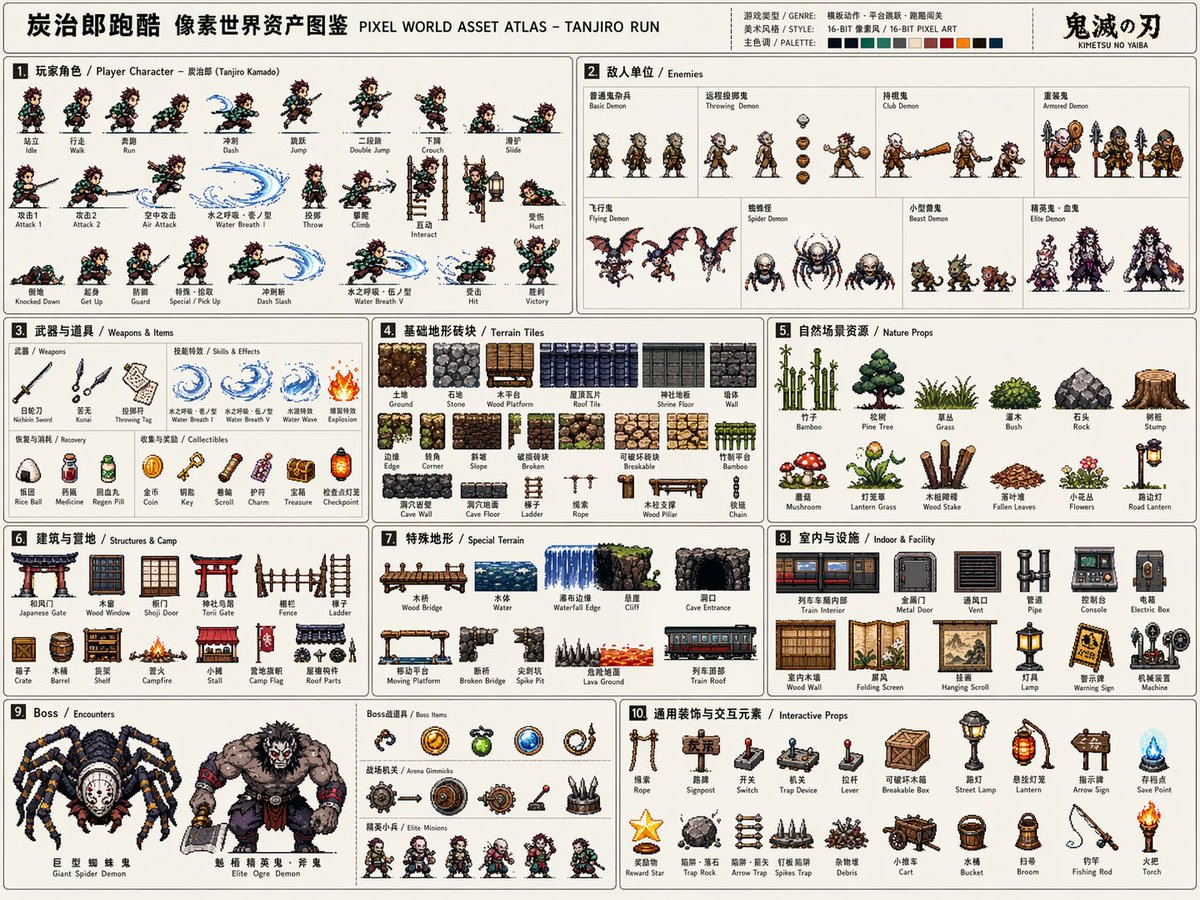
Pixel Game Asset Atlas Template
A comprehensive professional template for generating high-density 16-bit pixel art asset sheets for game development, including characters, animations, and environments.
This is a gpt-image-2 prompt case for 动漫游戏. Use the copy-ready prompt below to generate similar visuals, and review YouMind OpenLab awesome-gpt-image-2 attribution plus commercial-use rights before reuse.
Prompt
Copy-ready prompt
Please base your answer on [Game Theme:]{argument name="game theme" default="Demon Slayer: Kimetsu no Yaiba / Tanjiro"} Create a "Pixel World Asset Atlas" suitable for serialized releases, with high completion and high information density. This is not a typical pixel illustration or a single game scene, but a "2D pixel game asset overview" for game development, art design, level design, and visual proposals. The visuals should be presented as a complete game asset project, [Game Type:]{argument name="game type" default="Side-scrolling action"} The necessary core characters, enemies, items, terrain, scenes, mechanisms, bosses, and decorative elements are systematically organized into a clear, professional, and reusable game asset atlas. [Basic Settings] Theme/Worldview: [Game Theme] Game Type: [Game Type] Historical Setting: [Historical Setting] Protagonist Identity: [Protagonist Identity] Enemy Type: [Enemy Type] Main Scenes: [Main Scene Environment] Overall Style: [Style Direction, e.g.:{argument name="style" default="16-bit retro arcade pixel style"} [Main Color Scheme: [Main Color Scheme]] [Secondary Color Scheme: [Secondary Color]] [Accent Color Scheme: [Accent Color]] [Aspect Ratio: [Horizontal 4:3]] If not specified, the optimal scheme will be automatically matched based on the game theme. [Overall Visual Requirements] Visually, a large horizontal canvas should be used, with a simple or low-obstruction background, presenting the look of a game development asset list or instruction manual-style resource catalog. All elements should be 2D pixel art sprites with uniform pixel density, clear black/dark outlines, limited color gradations, and a retro game texture. Do not generate realistic photography, 3D renderings, paintings, illustrations, or movie poster styles. The focus is on "system completeness, clear classification, rich resources, and high development potential." [Layout Structure] The atlas uses a modular grid layout, using thin lines to divide different resource areas. Each area should contain a numbered title and a short category label, with the reading path from left to right and from top to bottom. The layout should have the sense of order of an instruction manual or game development document. Information density should be high but not chaotic; elements within each module should be evenly spaced. [Included Modules] 1. Player Character Module: Displays complete action frames, including standing, walking/running, jumping, etc., arranged horizontally like a sprite sheet. 2. Enemy Unit Module: Designs various enemies, including normal, ranged, heavy, and elite units. 3. Weapons and Items Module: Displays melee, ranged, projectiles, effects, and loot. 4. Basic Terrain Tile Module: Displays ground, walls, platforms, corners, and blocks of different materials. 5. Natural/External Scene Resources Module: Displays trees, grass, rocks, and obstacles. 6. Building/Base/Camp Resources Module: Displays doors, windows, walls, ladders, and camp facilities. 7. Special Terrain Module: Displays bridges, water bodies, cliffs, and cave entrances. 8. Indoor/Underground/Facility Resources Module: Displays pipes, control consoles, metal doors, and equipment. 9. Boss/Encounter Resources Module: Displays large bosses, special vehicles, and giant mechanisms. 10. General Decorations and Interactive Elements Module: Displays ladders, ropes, signs, switches, and mechanisms. [Visual Detail Requirements] All resources must maintain consistent pixel dimensions and world-building coherence. Proportional relationships must be clear. Action frames must demonstrate continuity; terrain tiles must support tiling; props and mechanisms must be functionally recognizable; boss elements should convey a sense of oppression.Prompt variables
Editable argument placeholders found in the prompt, with their default values.
More cases in this category
Prioritized by category, input mode compatibility, quality, and lower risk.






Reuse and source notes
Use this prompt safely after previewing the case.
- 1.Copy the prompt or open it directly in Dovoo with the generation button.
- 2.Adjust variables, aspect ratio, and reference images for your own use case.
- 3.Before publishing or paid usage, verify source rights, attribution requirements, and brand or likeness risks.
Can I use this prompt commercially?
Commercial-use status is unknown. Review the original source, license, brand constraints, and legal requirements before paid usage.
Where does this case come from?
This case is imported from YouMind OpenLab awesome-gpt-image-2; keep attribution visible and check the source URL before reuse.