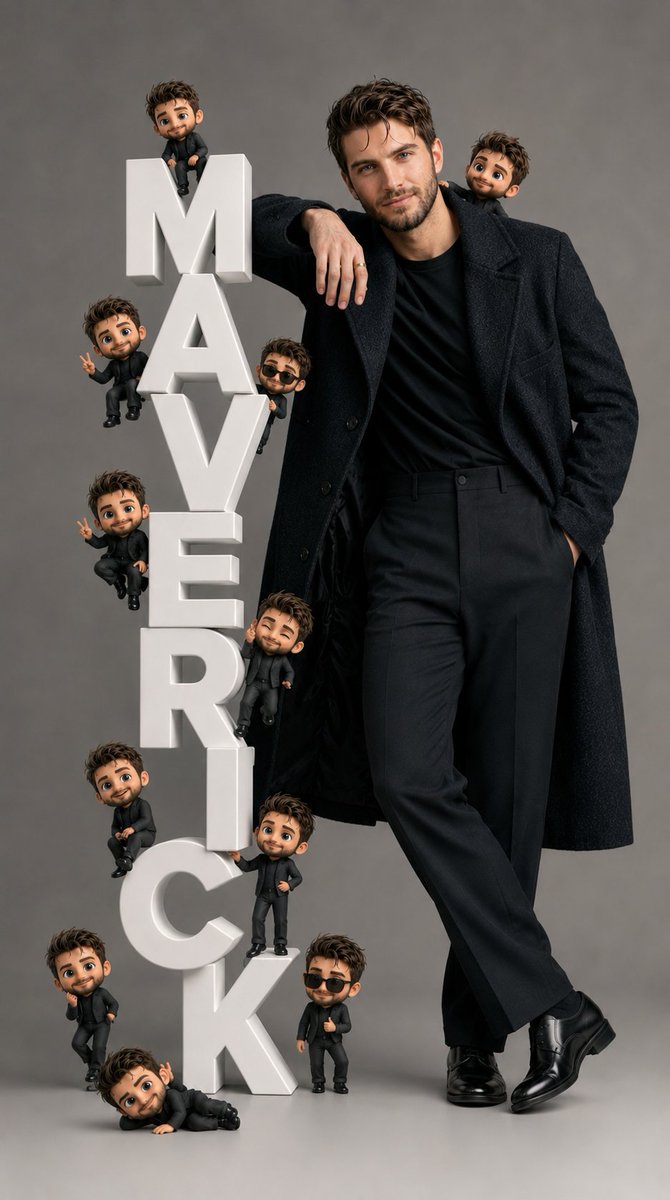
Pixar-Style Chibi Editorial Portrait
Combines high-end fashion editorial photography with Pixar-inspired 3D character design, featuring a central subject surrounded by multiple tiny chibi versions.
This is a gpt-image-2 prompt case for Portrait & Character. Use the copy-ready prompt below to generate similar visuals, and review YouMind OpenLab awesome-gpt-image-2 attribution plus commercial-use rights before reuse.
Prompt
Copy-ready prompt
Hyper-realistic fashion portrait, Pixar-style 3D cute and stylish character, accurately reproducing the facial features of the reference photo, sitting on a giant white 3D vertical letter "{argument name="text" default="PERCIVAL"} "Up there, she stood with a composed and confident posture against a simple and clean backdrop of a photography studio."{argument name="pose" default="A relaxed and confident posture"} A gentle smile, natural proportions, realistic skin texture, soft, cinematic studio lighting, and an ultra-clean look.{argument name="background" default="Neutral gray"} Background: High-end fashion photography aesthetics. Scattered around the giant letters are several Q-version 3D figures, identical to the main subject, designed in a cute Pixar style, naturally distributed on each letter and around the composition. Each Q-version figure has a different funny pose and expression. The composition is balanced and dynamic, rich in detail, with extremely sharp focus, soft shadows, glossy 3D fonts, a clean and luxurious studio atmosphere, a visual style that is both playful and sophisticated, a blend of realistic and stylized rendering, Octane rendering quality, Disney Pixar inspiration, cinematic depth of field, highly detailed textures, an 8K masterpiece.Prompt variables
Editable argument placeholders found in the prompt, with their default values.
Variable
text
Default
PERCIVAL
Variable
pose
Default
A relaxed and confident posture
Variable
background
Default
Neutral gray
Reuse and source notes
Use this prompt safely after previewing the case.
- 1.Copy the prompt or open it directly in Dovoo with the generation button.
- 2.Adjust variables, aspect ratio, and reference images for your own use case.
- 3.Before publishing or paid usage, verify source rights, attribution requirements, and brand or likeness risks.
Can I use this prompt commercially?
Commercial-use status is unknown. Review the original source, license, brand constraints, and legal requirements before paid usage.
Where does this case come from?
This case is imported from YouMind OpenLab awesome-gpt-image-2; keep attribution visible and check the source URL before reuse.