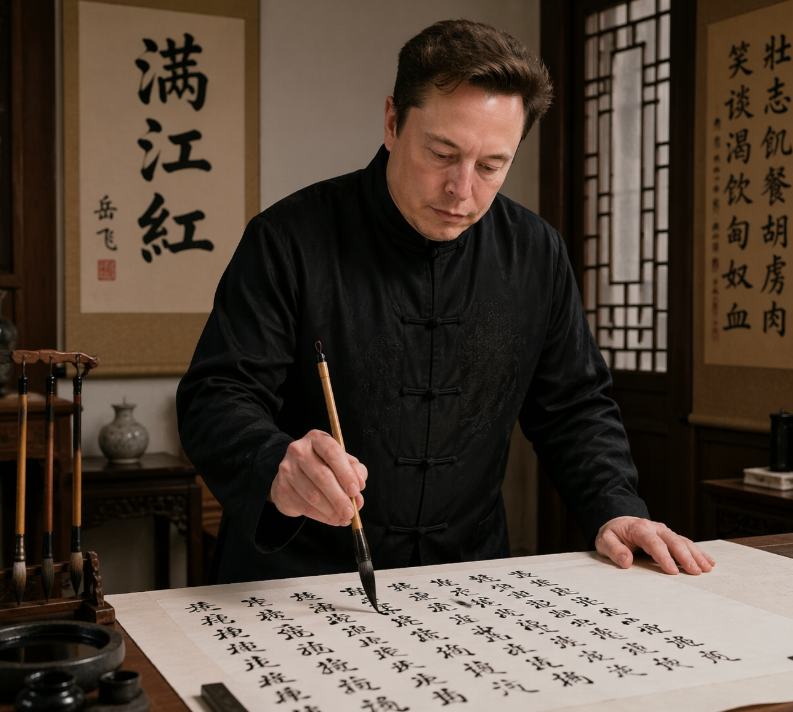
Photorealistic Calligraphy Scholar Scene
This prompt generates a realistic portrait of a famous tech figure writing Chinese calligraphy in a traditional study, suitable for editorial satire, cultural mashups, or social media comparison posts.
This is a gpt-image-2 prompt case for Portrait & Character. Use the copy-ready prompt below to generate similar visuals, and review YouMind OpenLab awesome-gpt-image-2 attribution plus commercial-use rights before reuse.
Prompt
Copy-ready prompt
A realistic indoor portrait, in which {argument name="subject" default="Elon Musk"} He stands before a traditional Chinese desk, practicing calligraphy on a large sheet of Xuan paper. He wears a black Tang suit with Chinese knot buttons and delicate embroidery, leaning slightly forward, one hand resting on the table, the other holding a brush suspended vertically above the paper. The scene is a warm and elegant scholar's study, furnished with dark wood furniture; to the left is a carved brush holder with four brushes hanging from it; to the left front is an inkstone and a small inkwell; a small porcelain vase sits on the side table behind him. Behind him hang two vertical scrolls: the left scroll prominently displays large characters.{argument name="left scroll text" default="Man Jiang Hong"} On the right, a scroll displays a long line of Chinese calligraphy. To the right is a wooden lattice window, letting in soft ambient light. The paper on the table is covered in flowing, semi-cursive black calligraphy, suggesting he is writing.{argument name="written poem" default="Man Jiang Hong"} The film employs a documentary-style aesthetic with photorealistic detail, combined with cinematic warm lighting, rich wood tones, authentic calligraphy tools, shallow depth of field, and half-body compositions to create a serious and focused atmosphere.Prompt variables
Editable argument placeholders found in the prompt, with their default values.
Reuse and source notes
Use this prompt safely after previewing the case.
- 1.Copy the prompt or open it directly in Dovoo with the generation button.
- 2.Adjust variables, aspect ratio, and reference images for your own use case.
- 3.Before publishing or paid usage, verify source rights, attribution requirements, and brand or likeness risks.
Can I use this prompt commercially?
Commercial-use status is unknown. Review the original source, license, brand constraints, and legal requirements before paid usage.
Where does this case come from?
This case is imported from YouMind OpenLab awesome-gpt-image-2; keep attribution visible and check the source URL before reuse.