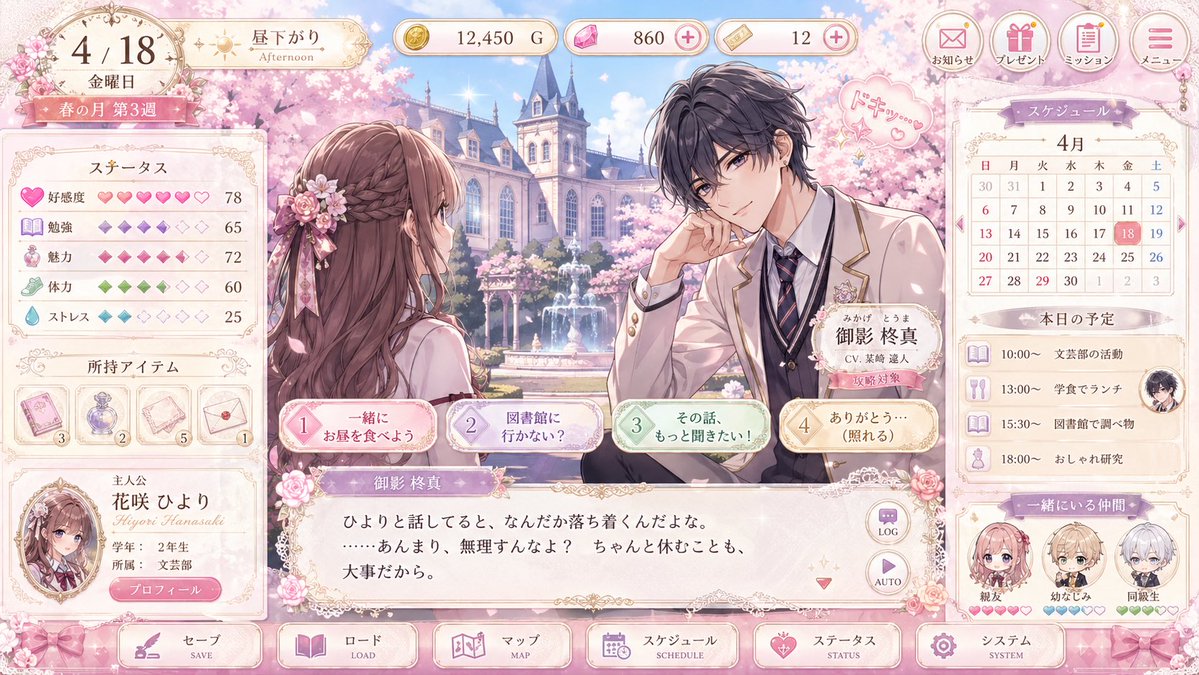
Pastel Otome Game UI Mockup
A polished anime romance game interface mockup showing a spring school courtyard scene with character dialogue, stats, schedule panels, and ornate pastel UI for visual novel or dating sim concepts.
This is a gpt-image-2 prompt case for Anime & Game. Use the copy-ready prompt below to generate similar visuals, and review YouMind OpenLab awesome-gpt-image-2 attribution plus commercial-use rights before reuse.
Prompt
Copy-ready prompt
{
  "type": "UI design drafts for a romance visual novel game",
  "platform": "Desktop game screen",
  "style": "An elegant and soft-toned otome game interface, high-quality anime illustrations, gorgeous gold filigree, a soft cherry blossom pink theme, glossy buttons, lace and ribbon decorations, and dreamy spring lighting.",
  "scene": {
    "setting": "In spring, the courtyard of a prestigious school features European-style buildings, blooming cherry blossom trees, a central fountain, falling petals, and a bright blue sky.",
    "time": "afternoon",
    "season": "spring",
    "mood": "Sweet, exquisite, romantic"
  },
  "characters": {
    "count": 2,
    "main pair": [
      {
        "role": "The female protagonist of the game, three-quarters profile view from behind.",
        "appearance": "Long, wavy chestnut brown hair, half-up style, pink flower hair accessory with ribbon, beige and pink school uniform, slender figure."
      },
      {
        "role": "Male romantic partner on the right",
        "name": "{argument name=\"character name\" default=\"Mikage Shuma\"}",
        "appearance": "Messy, dark charcoal hair; handsome anime-like features; a beige school uniform suit with gold trim; a white shirt; a navy blue striped tie; a dark vest; a flower brooch on the lapel; a relaxed posture; elbows resting on his hand; his hand close to his face.",
        "expression": "Gentle and focused",
        "speech bubble": "Pink heart doodles with Japanese onomatopoeia"
      }
    ]
  },
  "layout": {
    "top bar": {
      "count": 8,
      "components": [
        "Date plate, showing Friday, April 18th.",
        "Time badge, indicating afternoon",
        "Gold Coin Counter",
        "Pink gem counter with plus icon",
        "Ticket counter with plus icon",
        "Announcement button",
        "Gift button",
        "Task button",
        "Menu button"
      ]
    },
    "left sidebar": {
      "count": 3,
      "sections": [
        {
          "title": "ステータス",
          "count": 5,
          "labels": [
            "Likeability",
            "study",
            "charm",
            "Physical strength",
            "pressure"
          ]
        },
        {
          "title": "Possessed items",
          "count": 4,
          "labels": [
            "Pink card props",
            "Purple perfume bottle",
            "Letters or paper props",
            "Envelope props"
          ]
        },
        {
          "title": "main character",
          "count": 1,
          "labels": [
            "{argument name=\"heroine name\" default=\"Hanasaki Hiyori\"} Avatar Card"
          ]
        }
      ]
    },
    "center": {
      "count": 4,
      "components": [
        "Large-scale illustrated dialogue scene",
        "Male character name tag",
        "The four dialog option buttons in the lower middle section",
        "Main text box with Japanese dialogue"
      ]
    },
    "right sidebar": {
      "count": 3,
      "sections": [
        {
          "title": "スケジュール",
          "count": 1,
          "labels": [
            "April calendar, highlighting the 18th."
          ]
        },
        {
          "title": "Today's schedule",
          "count": 4,
          "labels": [
            "10:00 Support club activities",
            "13:00 Lunch in the cafeteria",
            "15:30 Library Studies",
            "18:00 Fashion Learning"
          ]
        },
        {
          "title": "Friends who are together",
          "count": 3,
          "labels": [
            "Best friend",
            "childhood sweethearts",
            "Classmates"
          ]
        }
      ]
    },
    "bottom navigation": {
      "count": 6,
      "labels": [
        "keep",
        "Read",
        "map",
        "schedule",
        "state",
        "system"
      ]
    }
  },
  "text": {
    "language": "Japanese",
    "dialogue": "Soft and romantic dialogue in the visual novel text box",
    "ui_labels": "All major buttons and panels are labeled in Japanese."
  },
  "color_palette": {
    "primary": "blush powder",
    "secondary": "Cream",
    "accent": "gold",
    "supporting": [
      "Lavender Purple",
      "Mint Green",
      "powder blue"
    ]
  },
  "rendering": {
    "quality": "High-resolution, clear game design drafts",
    "composition": "Full-screen UI screenshot: a balanced left-side properties panel, a central romantic scene, and a right-side schedule panel.",
    "aspect_ratio": "16:9"
  }
}
Prompt variables
Editable argument placeholders found in the prompt, with their default values.
Reuse and source notes
Use this prompt safely after previewing the case.
- 1.Copy the prompt or open it directly in Dovoo with the generation button.
- 2.Adjust variables, aspect ratio, and reference images for your own use case.
- 3.Before publishing or paid usage, verify source rights, attribution requirements, and brand or likeness risks.
Can I use this prompt commercially?
Commercial-use status is unknown. Review the original source, license, brand constraints, and legal requirements before paid usage.
Where does this case come from?
This case is imported from YouMind OpenLab awesome-gpt-image-2; keep attribution visible and check the source URL before reuse.