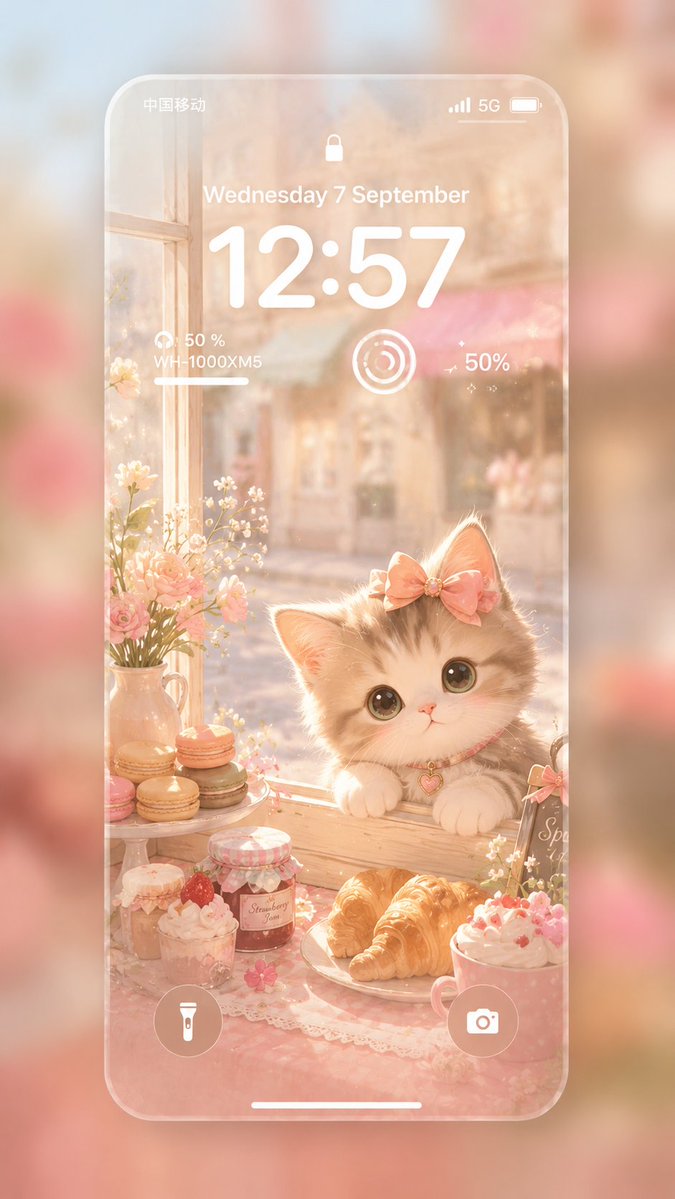
Pastel Kitten Café iPhone Lock Screen
Generates a dreamy pastel iPhone lock screen wallpaper featuring a cute kitten in a sunlit watercolor café window scene with desserts and iOS UI overlays.
This is a gpt-image-2 prompt case for 平面海报. Use the copy-ready prompt below to generate similar visuals, and review YouMind OpenLab awesome-gpt-image-2 attribution plus commercial-use rights before reuse.
Prompt
Copy-ready prompt
Create a 9:16 portrait-oriented, ultra-soft iPhone lock screen wallpaper showcase a dreamy, soft iOS aesthetic. The image displays a semi-transparent, rounded-corner iPhone screen floating above a blurred, warm pink and creamy background. Inside the phone, a soft Japanese watercolor café window scene is depicted in a flat 2D style, bathed in bright morning light, with shades of peach, blush pink, ivory, and honey gold. The main subject is an adorable, fluffy kitten with creamy gray fur, bright eyes, a pink nose, paws resting on a wooden windowsill, pink bows on its ears, and a pink collar with small heart pendants around its neck. Surrounding the kitten are cozy dessert still lifes: eight visible food and drink items, including three stacked macarons on a small stand, a jar of strawberry jam, a cup of strawberry cream dessert, a bread plate with two croissants (counted as one plate item), a pink cream drink or dessert, and a small jar or cup in the lower left corner. Add two floral decorative elements: a ceramic vase on the left containing small white flowers and pink roses, and some tiny white flowers near the edge of the right side. The view outside the window is blurred, depicting a street or bakery, to add depth. Overlay a realistic white iOS lock screen UI above the illustration: the status bar displays the Chinese carrier name "China Mobile" on the left, and signal bars, "5G," and a battery icon on the right; a small lock icon at the top center; the date text "Wednesday, September 7th"; an oversized time "12:57"; a small earphone battery widget on the left displaying "50%" and "WH-1000XM5" along with a short progress bar; a circular activity widget in the center; a text widget displaying "50%" with a small flashing indicator on the right; circular flashlight and camera buttons at the bottom; and a thin white home screen indicator bar. The phone's frame and UI utilize a frosted glass transparent effect, featuring a soft halo, subtle fog, and delicate bokeh. Adopting an Apple-style minimalist design, it creates a soothing atmosphere with no harsh outlines, extra text, or watermarks. Customization is supported.{argument name="time" default="12:57"} ,{argument name="date" default="Wednesday, September 7"} ,{argument name="main animal" default="fluffy cream-gray kitten"} ,{argument name="dessert theme" default="Pink Cafe Pastries and Macarons"} as well as{argument name="color palette" default="Peach, blush pink, ivory white, honey gold"} .Prompt variables
Editable argument placeholders found in the prompt, with their default values.
More cases in this category
Prioritized by category, input mode compatibility, quality, and lower risk.






Reuse and source notes
Use this prompt safely after previewing the case.
- 1.Copy the prompt or open it directly in Dovoo with the generation button.
- 2.Adjust variables, aspect ratio, and reference images for your own use case.
- 3.Before publishing or paid usage, verify source rights, attribution requirements, and brand or likeness risks.
Can I use this prompt commercially?
Commercial-use status is unknown. Review the original source, license, brand constraints, and legal requirements before paid usage.
Where does this case come from?
This case is imported from YouMind OpenLab awesome-gpt-image-2; keep attribution visible and check the source URL before reuse.