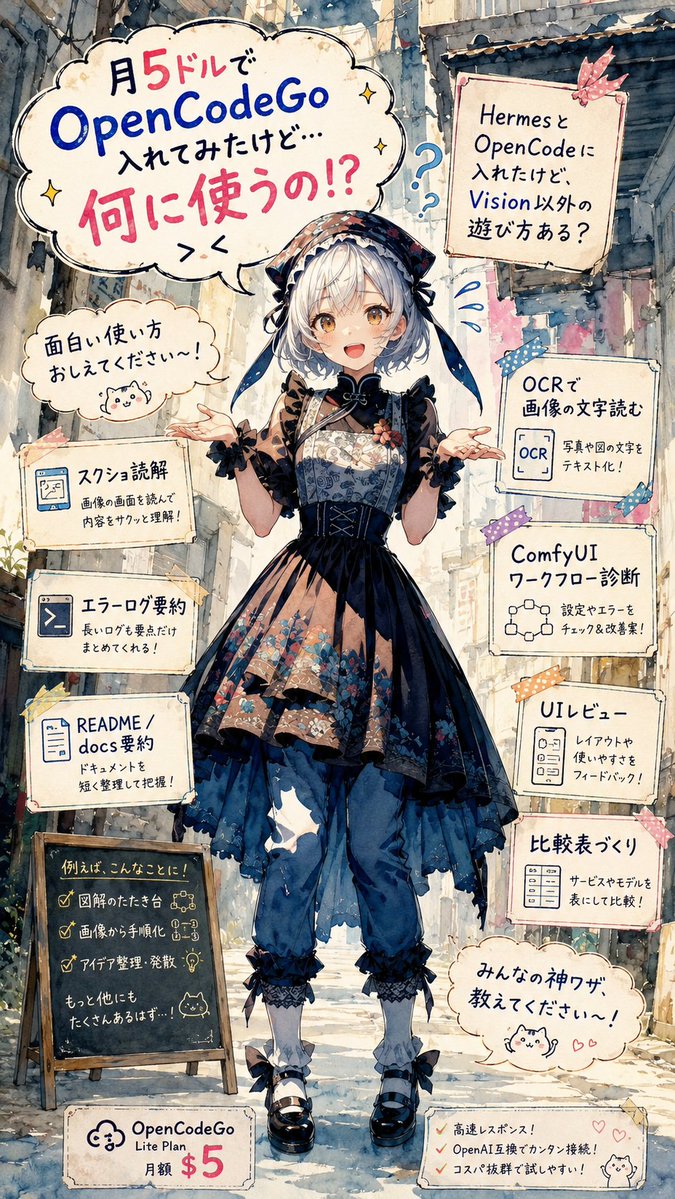
Anime OpenCodeGo Use-Case Poster
Generates a vertical Japanese anime-style infographic poster asking for creative ways to use OpenCodeGo and listing practical AI workflow examples.
This is a gpt-image-2 prompt case for 平面海报. Use the copy-ready prompt below to generate similar visuals, and review YouMind OpenLab awesome-gpt-image-2 attribution plus commercial-use rights before reuse.
Prompt
Copy-ready prompt
{
  "type": "vertical anime watercolor infographic poster",
  "aspect_ratio": "9:16",
  "style": "highly detailed Japanese anime illustration, soft watercolor and ink line art, paper texture, pastel but high-contrast colors, hand-drawn typography, whimsical tutorial flyer aesthetic",
  "main_subject": {
    "description": "A full-body anime girl standing centered in a narrow old city alley, facing forward with both hands open in a questioning pose. Her face is intentionally covered by a plain beige square censor block.",
    "outfit": "dark gothic lolita and wa-lolita inspired layered dress with navy and black tones, floral patterned bodice and skirt panels, lace trim, corset lacing, sheer brown sleeves, oversized bonnet or headscarf with ribbons, loose blue pants underneath, white socks, black Mary Jane shoes with bows",
    "hair": "{argument name=\"hair color\" default=\"silver-white\"} short bob hair visible around the bonnet",
    "mood": "curious, confused, playful, asking the viewer for ideas"
  },
  "setting": {
    "background": "sunlit narrow urban alley with old buildings, pipes, balconies, weathered walls, plants near the ground, soft perspective depth",
    "lighting": "bright daylight filtering through the alley, gentle shadows, painterly atmospheric depth"
  },
  "layout": {
    "composition": "single centered character surrounded by hand-drawn speech bubbles, taped note cards, small icons, doodles, and pricing labels",
    "top_left_main_bubble": {
      "count": 1,
      "text": "I installed OpenCodeGo for $5 a month, but... what do I use it for!?",
      "appearance": "large cloud-shaped speech bubble with blue and pink emphasis text, small sparkle doodles"
    },
    "left_side_elements": {
      "count": 5,
      "items": [
        {
          "type": "small speech bubble",
          "text": "Please tell me some interesting ways to use it!",
          "icon": "small cute cat doodle"
        },
        {
          "type": "note card",
          "title": "Screenshot interpretation",
          "body": "Read the image on the screen to quickly understand the content!",
          "icon": "browser or screenshot icon"
        },
        {
          "type": "note card",
          "title": "Error log summary",
          "body": "It summarizes long logs into just the essential points!",
          "icon": "terminal icon"
        },
        {
          "type": "note card",
          "title": "README / docs summary",
          "body": "Organize and understand documents concisely!",
          "icon": "document icon"
        },
        {
          "type": "chalkboard sign",
          "title": "For example, like this!",
          "checklist_count": 3,
          "checklist": [
            "Draft diagram",
            "Step-by-step instructions based on images",
            "Idea organization and brainstorming"
          ],
          "footer": "There must be many more...!"
        }
      ]
    },
    "right_side_elements": {
      "count": 6,
      "items": [
        {
          "type": "taped note card",
          "text": "I've installed Hermes and OpenCode, but are there any other ways to use them besides Vision?",
          "decor": "pink ribbon tape and blue question marks"
        },
        {
          "type": "note card",
          "title": "Reading text from an image using OCR",
          "body": "Convert text from photos and diagrams into digital text!",
          "icon": "OCR document icon"
        },
        {
          "type": "note card",
          "title": "ComfyUI Workflow Diagnostics",
          "body": "Check settings and errors, and suggest improvements!",
          "icon": "node graph icon"
        },
        {
          "type": "note card",
          "title": "UI レビュー",
          "body": "Please provide feedback on the layout and ease of use!",
          "icon": "UI panel icon"
        },
        {
          "type": "note card",
          "title": "Creating a comparison table",
          "body": "Compare services and models in a table!",
          "icon": "table icon"
        },
        {
          "type": "speech bubble",
          "text": "Please share your amazing techniques!",
          "icon": "cute cat doodle with small hearts"
        }
      ]
    },
    "bottom_elements": {
      "count": 2,
      "items": [
        {
          "type": "pricing tag",
          "text": "OpenCodeGo Lite Plan: $5/month",
          "icon": "cloud logo"
        },
        {
          "type": "benefit memo",
          "checklist_count": 3,
          "checklist": [
            "High-speed response!",
            "OpenAI compatible for easy connection!",
            "Great value for money and easy to try!"
          ],
          "icon": "small cat doodle and hearts"
        }
      ]
    }
  },
  "text_rendering": {
    "language": "Japanese",
    "style": "handwritten marker lettering with mixed blue, black, and hot pink emphasis",
    "headline_product": "{argument name=\"product name\" default=\"OpenCodeGo\"}",
    "monthly_price": "{argument name=\"monthly price\" default=\"$5\"}",
    "main_question": "{argument name=\"main question\" default=\"What will you use it for?!\"}",
    "call_to_action": "{argument name=\"call to action\" default=\"Please tell me some interesting ways to use it!\"}"
  },
  "quality_instructions": "Create a polished, readable, information-dense poster. Keep all visible note cards legible, preserve the exact counts of 1 main headline bubble, 5 left-side elements, 6 right-side elements, and 2 bottom elements. Use decorative tape, stars, question marks, hearts, and cat doodles to make the educational tech topic feel cute and approachable."
}
Prompt variables
Editable argument placeholders found in the prompt, with their default values.
More cases in this category
Prioritized by category, input mode compatibility, quality, and lower risk.






Reuse and source notes
Use this prompt safely after previewing the case.
- 1.Copy the prompt or open it directly in Dovoo with the generation button.
- 2.Adjust variables, aspect ratio, and reference images for your own use case.
- 3.Before publishing or paid usage, verify source rights, attribution requirements, and brand or likeness risks.
Can I use this prompt commercially?
Commercial-use status is unknown. Review the original source, license, brand constraints, and legal requirements before paid usage.
Where does this case come from?
This case is imported from YouMind OpenLab awesome-gpt-image-2; keep attribution visible and check the source URL before reuse.