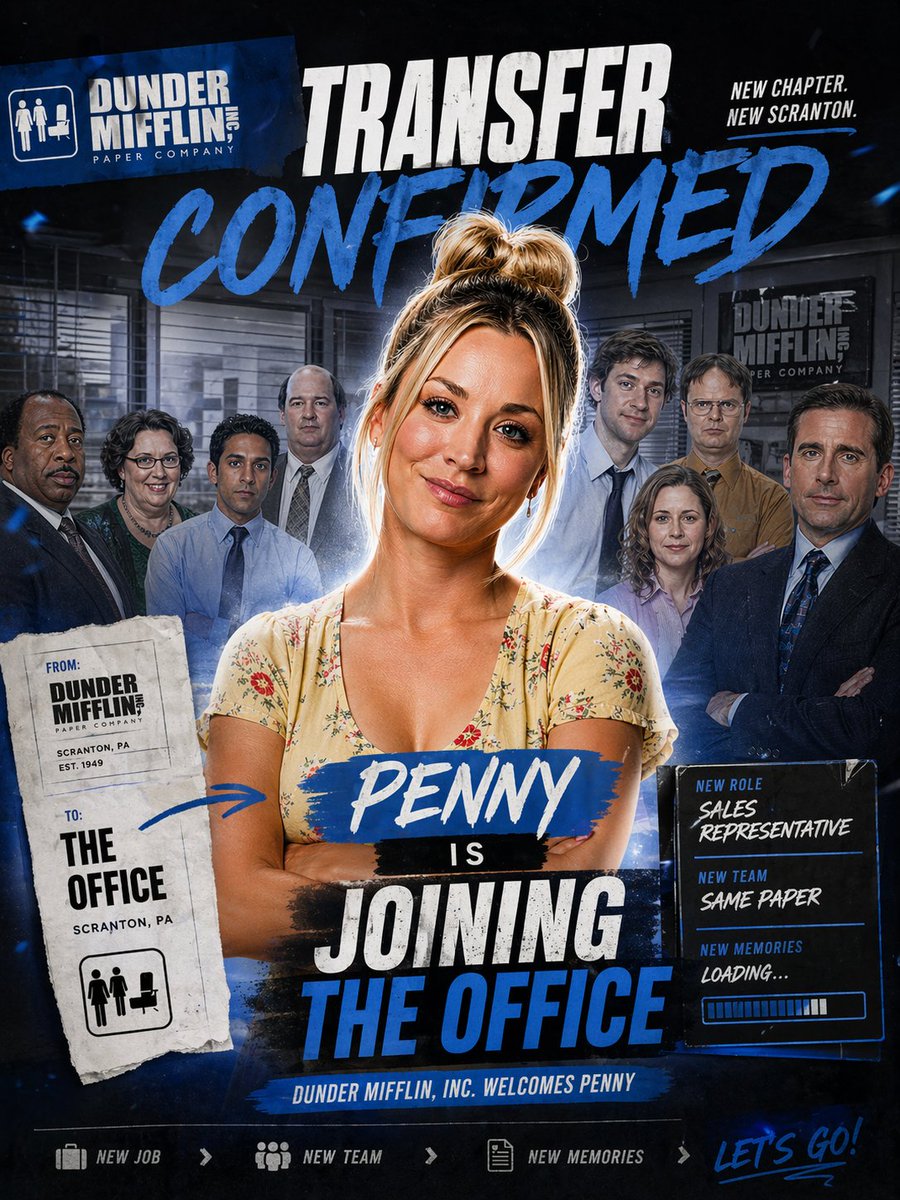
Office Transfer Announcement Poster
A bold TV-style ensemble poster announcing a new character joining an office team, ideal for fan edits, parody promos, or cast reveal graphics.
This is a gpt-image-2 prompt case for 平面海报. Use the copy-ready prompt below to generate similar visuals, and review YouMind OpenLab awesome-gpt-image-2 attribution plus commercial-use rights before reuse.

Prompt
Copy-ready prompt
Design a dramatic square promotional poster in the style of a TV actor transfer announcement, with a dark navy blue and black office theme background. It should have a rugged sports poster feel, complemented by striking blue brushstrokes, distressed white typography, and layered collage composition. Place a confident woman at the center of the image.{argument name="character name" default="Penny"} A half-length portrait shows her with her arms crossed, wearing a light beige floral V-neck dress and a messy high bun of blonde hair, the outline of which has a soft, shimmering edge. Behind her, eight office colleagues are shown as a blurred ensemble cast, arranged in a staggered manner within an office with blinds, desks, and company signage; they are kept in a secondary position and slightly shaded to highlight the central woman's dominance. In the upper left corner, a slanted blue company logo block is added, bearing the words "DUNDER MIFFLIN INC. PAPER COMPANY" along with a small office icon. At the top center, a large, distressed white headline "TRANSFER" is added, below which is the larger blue handwritten word "CONFIRMED." In the upper right corner, a small stacked slogan, "NEW CHAPTER. NEW SCRANTON," is added. On the left, place a torn-paper style transfer form with a stamped photocopy appearance; it should contain two clearly defined label sections: "FROM:" corresponding to "DUNDER MIFFLIN PAPER COMPANY, SCRANTON, PA, EST. 1949," and "TO:" corresponding to "THE OFFICE, SCRANTON, PA," with a small office icon at the bottom. Draw a hand-drawn blue arrow from this form pointing to the central woman. At the woman's torso, place a nameplate with blue strokes, bearing the words "..." in white handwriting.{argument name="character name" default="Penny"} This is followed by a small black bar with "IS" written on it, and below that is a large stacked title bar in an aged white and blue block font that reads "JOINING THE OFFICE". To the right, a glowing dark information panel is added, containing three lines of clear labels: "NEW ROLE" corresponding to {argument name="job title" default="SALES REPRESENTATIVE"} "NEW TEAM" corresponds to "{argument name="team tagline" default="SAME PAPER"} The text includes a heading and a message: "NEW MEMORIES" followed by "LOADING...", with a horizontal progress bar below. At the bottom center, a narrow blue banner reads "DUNDER MIFFLIN, INC. WELCOMES".{argument name="character name" default="Penny"} At the very bottom, create a footer containing four elements: a briefcase icon and "NEW JOB," a team icon and "NEW TEAM," a document icon and "NEW MEMORIES," and a handwritten blue phrase on the far right.{argument name="footer text" default="LET'S GO!"} It uses a high-contrast blue, white, and black color scheme, cinematic compositing effects, subtle dust and texture overlays, vibrant paint smear effects, and sophisticated fan-edited social media announcement aesthetics.Prompt variables
Editable argument placeholders found in the prompt, with their default values.
More cases in this category
Prioritized by category, input mode compatibility, quality, and lower risk.






Reuse and source notes
Use this prompt safely after previewing the case.
- 1.Copy the prompt or open it directly in Dovoo with the generation button.
- 2.Adjust variables, aspect ratio, and reference images for your own use case.
- 3.Before publishing or paid usage, verify source rights, attribution requirements, and brand or likeness risks.
Can I use this prompt commercially?
Commercial-use status is unknown. Review the original source, license, brand constraints, and legal requirements before paid usage.
Where does this case come from?
This case is imported from YouMind OpenLab awesome-gpt-image-2; keep attribution visible and check the source URL before reuse.