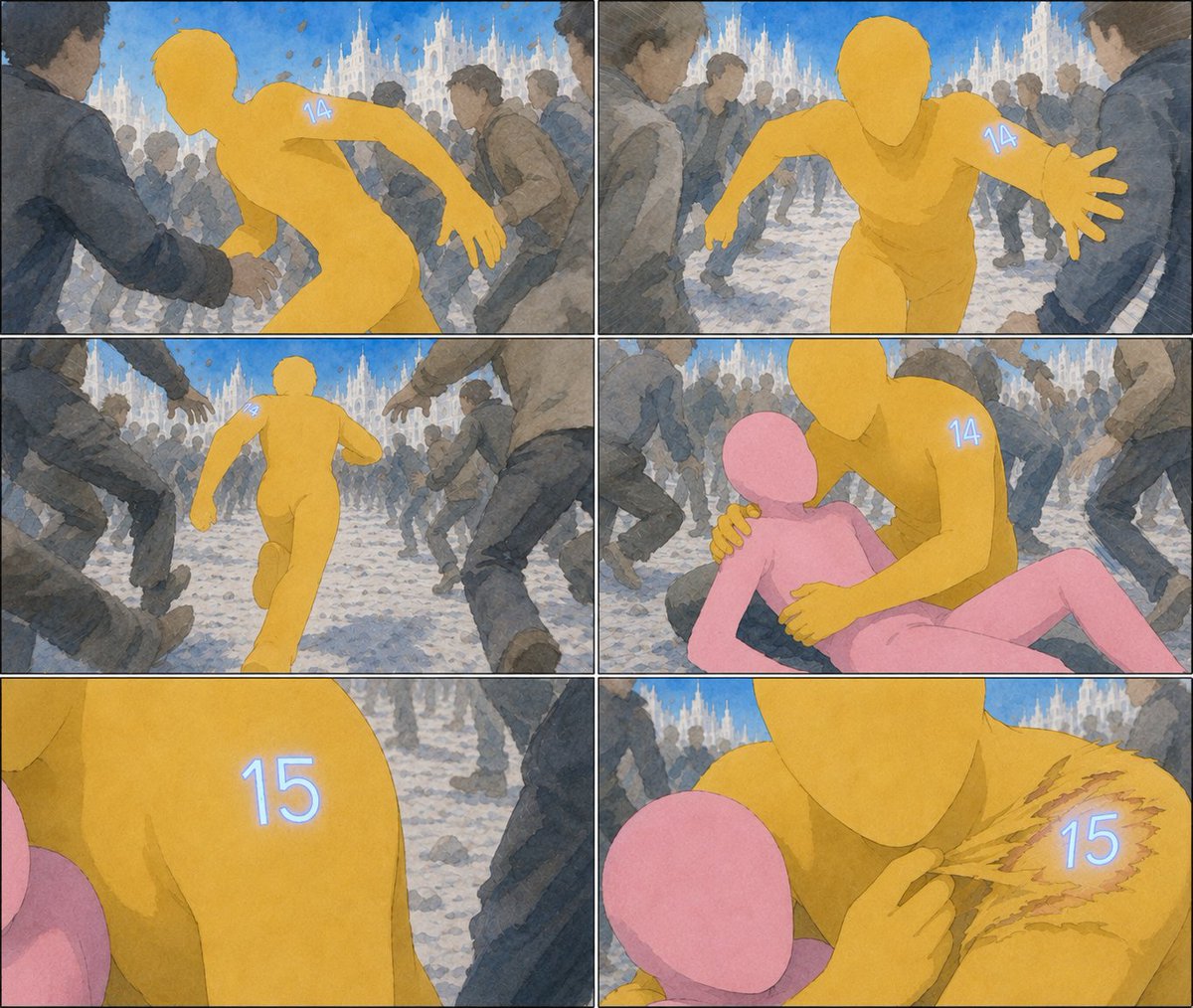
Six-Panel Numbered Humanoid Storyboard
Generates a watercolor comic storyboard showing a yellow faceless humanoid changing from number 14 to 15 while protecting a pink figure in a crowded cathedral square.
This is a gpt-image-2 prompt case for Illustration & Art. Use the copy-ready prompt below to generate similar visuals, and review YouMind OpenLab awesome-gpt-image-2 attribution plus commercial-use rights before reuse.
Prompt
Copy-ready prompt
Objective: Create a six-panel cinematic storyboard/comic page without dialogue, using an impressionistic watercolor ink style. The story should depict a faceless yellow humanoid with glowing numbers on its shoulders protecting a pink humanoid in a crowded public square, during which the numbers change from 14 to 15. Canvas: Landscape format, approximately 4:3 aspect ratio, divided into 6 panels by a thin black border. Arrange the panels in a 2-column, 3-row grid, with slight variations in camera distance and action composition for each panel. Visual Style: Soft hand-painted watercolor, soft blue-gray crowd, expressive sketch outlines, delicate paper texture, cinematic motion blur, natural sunlight, and dramatic action composition. Background: A crowded European-style square paved with light-colored cobblestones, with a magnificent white Gothic cathedral spire standing against a bright blue sky. The crowd should be faceless or blurred, wearing dark coats, hurrying about to highlight the colorful humanoid character. Character: The protagonist is a smooth, faceless figure.{argument name="main character color" default="Golden yellow"} A humanoid runner with a simplified body structure, no clothing, and initially a glowing pale blue number on its shoulder/upper arm.{argument name="first number" default="14"} The protected character is a smooth, faceless {argument name="secondary character color" default="pink"} The character is humanoid, small and fragile. The protagonist later has glowing pale blue numbers on their shoulders.{argument name="second number" default="15"} No other readable text appears in the frame. Layout and Content: 6 independent frames are used. Frame 1 (Top Left): A rear view of the yellow humanoid figure moving through a crowd, its body contorted as if being grabbed or chased; a glowing "14" is visible on its back/shoulder. Frame 2 (Top Right): A frontal shot of the yellow humanoid figure running towards the viewer, one hand outstretched, the right shoulder glowing with "14," with a cathedral and crowd in the background. Frame 3 (Middle Left): A distant view of the yellow humanoid figure running through a corridor formed by the legs of the crowd, with the crowd surrounding the runner; a cathedral is visible in the distance. Frame 4 (Middle Right): The yellow humanoid figure kneels or leans over a pink humanoid figure on the ground, one hand protecting its shoulder, the other close to its torso; "14" is still visible on the yellow shoulder. Frame 5 (Bottom Left): A close-up of the yellow shoulder; the glowing number "15" replaces the previous number; the pink humanoid figure is partially visible at the edge, and the background crowd is blurred. Panel 6 (bottom right): A close-up of the yellow and pink humanoid figures; the yellow figure touches or peels back a damaged, scratched area on its shoulder, revealing a glowing "15" below, surrounded by torn ochre marks. Constraint: Keep the image completely text-free, only displaying the glowing number.{argument name="first number" default="14"} and{argument name="second number" default="15"} Do not add speech bubbles, titles, logos, watermarks, extra cells, or extra numbered characters. Maintain consistency in character color and size across all cells.Prompt variables
Editable argument placeholders found in the prompt, with their default values.
Variable
main character color
Default
Golden yellow
Variable
first number
Default
14
Variable
secondary character color
Default
pink
Variable
second number
Default
15
Reuse and source notes
Use this prompt safely after previewing the case.
- 1.Copy the prompt or open it directly in Dovoo with the generation button.
- 2.Adjust variables, aspect ratio, and reference images for your own use case.
- 3.Before publishing or paid usage, verify source rights, attribution requirements, and brand or likeness risks.
Can I use this prompt commercially?
Commercial-use status is unknown. Review the original source, license, brand constraints, and legal requirements before paid usage.
Where does this case come from?
This case is imported from YouMind OpenLab awesome-gpt-image-2; keep attribution visible and check the source URL before reuse.