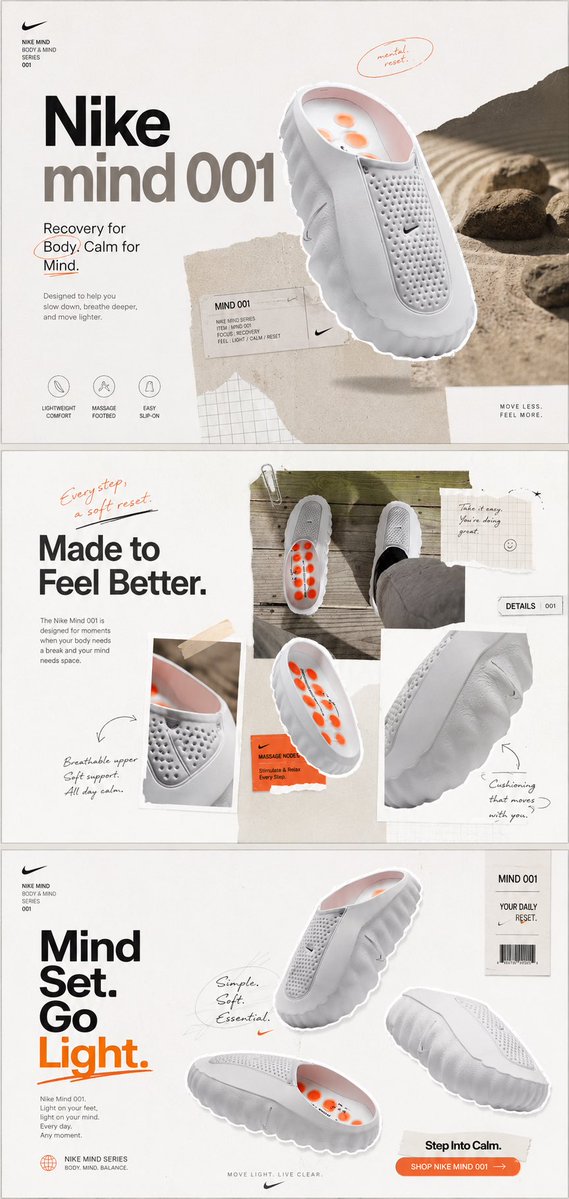
Nike Mind 001 Campaign Layout
Creates a three-panel minimalist Nike-style product campaign from a casual shoe reference photo, useful for turning rough product shots into polished ads.
This is a gpt-image-2 prompt case for Product & Commercial. Use the copy-ready prompt below to generate similar visuals, and review YouMind OpenLab awesome-gpt-image-2 attribution plus commercial-use rights before reuse.

Prompt
Copy-ready prompt
Using REFERENCE_0 as the base for product and lifestyle photos, this casual shoe photo was transformed into {argument name="product name" default="Nike Mind 001"} A beautifully designed Nike-style product advertising campaign. Maintain the original white slip-on recovery shoe concept, retain the orange massage nodes in the insole, and use the original deck photo as one of the collage elements, but redesign it into a clean, editorial branding typography. Create three stacked horizontal poster panels on a vertical canvas, separated by thin borders: Panel 1: Main Poster. Showcase a large, upward-sloping, floating silhouette rendering of the shoe, complemented by a beige desert/rock landscape stripe on the right and minimalist paper-textured collage elements. Add a striking headline “Nike” and “mind 001”. Add a subheading.{argument name="recovery tagline" default="Recovery for Body. Calm for Mind."} The top left corner contains a small product system text, a small handwritten oval sticky note that reads "mental reset.", three simple circular function icons labeled "LIGHTWEIGHT COMFORT," "MASSAGE FOOTBED," and "EASY SLIP-ON," along with a small product label card and the footer phrase "MOVE LESS. FEEL MORE." Section 2: Lifestyle Collage Ad. A reference photo is used as the main rectangular image in the upper right corner, maintaining a foot-on-deck perspective. Surrounding it are silhouette images of product details: a close-up of the breathable upper, an angled view of the orange massage insole, and a close-up of the wavy cushioned sole. A prominent headline is added to the left.{argument name="middle headline" default="Made to Feel Better."} Add a handwritten note in the top left corner: “Every step, a soft reset.” Add a paper note in the top right corner: “Take it easy. You're doing great.” A small label reads “DETAILS 001,” along with handwritten arrows pointing to “Breathable upper Soft support. All day calm.” and “Cushioning that moves with you.” Section 3: Multi-angle product poster. Show three floating shoe silhouette views on a beige white background: a slightly above-center view, a side/top view showing the orange insole in the lower left, and a sole/side view on the right. Add stacked large typography on the left that reads “Mind Set. Go Light.”, with “Light.” in orange. Includes small Nike Mind Series text, one of which reads…{argument name="handwritten note" default="Simple. Soft. Essential."} The circular handwritten note has a vertical barcode label on the right that reads "MIND 001" and "YOUR DAILY RESET," as well as an orange call-to-action button.{argument name="button text" default="SHOP NIKE MIND 001 →"} Style: High-end minimalist sneaker campaign, off-white paper background, soft shadows, clip-on aesthetic, black/grey typography accented with orange, subtle washi tape texture, handwritten red/orange pencil markings, clean modern sans-serif font. Make the shoes look like high-end studio product renderings while clearly deriving from reference shoes. Avoid adding extra sections, additional shoes beyond the designated product view, watermarks, or irrelevant branding content other than Nike-style markings and text.Prompt variables
Editable argument placeholders found in the prompt, with their default values.
Variable
product name
Default
Nike Mind 001
Variable
recovery tagline
Default
Recovery for Body. Calm for Mind.
Variable
middle headline
Default
Made to Feel Better.
Variable
handwritten note
Default
Simple. Soft. Essential.
Variable
button text
Default
SHOP NIKE MIND 001 →
Reuse and source notes
Use this prompt safely after previewing the case.
- 1.Copy the prompt or open it directly in Dovoo with the generation button.
- 2.Adjust variables, aspect ratio, and reference images for your own use case.
- 3.Before publishing or paid usage, verify source rights, attribution requirements, and brand or likeness risks.
Can I use this prompt commercially?
Commercial-use status is unknown. Review the original source, license, brand constraints, and legal requirements before paid usage.
Where does this case come from?
This case is imported from YouMind OpenLab awesome-gpt-image-2; keep attribution visible and check the source URL before reuse.