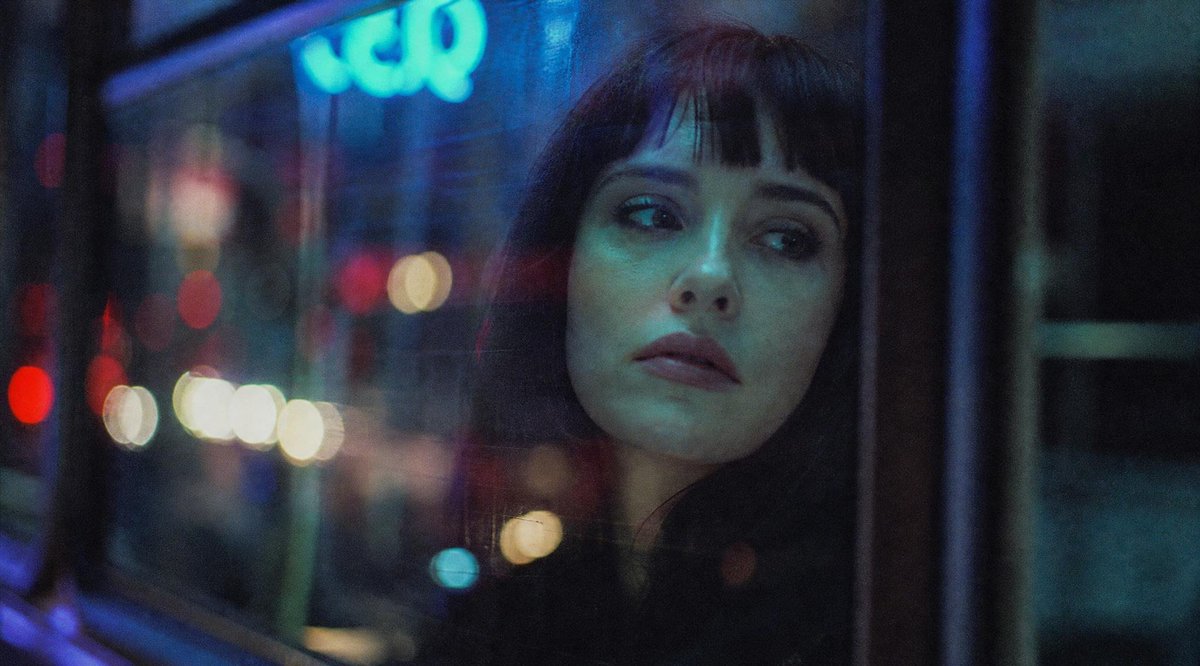
Cinematic Night Bus Window Portrait
Generates a moody low-light film-style image of a passenger by a neon-lit bus window with a single square face censor.
This is a gpt-image-2 prompt case for Portrait & Character. Use the copy-ready prompt below to generate similar visuals, and review YouMind OpenLab awesome-gpt-image-2 attribution plus commercial-use rights before reuse.
Prompt
Copy-ready prompt
Create a cinematic, grainy nighttime photograph taken from inside a city bus or tram, looking out through a rain-drenched, reflected window. The image should have a 35mm film quality, with shallow depth of field, strong bokeh, and melancholic neon lights composed of deep blue, cyan, red, and warm white. On the left and in the background, show the blurred streetlights and traffic lights outside the window. The upper left includes a softly glowing cyan sign with blurred text. Place [something] in the center right.{argument name="subject" default="A seated passenger"} Partial silhouettes are positioned near the car window, mostly hidden in darkness and reflections. A large, opaque square obscuring the passenger's face is used, with only one visible obscuring element, positioned slightly to the right center, in a deep charcoal gray with a subtle vertical gradient from a navy blue at the top to almost black. The composition is a wide 16:9 horizontal format, with the left half dominated by the car window reflection and colored light spots, while the right half is darker, containing the window frame and the passenger silhouette. A realistic low-light photography style is employed, with soft focus, visible film grain, gentle contrast, no sharp text, and no watermark, creating an introspective, late-night urban atmosphere.Prompt variables
Editable argument placeholders found in the prompt, with their default values.
Variable
subject
Default
A seated passenger
Reuse and source notes
Use this prompt safely after previewing the case.
- 1.Copy the prompt or open it directly in Dovoo with the generation button.
- 2.Adjust variables, aspect ratio, and reference images for your own use case.
- 3.Before publishing or paid usage, verify source rights, attribution requirements, and brand or likeness risks.
Can I use this prompt commercially?
Commercial-use status is unknown. Review the original source, license, brand constraints, and legal requirements before paid usage.
Where does this case come from?
This case is imported from YouMind OpenLab awesome-gpt-image-2; keep attribution visible and check the source URL before reuse.