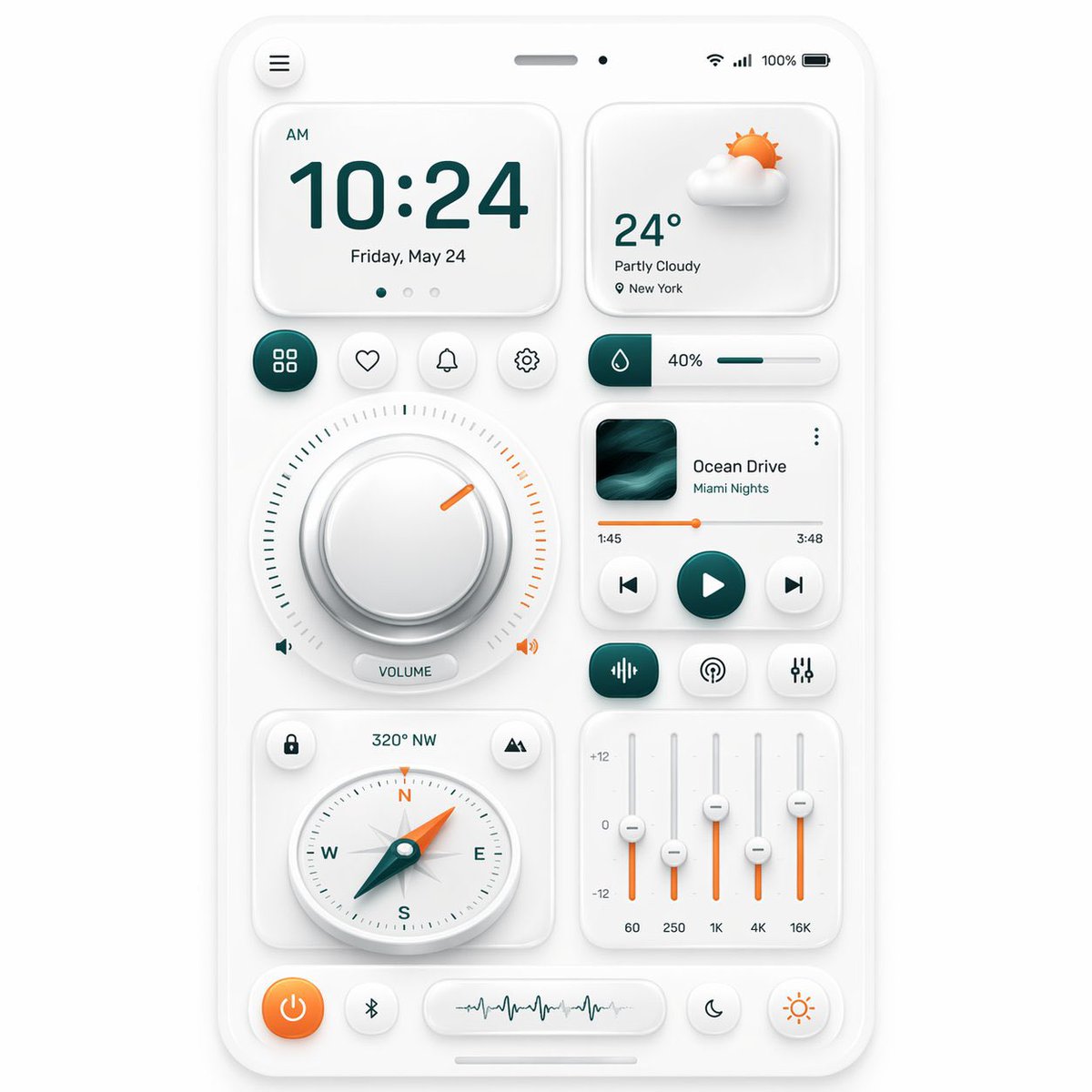
Neumorphic Mobile Dashboard UI
This prompt generates a polished smartphone-style neumorphic control dashboard with multiple widgets, ideal for UI concept art, design inspiration, and app mockup presentations.
This is a gpt-image-2 prompt case for 其他灵感. Use the copy-ready prompt below to generate similar visuals, and review YouMind OpenLab awesome-gpt-image-2 attribution plus commercial-use rights before reuse.
Prompt
Copy-ready prompt
{
  "type": "Neo-mimicry mobile dashboard UI showcase",
  "style": {
    "theme": "Simple and gentle neomimicry",
    "background": "Light warm gray",
    "primary color": "Deep blue",
    "accent color": "orange color",
    "material": "Matte white plastic card with subtle inner and outer shadows, rounded corners, and soft highlights.",
    "rendering": "High-resolution, exquisite 3D UI prototype, front view, centered composition."
  },
  "device": {
    "kind": "Smartphone screen prototype",
    "frame": "Slim white rounded corner frame",
    "status bar": {
      "count": 5,
      "items": [
        "Hamburger menu button in the top left corner",
        "Top center speaker slot",
        "Small front-facing camera",
        "Wi-Fi icon in the upper right corner",
        "100% battery indicator"
      ]
    }
  },
  "layout": {
    "sections": [
      {
        "title": "Clock cards",
        "position": "Top left",
        "count": 4,
        "labels": [
          "morning",
          "10:24",
          "Friday, May 24",
          "3 page indicator points"
        ]
      },
      {
        "title": "Weather Card",
        "position": "Top right",
        "count": 4,
        "labels": [
          "Cloudy 3D Sun and Cloud Icons",
          "24°",
          "Partly cloudy",
          "New York"
        ]
      },
      {
        "title": "Shortcut button row",
        "position": "Center upper left",
        "count": 4,
        "labels": [
          "Grid/Application",
          "Heart-shaped/Collection",
          "Bell/Notification",
          "set up"
        ]
      },
      {
        "title": "Humidity slider",
        "position": "Center upper right",
        "count": 3,
        "labels": [
          "Water drop icon block",
          "40%",
          "Horizontal progress bar"
        ]
      },
      {
        "title": "Volume knob module",
        "position": "center left",
        "count": 5,
        "labels": [
          "Large round knob",
          "Surrounding scale",
          "Orange indicates gap",
          "Left speaker icon",
          "VOLUME capsule label and speaker icon on the right"
        ]
      },
      {
        "title": "Music Player Card",
        "position": "center right",
        "count": 8,
        "labels": [
          "Album cover",
          "Ocean Drive",
          "Miami Nights",
          "Three-point menu",
          "1:45",
          "3:48",
          "Orange progress bar",
          "Previous/Play/Next Track Controls"
        ]
      },
      {
        "title": "Audio control line",
        "position": "Below the music player",
        "count": 3,
        "labels": [
          "Equalizer/Wave Icon Button",
          "Radio/Podcast icon button",
          "Slider/Settings Icon Button"
        ]
      },
      {
        "title": "Compass Cards",
        "position": "Bottom left",
        "count": 5,
        "labels": [
          "Lock icon button",
          "320° NW",
          "Mountain/Location Icon Button",
          "Round compass dial (marked NESW)",
          "Cyan pointer with orange tip"
        ]
      },
      {
        "title": "Equalizer Card",
        "position": "Bottom right",
        "count": 8,
        "labels": [
          "+12",
          "0",
          "-12",
          "60",
          "250",
          "1K",
          "4K",
          "16K"
        ]
      },
      {
        "title": "Bottom dock",
        "position": "bottom",
        "count": 4,
        "labels": [
          "Orange power button",
          "Bluetooth button",
          "Waveform display capsule",
          "Two circular mode buttons: Moon and Sun"
        ]
      }
    ],
    "centerpiece": "A new mesh of biomimetic widgets evenly arranged on a smartphone dashboard"
  },
  "composition": {
    "spacing": "Even margins and ample white space",
    "perspective": "face",
    "shadow behavior": "Extremely soft ambient shadows create a tactile embossed effect.",
    "iconography": "Minimalist line icons with cyan and orange highlights"
  }
}
More cases in this category
Prioritized by category, input mode compatibility, quality, and lower risk.

Premium Sports Editorial Poster
Text to Imageunknown

Hand-Drawn Sketch Photo Annotation
Text to Imageunknown

Cosmic Big Bang Snooze Comic
Text to Imageunknown

Hyper Realistic FIFA Football Poster
Text to Imageunknown

Direct Flash Editorial Portrait
Text to Imageunknown

Vintage Film Projection Portrait
Image to Imageunknown
Reuse and source notes
Use this prompt safely after previewing the case.
- 1.Copy the prompt or open it directly in Dovoo with the generation button.
- 2.Adjust variables, aspect ratio, and reference images for your own use case.
- 3.Before publishing or paid usage, verify source rights, attribution requirements, and brand or likeness risks.
Can I use this prompt commercially?
Commercial-use status is unknown. Review the original source, license, brand constraints, and legal requirements before paid usage.
Where does this case come from?
This case is imported from YouMind OpenLab awesome-gpt-image-2; keep attribution visible and check the source URL before reuse.