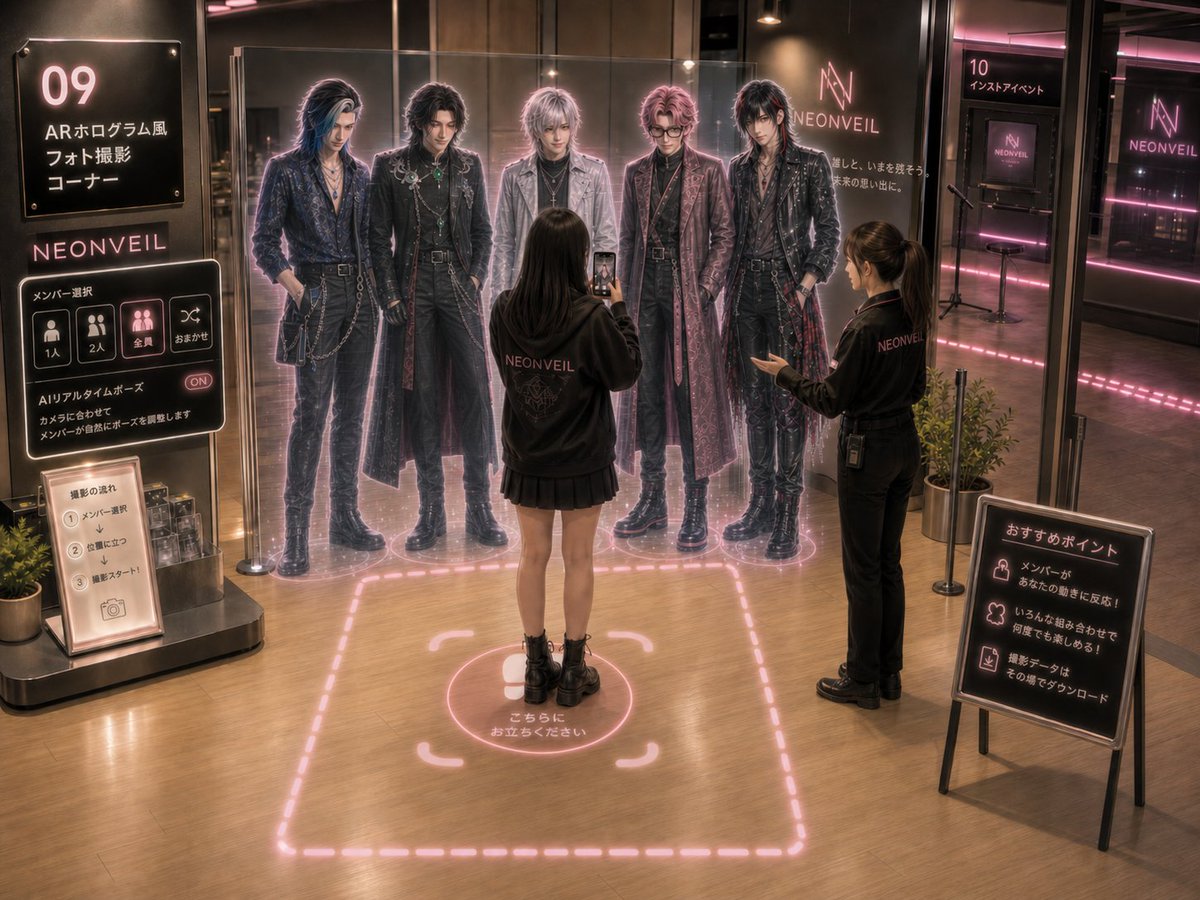
NEONVEIL AR Photo Zone
Generates a detailed concept visual for a neon-lit idol shop AR photo booth with life-size holographic members, visitor interaction, and Japanese event signage.
This is a gpt-image-2 prompt case for 室内建筑. Use the copy-ready prompt below to generate similar visuals, and review YouMind OpenLab awesome-gpt-image-2 attribution plus commercial-use rights before reuse.
Prompt
Copy-ready prompt
{
  "type": "A cinematic concept art area featuring an AR photo zone for futuristic idol groups, located within the permanent pop-up store.",
  "brand": "{argument name=\"brand name\" default=\"NEONVEIL\"}",
  "scene": "A warmly lit indoor retail/event space featuring polished wood floors, black glass walls, pink neon accents, and a dark, luxurious rock-and-roll aesthetic. A slightly elevated, wide-angle view showcases the entire photo booth area and surrounding signage. The atmosphere is immersive, upscale, and authentic, like a rendered event proposal visual.",
  "main_attraction": {
    "description": "A life-size AR photo corner where visitors can take photos with virtual, full-size band members instead of using physical cardboard cutouts.",
    "AR_members": {
      "count": 5,
      "appearance": "Five tall, faceless or softly blurred silhouettes of male idols stand side by side behind a transparent, glass-like AR barrier, each member's silhouette surrounded by glowing pink holographic edges.",
      "fashion": "Dark, visually striking rock-inspired outfits, layered with long coats, leather pants, boots, belts, chains, necklaces, metallic details, lace, and brocade textures.",
      "poses": "The five individuals stood in slightly different, confident poses, with their hands in their pockets or hanging naturally at their sides, creating a random and unique sense of posing for the photo.",
      "glow": "A subtle, semi-transparent holographic effect; a pink halo surrounds the body; faint scanning lines/glittering particles appear beneath the feet."
    }
  },
  "people": {
    "count": 2,
    "visitor": "A young female visitor, with her back to the camera, stands at the marked photo spot, wearing a shirt printed with {argument name=\"staff hoodie logo\" default=\"NEONVEIL\"} Wearing a signature black hoodie, black pleated mini skirt, and platform black ankle boots, she is holding up her smartphone to photograph an AR member.",
    "staff": "The female shop assistant on the right is wearing a shirt printed with {argument name=\"staff hoodie logo\" default=\"NEONVEIL\"} Wearing a distinctive black employee uniform, with her hair in a ponytail and carrying a lanyard and walkie-talkie, she politely gestured towards the AR members."
  },
  "floor_graphics": {
    "count": 2,
    "items": [
      {
        "description": "The boundary of the huge dashed square photo area on the wooden floor is composed of glowing pink neon light strips."
      },
      {
        "description": "The central circular standing marker, adorned with right-angled brackets and a footprint, emits a pink glow and is labeled \"こちらにお立ちください\" (Please stand here)."
      }
    ]
  },
  "layout": {
    "sections": [
      {
        "title": "Main left wall sign",
        "position": "Top left",
        "count": 1,
        "visible_text": [
          "09",
          "AR hologram style",
          "Photo shoot",
          "コーナー"
        ]
      },
      {
        "title": "Interactive member selection UI panel",
        "position": "Below the logo on the left",
        "count": 4,
        "visible_buttons": [
          "1 person",
          "2 people",
          "All",
          "おまかせ"
        ],
        "extra_text": [
          "Member Selection",
          "AIリアルタイムポーズ",
          "ON",
          "The members naturally adjust their poses to match the camera."
        ]
      },
      {
        "title": "Photo instruction sign",
        "position": "On the small stand at the bottom left",
        "count": 3,
        "numbered_steps": [
          "1. Member Selection",
          "Stand in position 2",
          "3. Filming begins."
        ]
      },
      {
        "title": "Recommended signage",
        "position": "On the black easel panel in the front right",
        "count": 3,
        "items": [
          "The members will react to your movements!",
          "You can enjoy it again and again with various combinations!",
          "The photo data can be downloaded on the spot."
        ]
      },
      {
        "title": "Background Activity Area",
        "position": "Behind the glass door, to the right rear",
        "count": 1,
        "visible_text": [
          "10",
          "インストアイベント"
        ]
      }
    ],
    "brand_marks": {
      "count": 4,
      "locations": [
        "Left UI area logo",
        "Large wall logo behind AR members",
        "Right rear monitor logo",
        "Logo on the far right glass wall"
      ],
      "text": "NEONVEIL"
    }
  },
  "lighting_and_materials": "The boutique's lighting is atmospheric, featuring overhead spotlights, black metal fixtures, reflective glass partitions, pink LED light strips along the walls and floor, soft mist, realistic reflections, high detail, and a sophisticated Japanese-style event store design.",
  "camera": "4:3 wide-angle composition, from eye level to slightly overhead, all signage is clearly readable, full-body views are visible, and the central visitor is aligned with AR members.",
  "style": "Photorealistic cinematic rendering, detailed environmental concept art, clear signage, soft neon lighting, warm brown and black tones, accented with magenta highlights.",
  "avoid": "Do not create flat, anime-style illustrations; avoid cluttered and unreadable text; avoid having more than five band members; avoid changing the numbering of corner 09."
}
Prompt variables
Editable argument placeholders found in the prompt, with their default values.
More cases in this category
Prioritized by category, input mode compatibility, quality, and lower risk.






Reuse and source notes
Use this prompt safely after previewing the case.
- 1.Copy the prompt or open it directly in Dovoo with the generation button.
- 2.Adjust variables, aspect ratio, and reference images for your own use case.
- 3.Before publishing or paid usage, verify source rights, attribution requirements, and brand or likeness risks.
Can I use this prompt commercially?
Commercial-use status is unknown. Review the original source, license, brand constraints, and legal requirements before paid usage.
Where does this case come from?
This case is imported from YouMind OpenLab awesome-gpt-image-2; keep attribution visible and check the source URL before reuse.