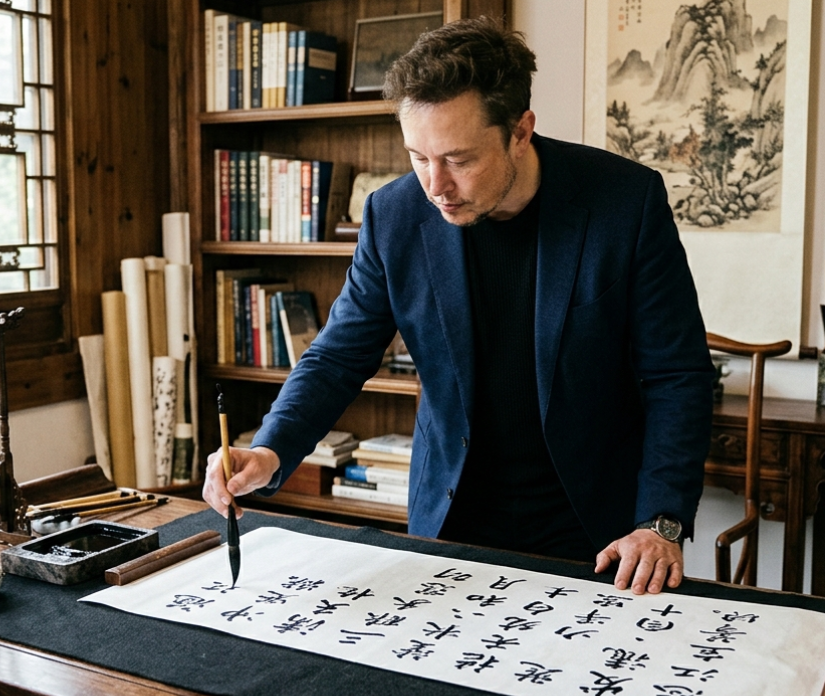
Musk Writing Chinese Calligraphy
A realistic cultural portrait of a well-known figure practicing Chinese brush calligraphy in a traditional study, suitable for editorial, social media, or concept-image generation.
This is a gpt-image-2 prompt case for 人像角色. Use the copy-ready prompt below to generate similar visuals, and review YouMind OpenLab awesome-gpt-image-2 attribution plus commercial-use rights before reuse.
Prompt
Copy-ready prompt
A realistic, edited photograph that showcases{argument name="public figure" default="Elon Musk"} Standing before the desk in a traditional Chinese study, leaning forward, he was writing Chinese calligraphy with a brush on a long horizontal strip of white paper. He wore a dark blue suit jacket over a black shirt, a watch on his wrist, and his expression was focused and serious. The room had a warm and elegant atmosphere, with a wooden bookshelf filled with books as a backdrop, several scrolls beside it, and a carved wooden chair. Soft natural light streamed in through the traditional lattice window to the left, and a traditional Chinese landscape painting hung on the wall. On the desk were four unique calligraphy tools and materials: a rectangular black inkstone (containing ink), a brush rest, a long wooden paperweight, and a large sheet of paper or scroll with poems written on it.{argument name="calligraphy text" default="Man Jiang Hong"} The bold black Chinese characters. The composition is a medium-range full-body indoor shot taken from the left front, with the pen tip touching the paper, shallow depth of field, and a rich wood tone as the main color, with a delicate cinematic contrast. It has a documentary style, rich details, presents an authentic Chinese literati atmosphere, and is carefully rendered with ink brushstrokes.Prompt variables
Editable argument placeholders found in the prompt, with their default values.
More cases in this category
Prioritized by category, input mode compatibility, quality, and lower risk.






Reuse and source notes
Use this prompt safely after previewing the case.
- 1.Copy the prompt or open it directly in Dovoo with the generation button.
- 2.Adjust variables, aspect ratio, and reference images for your own use case.
- 3.Before publishing or paid usage, verify source rights, attribution requirements, and brand or likeness risks.
Can I use this prompt commercially?
Commercial-use status is unknown. Review the original source, license, brand constraints, and legal requirements before paid usage.
Where does this case come from?
This case is imported from YouMind OpenLab awesome-gpt-image-2; keep attribution visible and check the source URL before reuse.