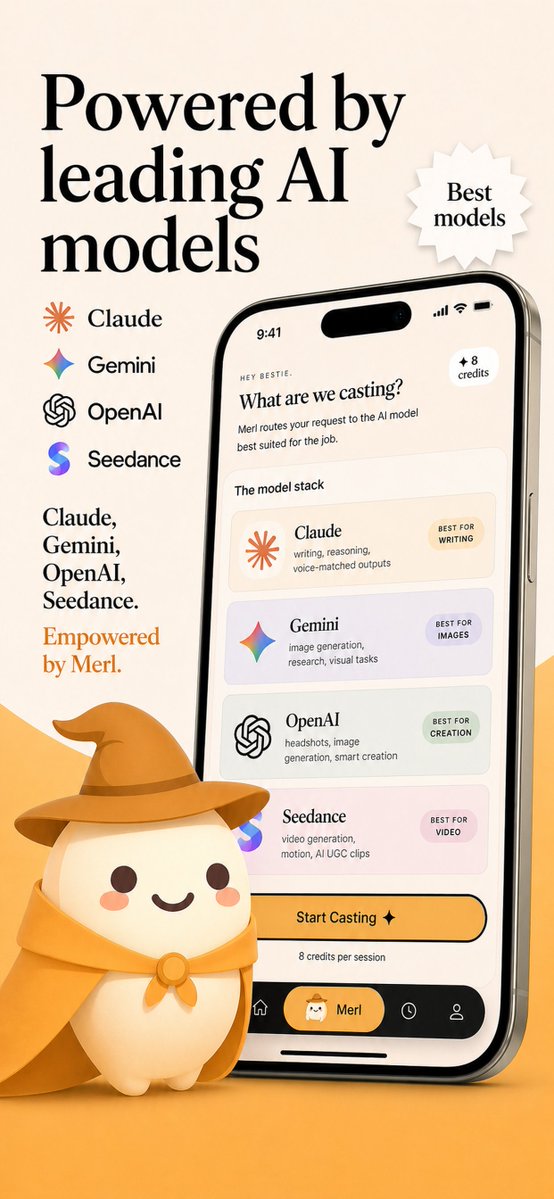
AI Model Router App Store Screenshot
A premium mobile app marketing screenshot showing a branded AI model-routing interface with provider logos, promotional copy, and a cute mascot, ideal for App Store listings or startup launch visuals.
This is a gpt-image-2 prompt case for 产品商业. Use the copy-ready prompt below to generate similar visuals, and review YouMind OpenLab awesome-gpt-image-2 attribution plus commercial-use rights before reuse.
Prompt
Copy-ready prompt
Create a sophisticated App Store promotional screenshot using a warm beige and golden orange brand color scheme, with a vertical composition that presents a high-end yet friendly startup aesthetic. The layout is a single vertical marketing graphic with a soft cream background and an orange gradient at the bottom. In the upper left corner, place a very striking and elegant black serif title displayed in three lines:{argument name="headline text" default="Driven by leading AI models"} To the right of the title, add a white, jagged star-shaped badge with subtle shadows, containing two lines of serif text:{argument name="badge text" default="Optimal Model"} Below the left-hand heading is a vertical list of four AI service providers, with icons and names evenly spaced: Claude (orange sunburst icon), Gemini (multicolored four-pointed star icon), OpenAI (black knot icon), and Seedance (purple-blue gradient S icon). Below this is a left-aligned serif text block divided into two parts: first, a four-line black text list reading "Claude, Gemini, OpenAI, Seedance."; then, a final line of brand-colored orange text.{argument name="tagline text" default="Powered by Merl."} On the right half, a realistic modern smartphone, slightly tilted to the left, is placed with a reflective silver frame, black screen bezel, a dynamic island-style top cutout, visible side buttons, and soft shadows. The phone screen should display a clean, cream-colored AI-modeled routing app UI. At the very top of the screen is a 9:41 time display along with standard signal, Wi-Fi, and battery icons. Inside the app, a short greeting, "HEY BESTIE," is displayed, followed by a question title in bold serif font.{argument name="screen title" default="What should we project?"} This is followed by a short sans-serif subheading about routing requests to the AI model best suited for the task. A small rounded badge with "+8 points" is added to the top right corner of the app content. Below, there's a section labeled "Model Stack," along with a stack of four rounded cards, each with a soft, muted background. Card 1: Claude, with an orange sunburst icon, described as "Writing, Reasoning, Speech Matching Output," and labeled "Best for Writing" (small pill-shaped tag). Card 2: Gemini, with a colorful star icon, described as "Image Generation, Research, Visual Tasks," and labeled "Best for Images." Card 3: OpenAI, with a black knot-like icon, described as "Avatars, Image Generation, Intelligent Creation," and labeled "Best for Creation." Card 4: Seedance, with a purple-blue gradient "S" icon, described as "Video Generation, Animation, AI UGC Short Films," and labeled "Best for Video." Below the card, place a large, rounded, yellow-orange CTA button with the text "Start Projecting ✦", and below that, a line of smaller text reads "8 points per session". At the bottom of the phone's UI, create a black tab bar containing four navigation items: a home icon, a selected center pill-shaped icon (with a small mascot face and label), and a home icon.{argument name="app name" default="Merl"} The app includes a clock/history icon and a profile icon. At the bottom left of the screen, place a cute 3D mascot character: a round, cream-colored ball with small feet, dark brown dotted eyes, rosy cheeks, and a smiling mouth, wearing a golden wizard's hat and a matching cloak secured by a circular buckle. The mascot should slightly obscure the phone and sit on an orange ground, casting a soft shadow. Overall style: a high-end, friendly tech brand feel; clear typography; detailed realism; soft shadows; a clean app mockup; App Store screenshot quality; consistent visual brand identity; high readability; and high resolution.Prompt variables
Editable argument placeholders found in the prompt, with their default values.
More cases in this category
Prioritized by category, input mode compatibility, quality, and lower risk.






Reuse and source notes
Use this prompt safely after previewing the case.
- 1.Copy the prompt or open it directly in Dovoo with the generation button.
- 2.Adjust variables, aspect ratio, and reference images for your own use case.
- 3.Before publishing or paid usage, verify source rights, attribution requirements, and brand or likeness risks.
Can I use this prompt commercially?
Commercial-use status is unknown. Review the original source, license, brand constraints, and legal requirements before paid usage.
Where does this case come from?
This case is imported from YouMind OpenLab awesome-gpt-image-2; keep attribution visible and check the source URL before reuse.