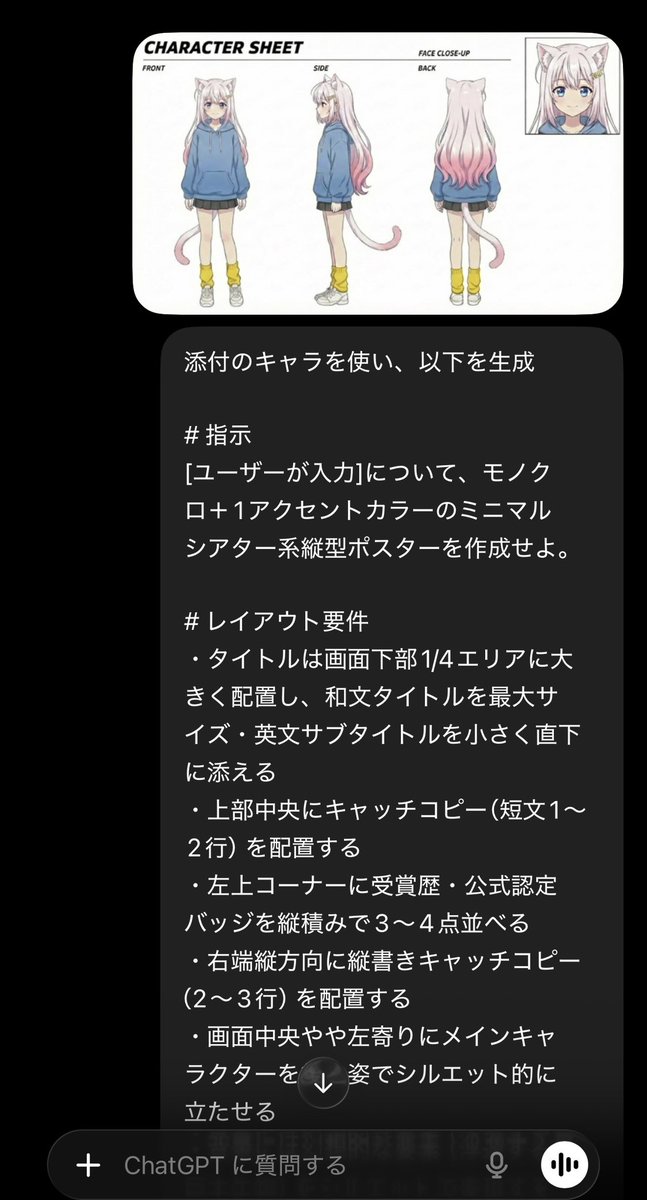
Minimalist Cinematic Vertical Poster with Character Reference
A sophisticated prompt for creating minimalist, monochrome posters with single accent colors while maintaining character consistency from a reference image.
This is a gpt-image-2 prompt case for Graphic & Poster. Use the copy-ready prompt below to generate similar visuals, and review YouMind OpenLab awesome-gpt-image-2 attribution plus commercial-use rights before reuse.

Prompt
Copy-ready prompt
Using the attached role, generate the following: # Command is{argument name="user input" default="[User Input]"} Create a minimalist, theatrical-style vertical poster using monochrome +{argument name="accent color" default="An accent color"} # Layout Requirements - Place the title in large font in the bottom 1/4 area, maximizing the Japanese title, followed immediately by the English subtitle in a smaller font size. - Place a tagline (1-2 lines) at the top center. - Vertically stack 3-4 award/official certification badges in the top left corner. - Place a vertical tagline (2-3 lines) along the right edge. - Place the main character in silhouette form slightly to the left of the center. - Present fantasy elements (floating islands, giant creatures) in silhouette form in the background. - Arrange the cast and crew, release date, and distribution information in small horizontal lines at the bottom. - Highlight the release date in large font in the bottom right corner. # Design Requirements - Keep the background a single color (black to gray gradient). - Use only one accent color (e.g., vibrant cobalt blue or gold). - Combine silhouette and thin-line art style. - Emphasize the title text using white + accent color. - Create an overall cinematic and artistic atmosphere. - Avoid using colored backgrounds, excessive decoration, or large gradient effects. - Format: Portrait, aspect ratio 2:3, high resolution.Prompt variables
Editable argument placeholders found in the prompt, with their default values.
Variable
user input
Default
[User Input]
Variable
accent color
Default
An accent color
Reuse and source notes
Use this prompt safely after previewing the case.
- 1.Copy the prompt or open it directly in Dovoo with the generation button.
- 2.Adjust variables, aspect ratio, and reference images for your own use case.
- 3.Before publishing or paid usage, verify source rights, attribution requirements, and brand or likeness risks.
Can I use this prompt commercially?
Commercial-use status is unknown. Review the original source, license, brand constraints, and legal requirements before paid usage.
Where does this case come from?
This case is imported from YouMind OpenLab awesome-gpt-image-2; keep attribution visible and check the source URL before reuse.