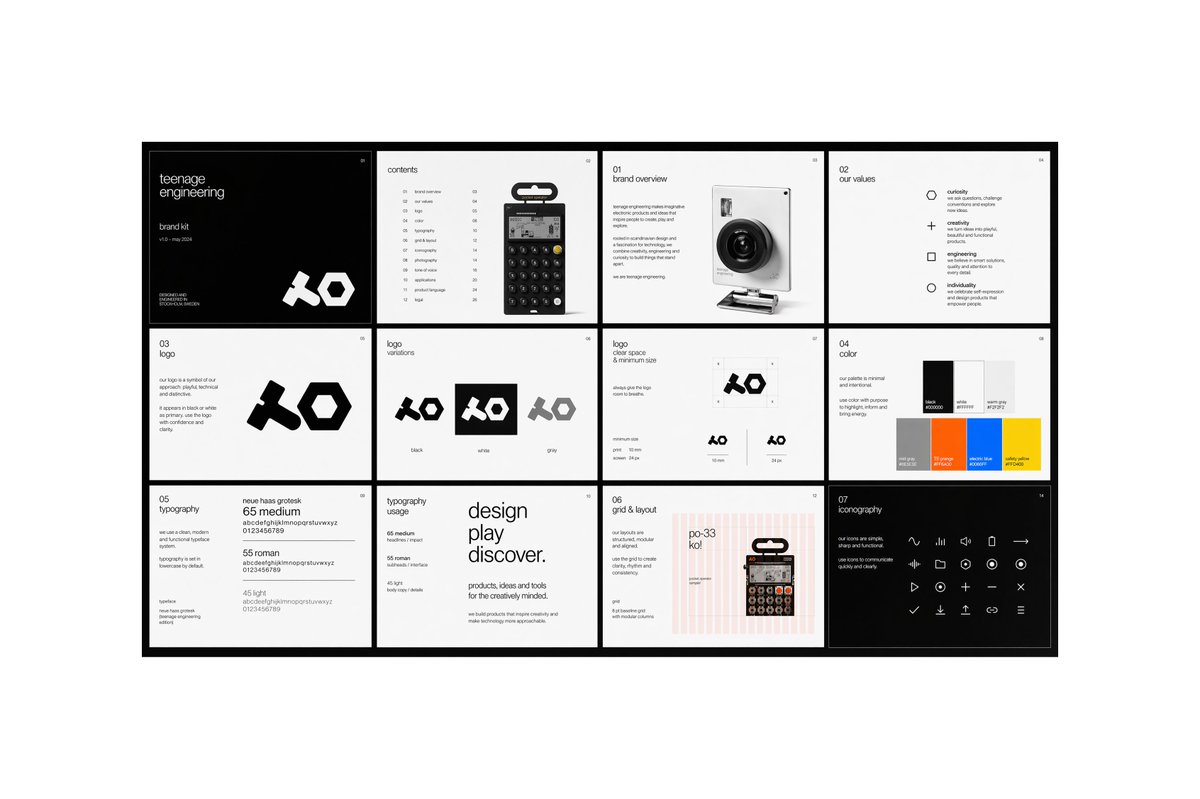
Minimal Brand Guideline Board
A sleek multi-panel brand identity presentation board for showcasing a modern tech brand's logo, values, typography, colors, layout system, and iconography.
This is a gpt-image-2 prompt case for 平面海报. Use the copy-ready prompt below to generate similar visuals, and review YouMind OpenLab awesome-gpt-image-2 attribution plus commercial-use rights before reuse.
Prompt
Copy-ready prompt
{
  "type": "Modern Brand Guide Showcase Project",
  "style": "The minimalist Swiss editorial design features a monochromatic palette accented with carefully selected accent colors, a clear grid system, ample white space, a slender sans-serif font, and a clean, crisp product aesthetic.",
  "brand": {
    "name": "{argument name=\"brand name\" default=\"teenage engineering\"}",
    "subtitle": "Branded tool kit",
    "issue": "v18 - May 2024",
    "logo_style": "Bold geometric abstract text logo with thick, angular shapes."
  },
  "canvas": {
    "aspect_ratio": "16:9",
    "background": "The background is light gray, and the central display item is surrounded by a thick black border."
  },
  "layout": {
    "structure": "4 columns and 3 rows",
    "total_panels": 12,
    "sections": [
      {
        "title": "Cover",
        "position": "Row 1, Column 1",
        "count": 1,
        "theme": "The cover features a black background with small white text and an oversized white logo on the bottom right."
      },
      {
        "title": "Table of contents",
        "position": "Row 1, Column 2",
        "count": 1,
        "theme": "The table of contents features a product image of the handheld calculator in the center, with a vertical list of chapters with page numbers on the right."
      },
      {
        "title": "01 Brand Overview",
        "position": "Row 1, Column 3",
        "count": 1,
        "theme": "The left side displays an introductory text block, while the right side shows a realistic rendering of a compact camera."
      },
      {
        "title": "02 Our Values",
        "position": "Row 1, Column 4",
        "count": 1,
        "theme": "A list containing four values, accompanied by simple outline icons.",
        "labels": [
          "curiosity",
          "creativity",
          "project",
          "personality"
        ]
      },
      {
        "title": "03 Logo",
        "position": "Row 2, Column 1",
        "count": 1,
        "theme": "The left side shows the logo description text, and the right side shows a large black logo on a white background."
      },
      {
        "title": "Logo Variations",
        "position": "Row 2, Column 2",
        "count": 1,
        "theme": "Three logo tiles displayed side by side",
        "labels": [
          "black",
          "White",
          "grey"
        ]
      },
      {
        "title": "Logo safety space and minimum size",
        "position": "Row 2, Column 3",
        "count": 1,
        "theme": "The chart page shows the protective area around the logo and two minimum size examples."
      },
      {
        "title": "04 Color",
        "position": "Row 2, Column 4",
        "count": 1,
        "theme": "The color palette page contains 6 rectangular color blocks arranged in two rows and three columns.",
        "labels": [
          "black",
          "White",
          "Light gray",
          "Medium gray",
          "orange color",
          "blue",
          "yellow"
        ]
      },
      {
        "title": "05 Layout",
        "position": "Row 3, Column 1",
        "count": 1,
        "theme": "The font sample page showcases three font weights and examples of letters and numbers.",
        "labels": [
          "65 medium",
          "55 roman",
          "45 light"
        ]
      },
      {
        "title": "Typesetting applications",
        "position": "Row 3, Column 2",
        "count": 1,
        "theme": "Large-scale editing and layout, including stacked text and smaller auxiliary body text."
      },
      {
        "title": "06 Grids and Layouts",
        "position": "Row 3, Column 3",
        "count": 1,
        "theme": "The page displays a pink vertical grid overlay, aligned annotations, and a product image placed on the right."
      },
      {
        "title": "07 Icon",
        "position": "Row 3, Column 4",
        "count": 1,
        "theme": "A black background page containing a matrix of 24 minimalist white line icons.",
        "labels": [
          "waveform",
          "pause",
          "speaker",
          "stop",
          "Right arrow",
          "Rewind",
          "Turn down the volume",
          "round",
          "plus sign",
          "Recording",
          "Play",
          "download",
          "closure",
          "Check",
          "minus sign",
          "Upload",
          "Link",
          "menu",
          "And 6 other simple media/system icons"
        ]
      }
    ]
  },
  "visual_details": {
    "products": [
      {
        "type": "Calculator/synthesizer style handheld device",
        "appearance": "A small, black rectangular device with a round button and a hanging retail label."
      },
      {
        "type": "compact camera",
        "appearance": "The white body features a large black lens for shooting at narrow angles."
      }
    ],
    "typography": "The neutral Grotesk sans-serif font features extremely small descriptive text, neat alignment, and a magazine-like sense of hierarchy.",
    "color_palette": "The design is primarily black and white, supplemented by light gray, orange, blue, yellow, and a light pink grid line.",
    "rendering": "High-resolution demo unit, perfect front view, sharp edges, professional brand case study aesthetics."
  },
  "text_treatment": "It primarily uses small, editable placeholder text and concise brand copy, retaining a minimalist corporate design language.",
  "quality": "Neat, high-end, modern, award-winning design projects"
}
Prompt variables
Editable argument placeholders found in the prompt, with their default values.
More cases in this category
Prioritized by category, input mode compatibility, quality, and lower risk.






Reuse and source notes
Use this prompt safely after previewing the case.
- 1.Copy the prompt or open it directly in Dovoo with the generation button.
- 2.Adjust variables, aspect ratio, and reference images for your own use case.
- 3.Before publishing or paid usage, verify source rights, attribution requirements, and brand or likeness risks.
Can I use this prompt commercially?
Commercial-use status is unknown. Review the original source, license, brand constraints, and legal requirements before paid usage.
Where does this case come from?
This case is imported from YouMind OpenLab awesome-gpt-image-2; keep attribution visible and check the source URL before reuse.