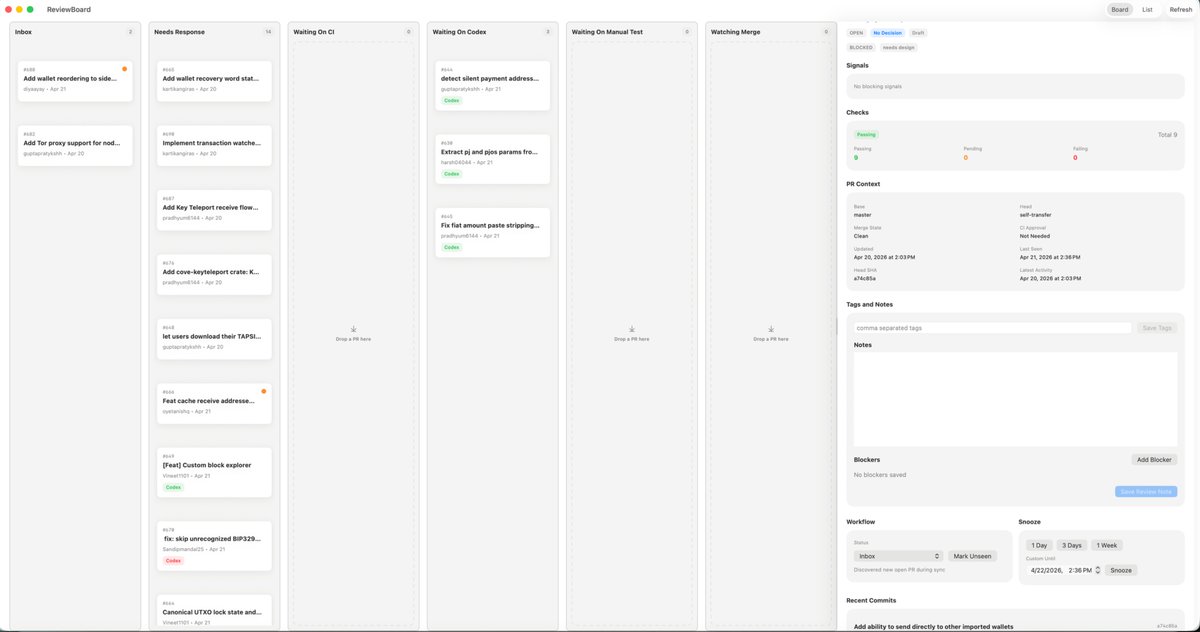
MacOS Kanban Review App UI
A polished light-mode macOS kanban-style review dashboard mockup for redesigning a desktop productivity or engineering triage app.
This is a gpt-image-2 prompt case for Product & Commercial. Use the copy-ready prompt below to generate similar visuals, and review YouMind OpenLab awesome-gpt-image-2 attribution plus commercial-use rights before reuse.
Prompt
Copy-ready prompt
{
  "type": "Desktop application UI model",
  "platform": "macOS",
  "style": "A clean, light-colored productivity dashboard with a soft gray background, rounded cards, subtle shadows, and fine dividing lines—a minimalist, modern SaaS aesthetic with a compact yet uncluttered layout.",
  "app": {
    "name": "ReviewBoard",
    "window_controls": "Top left macOS red, yellow, and green traffic light button"
  },
  "layout": {
    "structure": "A single widescreen application window, divided into 7 vertical columns and a right-side inspector panel.",
    "sections": [
      {
        "title": "Inbox",
        "position": "Leftmost column",
        "count": 2,
        "labels": [
          "Add wallet and reorder to the side...",
          "Add Tor proxy support to enable node..."
        ]
      },
      {
        "title": "Response required",
        "position": "Second column from the left",
        "count": 7,
        "labels": [
          "Add wallet to restore mnemonic phrase status...",
          "Implement transaction monitoring...",
          "Add Key Teleport receiving process...",
          "Add cove-keyteleport crate: K...",
          "Allow users to download its TAPSI...",
          "Function: Cache the receiving address...",
          "[Features] Custom block explorer"
        ]
      },
      {
        "title": "Waiting for CI",
        "position": "Third column",
        "count": 0,
        "labels": []
      },
      {
        "title": "Waiting for Codex",
        "position": "Fourth column",
        "count": 3,
        "labels": [
          "Detecting silent payment addresses...",
          "Extracting pi and pjs parameters from...",
          "Fixed the issue of truncation when pasting fiat currency amounts..."
        ]
      },
      {
        "title": "Waiting for manual testing",
        "position": "Fifth column",
        "count": 0,
        "labels": []
      },
      {
        "title": "Observation and Merging",
        "position": "Column 6",
        "count": 0,
        "labels": []
      },
      {
        "title": "Inspector",
        "position": "Rightmost sidebar",
        "count": 8,
        "labels": [
          "Signal",
          "examine",
          "PR context",
          "Tags and Notes",
          "Remark",
          "Blocking items",
          "Workflow",
          "Recent submissions"
        ]
      }
    ],
    "top_right_controls": {
      "count": 3,
      "labels": [
        "project",
        "List",
        "refresh"
      ]
    }
  },
  "board": {
    "column_style": "The tall, light gray Kanban aisle features title labels, miniature counting arrows, and a centrally located empty target within the aisle.",
    "cards": {
      "shape": "Small white rounded rectangle with subtle shadows and thin borders",
      "metadata": "The top left corner displays the issue or PR number, with a bold truncated title. Below are the author and date lines, and occasionally small colored status capsules (such as green Code or red Codex). Some cards have a tiny orange notification dot in the top right corner."
    }
  },
  "inspector": {
    "tabs": {
      "count": 3,
      "labels": [
        "Open",
        "Design required",
        "draft"
      ],
      "active": "Design required"
    },
    "signals": "An empty light gray panel displays text indicating no blocking signal.",
    "checks": {
      "summary": "The horizontal status card contains three columns: Pass, Pending, and Failed, with a total of 9 items displayed on the right.",
      "counts": {
        "Passing": 9,
        "Pending": 0,
        "Failing": 0
      }
    },
    "pr_context": {
      "fields": [
        "Baseline branch",
        "Head branch",
        "Merged status",
        "CI Approval",
        "Cleaned",
        "Last request",
        "Update time",
        "April 21, 2026, 2:36 PM",
        "Last post",
        "April 20, 2026, 2:03 PM",
        "SHA",
        "a7c48b5a"
      ]
    },
    "tags_and_notes": {
      "elements": 3,
      "labels": [
        "Comma-separated tags",
        "Save tags",
        "Remark"
      ]
    },
    "blockers": {
      "elements": 3,
      "labels": [
        "No saved blocked items",
        "Add blocking item",
        "Save review notes"
      ]
    },
    "workflow": {
      "groups": 2,
      "labels": [
        "Inbox",
        "nap"
      ],
      "buttons": [
        "Marked as unread",
        "1 day",
        "3 days",
        "1 week",
        "nap"
      ]
    },
    "recent_commits": {
      "visible_count": 1,
      "labels": [
        "Add the ability to send directly to other imported wallets"
      ]
    }
  },
  "camera": "Forward full window screenshot",
  "text_rendering": "Tiny, clear UI text, realistic product design presentation.",
  "color_palette": {
    "background": "Very light warm gray",
    "columns": "Light gray",
    "cards": "White",
    "accent": "Green active status, light blue selected label, orange notification dot, soft black text."
  }
}
Reuse and source notes
Use this prompt safely after previewing the case.
- 1.Copy the prompt or open it directly in Dovoo with the generation button.
- 2.Adjust variables, aspect ratio, and reference images for your own use case.
- 3.Before publishing or paid usage, verify source rights, attribution requirements, and brand or likeness risks.
Can I use this prompt commercially?
Commercial-use status is unknown. Review the original source, license, brand constraints, and legal requirements before paid usage.
Where does this case come from?
This case is imported from YouMind OpenLab awesome-gpt-image-2; keep attribution visible and check the source URL before reuse.