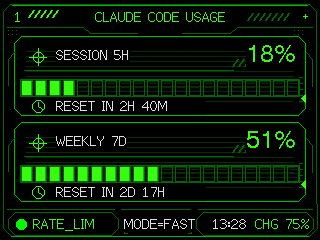
Neon M5Stack Usage Gauge
Transforms a simple Claude Code usage gauge into a polished neon HUD dashboard for an embedded M5Stack-style screen.
This is a gpt-image-2 prompt case for Graphic & Poster. Use the copy-ready prompt below to generate similar visuals, and review YouMind OpenLab awesome-gpt-image-2 attribution plus commercial-use rights before reuse.

Prompt
Copy-ready prompt
Using the provided reference image as the functional UI base, redesign it into a polished neon-green cyberpunk terminal interface suitable for an M5Stack-style 320×240 display. Keep the same two usage meters and overall information hierarchy, but replace the plain black layout with thin glowing vector line art, angular framed panels, pixel/monospace typography, and sci-fi HUD decorations. Convert the two meters into 2 stacked framed cards: 1) “SESSION 5H” with a crosshair icon, large percentage “{argument name="session percent" default="18%"}”, a segmented horizontal progress bar, and a clock/reset row reading “{argument name="session reset text" default="RESET IN 2H 40M"}”; 2) “WEEKLY 7D” with a crosshair icon, large percentage “{argument name="weekly percent" default="51%"}”, a segmented horizontal progress bar, and a clock/reset row reading “{argument name="weekly reset text" default="RESET IN 2D 17H"}”. Add a top header reading “{argument name="header text" default="CLAUDE CODE USAGE"}” centered, with decorative diagonal tick marks on both sides and a small plus sign at the top right. Add a bottom status bar with exactly 5 visible items: a green status dot, “RATE_LIM”, “MODE=FAST”, “13:28”, and “CHG 75%”. Use only black background, bright green strokes, darker green grid/bar outlines, and crisp pixel-perfect rendering; make the final image look like a refined embedded-device dashboard rather than a flat mockup.Prompt variables
Editable argument placeholders found in the prompt, with their default values.
Variable
session percent
Default
18%
Variable
session reset text
Default
RESET IN 2H 40M
Variable
weekly percent
Default
51%
Variable
weekly reset text
Default
RESET IN 2D 17H
Variable
header text
Default
CLAUDE CODE USAGE
Reuse and source notes
Use this prompt safely after previewing the case.
- 1.Copy the prompt or open it directly in Dovoo with the generation button.
- 2.Adjust variables, aspect ratio, and reference images for your own use case.
- 3.Before publishing or paid usage, verify source rights, attribution requirements, and brand or likeness risks.
Can I use this prompt commercially?
Commercial-use status is unknown. Review the original source, license, brand constraints, and legal requirements before paid usage.
Where does this case come from?
This case is imported from YouMind OpenLab awesome-gpt-image-2; keep attribution visible and check the source URL before reuse.