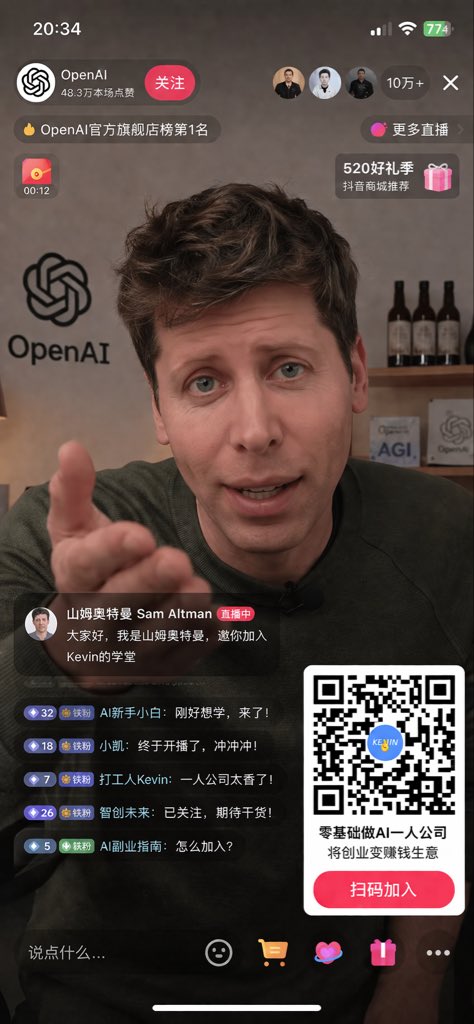
Livestream UI Mockup with Host
Generates a realistic mobile livestream interface featuring a specific host, complete with chat overlays, viewer stats, and a prominent QR code call-to-action.
This is a gpt-image-2 prompt case for Graphic & Poster. Use the copy-ready prompt below to generate similar visuals, and review YouMind OpenLab awesome-gpt-image-2 attribution plus commercial-use rights before reuse.
Prompt
Copy-ready prompt
{
  "type": "Mobile live streaming interface design draft",
  "scene": {
    "subject": "{argument name=\"main subject\" default=\"Sam Altman\"} The portrait shows the subject wearing a dark green sweater, looking directly at the camera, with her right hand extended forward in an inviting gesture.",
    "background": "The scene is set in an office studio. On the left is a huge 'OpenAI' logo on the wall. On the right is a wooden shelf with three bottles of dark wine and two small square plaques, one of which reads 'AGI' and the other 'OpenAI'."
  },
  "layout": {
    "top_overlay": {
      "status_bar": "Time '20:34', Cellular signal bar, Wi-Fi icon, Battery '774'",
      "host_profile": "The OpenAI logo, the name 'OpenAI', the subtitle '483k people liked this live stream', and a red 'Follow' button.",
      "viewer_stats": "Three user avatars, text '100k+', and an 'X' close icon.",
      "banners": [
        "The top banner displays 'OpenAI Official Flagship Store Ranking #1'",
        "The link shows 'More Live Streams>'",
        "Red envelope countdown icon '00:12'",
        "The gift box icon displays 'Recommended by Douyin Mall during the 520 Gift Season'."
      ]
    },
    "bottom_left_overlay": {
      "pinned_host_message": {
        "avatar": "Anchor Portrait",
        "name": "Sam Altman",
        "badge": "During the live stream",
        "message": "{argument name=\"host message\" default=\"Hello everyone, I'm Ultraman Sam, and I invite you to join Kevin's academy.\"}"
      },
      "live_chat": {
        "count": 5,
        "messages": [
          "Level 32 badge, user 'AI beginner', content 'Just came to learn, I'm here!'",
          "Level 18 badge, user 'Xiaokai', content: 'Finally started streaming, let's go!'",
          "Level 7 badge, user 'Worker Kevin', post: 'A one-man company is awesome!'",
          "Level 26 badge, user 'Smart Future', content 'Followed, looking forward to more content!'",
          "Level 5 badge, user 'AI Side Hustle Guide', content 'How to join?'"
        ]
      }
    },
    "bottom_right_overlay": {
      "qr_code_card": {
        "graphic": "A large, scannable QR code with a blue logo in the center that reads 'KEVIN'.",
        "primary_text": "{argument name=\"promo headline\" default=\"Starting an AI-powered one-person company with zero experience\"}",
        "secondary_text": "{argument name=\"promo subheadline\" default=\"Turn entrepreneurship into a profitable business\"}",
        "call_to_action_button": "The red button displays {argument name=\"button text\" default=\"Scan the QR code to join\"}"
      }
    },
    "bottom_navigation_bar": {
      "input_field": "The text box displays 'Say something...'",
      "icons_count": 5,
      "icons": [
        "smiley face emoji",
        "Shopping cart icon",
        "Heart icon",
        "Gift box icon",
        "Three-dot menu icon"
      ],
      "system": "Bottom iOS Home Screen Indicator Bar"
    }
  }
}
Prompt variables
Editable argument placeholders found in the prompt, with their default values.
Variable
main subject
Default
Sam Altman
Variable
host message
Default
Hello everyone, I'm Ultraman Sam, and I invite you to join Kevin's academy.
Variable
promo headline
Default
Starting an AI-powered one-person company with zero experience
Variable
promo subheadline
Default
Turn entrepreneurship into a profitable business
Variable
button text
Default
Scan the QR code to join
Reuse and source notes
Use this prompt safely after previewing the case.
- 1.Copy the prompt or open it directly in Dovoo with the generation button.
- 2.Adjust variables, aspect ratio, and reference images for your own use case.
- 3.Before publishing or paid usage, verify source rights, attribution requirements, and brand or likeness risks.
Can I use this prompt commercially?
Commercial-use status is unknown. Review the original source, license, brand constraints, and legal requirements before paid usage.
Where does this case come from?
This case is imported from YouMind OpenLab awesome-gpt-image-2; keep attribution visible and check the source URL before reuse.