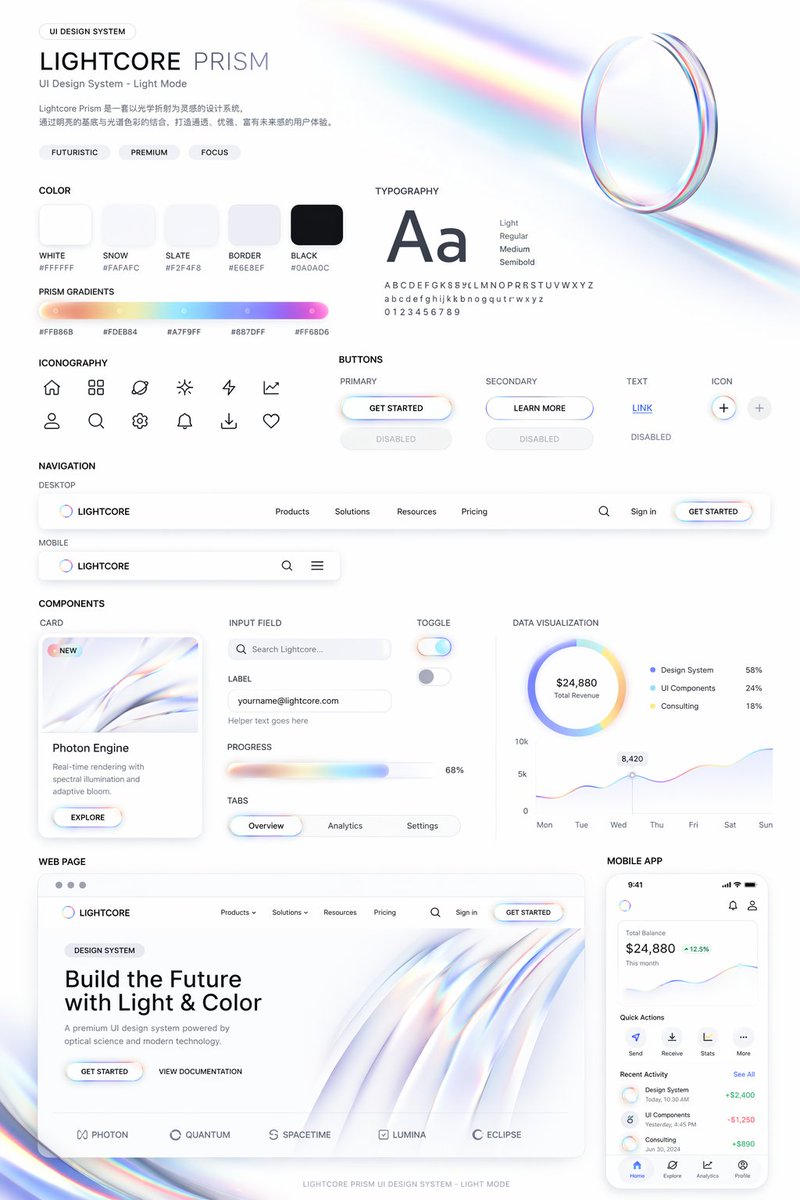
Light Mode UI Design System Board
Generates a comprehensive UI design system presentation featuring color palettes, typography, components, and responsive mockups with a futuristic, iridescent aesthetic.
This is a gpt-image-2 prompt case for 平面海报. Use the copy-ready prompt below to generate similar visuals, and review YouMind OpenLab awesome-gpt-image-2 attribution plus commercial-use rights before reuse.
Prompt
Copy-ready prompt
{
  "type": "UI design system demonstration project",
  "theme": "{argument name=\"visual theme\" default=\"Optical Science and Light Refraction\"}",
  "overall_aesthetic": "A clean white background, light color mode, futuristic and sophisticated feel; its distinctive feature lies in {argument name=\"primary gradient colors\" default=\"Iridescent, soft orange, yellow, cyan, purple, pink\"} embellishment",
  "header": {
    "title": "{argument name=\"system name\" default=\"LIGHTCORE PRISM\"}",
    "subtitle": "UI Design System - Light Mode",
    "tags": [
      "Futuristic",
      "sense of sophistication",
      "Focus"
    ],
    "hero_graphic": "3D transparent glass ring that refracts iridescent light"
  },
  "layout": {
    "sections": [
      {
        "title": "color",
        "count": 5,
        "labels": [
          "White #FFFFFF",
          "Snowy #FAFAFC",
          "Slate color #F2F4F8",
          "Border color #E6E8EF",
          "Black #0A0A0C"
        ],
        "description": "5 rounded square solid color blocks"
      },
      {
        "title": "Prism Gradient",
        "count": 1,
        "description": "A long horizontal gradient bar with five hexadecimal color codes below."
      },
      {
        "title": "typesetting",
        "description": "The large 'Aa' font is listed in four weights (Light, Regular, Medium, Semibold) along with the complete alphabet/numbers."
      },
      {
        "title": "icon",
        "count": 12,
        "description": "12 minimalist line-style icons arranged in a 2x6 grid."
      },
      {
        "title": "Button",
        "count": 8,
        "categories": [
          "main",
          "secondary",
          "text",
          "icon"
        ],
        "description": "There are a total of 8 buttons, displaying the normal and disabled states for each category. The main button features an iridescent border and {argument name=\"primary button text\" default=\"Start using\"} text."
      },
      {
        "title": "navigation",
        "count": 2,
        "variants": [
          "Desktop",
          "mobile"
        ],
        "description": "The desktop navigation includes a logo, four text links, a search bar, a login button, and a mobile navigation bar."
      },
      {
        "title": "Components",
        "count": 6,
        "items": [
          "Card: 'Photon Engine' with abstract rainbow graphics and buttons",
          "Input boxes: a labeled search bar and an email input box.",
          "Progress bar: 68% rainbow progress bar",
          "Tabs: Overview, Analysis, Settings",
          "Switches: 2 switches (on/off)",
          "Data visualization: a pie chart with 3 legend items, and a 7-day line chart."
        ]
      },
      {
        "title": "Web page",
        "description": "Desktop browser model, including title '{argument name=\"hero headline\" default=\"Building the future with light and color\"} The design includes two buttons, a flowing 3D rainbow wave graphic, and five partner logos at the bottom."
      },
      {
        "title": "Mobile application",
        "description": "The smartphone model displays a balance of $24,880, a line chart, four quick action icons, a list of recent activities with three items, and a bottom navigation bar with four icons."
      }
    ]
  }
}
Prompt variables
Editable argument placeholders found in the prompt, with their default values.
More cases in this category
Prioritized by category, input mode compatibility, quality, and lower risk.






Reuse and source notes
Use this prompt safely after previewing the case.
- 1.Copy the prompt or open it directly in Dovoo with the generation button.
- 2.Adjust variables, aspect ratio, and reference images for your own use case.
- 3.Before publishing or paid usage, verify source rights, attribution requirements, and brand or likeness risks.
Can I use this prompt commercially?
Commercial-use status is unknown. Review the original source, license, brand constraints, and legal requirements before paid usage.
Where does this case come from?
This case is imported from YouMind OpenLab awesome-gpt-image-2; keep attribution visible and check the source URL before reuse.