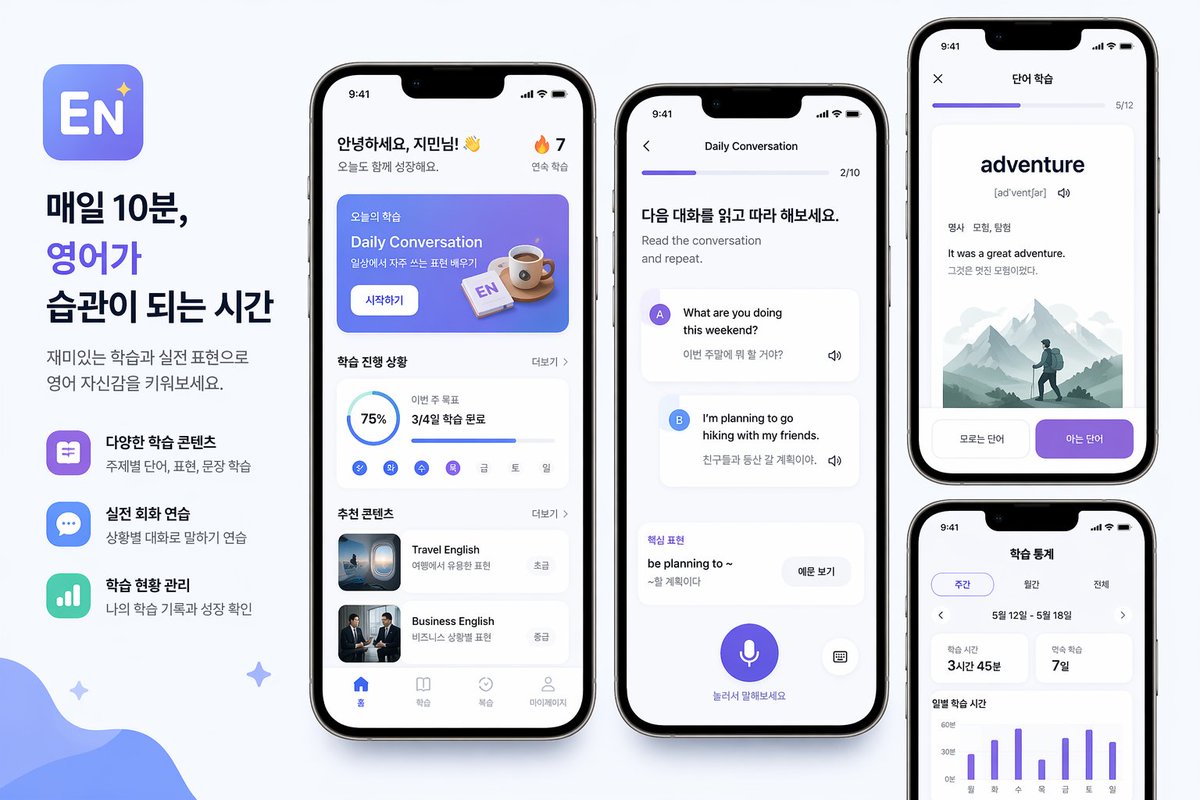
Korean English Learning App Promo
A polished promotional poster showing four smartphone screens for a Korean English-learning app, suitable for app marketing, landing pages, or social media announcements.
This is a gpt-image-2 prompt case for Product & Commercial. Use the copy-ready prompt below to generate similar visuals, and review YouMind OpenLab awesome-gpt-image-2 attribution plus commercial-use rights before reuse.
Prompt
Copy-ready prompt
{
  "type": "Mobile App Promotional Poster Mockup",
  "style": "The design features clean, modern graphics for Korean language education technology marketing, a soft light gray background, high-end iPhone-style device rendering, rounded corner UI cards, subtle shadows, a blue and purple gradient color scheme, and a minimalist sans-serif font.",
  "subject": "English learning mobile app ad layout",
  "branding": {
    "app icon": "The icon is a rounded square with a blue-purple gradient background, large white letters \"EN\", and a small flashing star in the upper right corner.",
    "headline": [
      "10 minutes a day",
      "Let English",
      "Make it your habit"
    ],
    "body": "Boost your confidence in English through fun lessons and practical exercises."
  },
  "layout": {
    "canvas": "Wide horizontal poster",
    "sections": [
      {
        "title": "Left-side marketing copy column",
        "position": "Leftmost",
        "count": 3,
        "labels": [
          "Diverse learning content",
          "Practical oral English practice",
          "Learning progress management"
        ]
      },
      {
        "title": "App home screen",
        "position": "Left-middle mobile phone",
        "count": 6,
        "labels": [
          "Top greeting",
          "Today's Course Banner",
          "Progress Card",
          "Workday Mini Tracker",
          "Recommended content card 1",
          "Recommended content card 2"
        ]
      },
      {
        "title": "Dialogue Practice Screen",
        "position": "Middle phone",
        "count": 6,
        "labels": [
          "Top progress bar",
          "Command Title",
          "A Speaker's Message Card",
          "B Speaker's Message Card",
          "Core phrase cards",
          "Bottom microphone button"
        ]
      },
      {
        "title": "Word learning screen",
        "position": "upper right corner of the phone",
        "count": 5,
        "labels": [
          "Top progress bar",
          "Large vocabulary",
          "Parts of speech and meaning",
          "Example Sentence Block",
          "Two option buttons at the bottom"
        ]
      },
      {
        "title": "Learning Statistics Screen",
        "position": "bottom right of the phone",
        "count": 5,
        "labels": [
          "Tag selector",
          "Date range rows",
          "2 Statistical Summary Cards",
          "Weekly bar chart",
          "Chart Labels"
        ]
      }
    ],
    "phone_count": 4
  },
  "screens": {
    "home": {
      "status_bar_time": "9:41",
      "greeting": "Hello,{argument name=\"character name\" default=\"Jimin\"} ! 👋",
      "streak": "🔥 7",
      "banner": {
        "korean_label": "Today's Learning",
        "title": "Daily conversation",
        "subtitle": "Learn commonly used expressions in daily life",
        "button": "Start learning",
        "illustration": "Coffee cup and small English flashcards on a blue gradient panel."
      },
      "progress": {
        "section_title": "Learning progress",
        "completion": "75%",
        "monthly_goal_text": "This week's goals",
        "monthly_goal_value": "Completed 3/4 of the learning session",
        "weekday_count": 7,
        "weekday_labels": [
          "one",
          "two",
          "three",
          "Four",
          "five",
          "six",
          "day"
        ]
      },
      "recommendations": {
        "section_title": "Recommended content",
        "items": [
          {
            "title": "Tourism English",
            "subtitle": "Practical expressions for travel",
            "level": "primary",
            "thumbnail": "Airplane window or travel scene"
          },
          {
            "title": "Business English",
            "subtitle": "Expression in business scenarios",
            "level": "intermediate",
            "thumbnail": "Two businessmen in suits"
          }
        ]
      },
      "bottom_nav": {
        "count": 4,
        "labels": [
          "front page",
          "study",
          "review",
          "mine"
        ]
      }
    },
    "conversation": {
      "title": "Daily conversation",
      "progress": "2/10",
      "header": "Please read and follow along with the following dialogue.",
      "subheader": "Read the dialogue and repeat after it.",
      "messages": [
        {
          "speaker": "A",
          "bubble_text": "What are you doing this weekend?",
          "translation": "What are your plans for this weekend?"
        },
        {
          "speaker": "B",
          "bubble_text": "I'm planning to go hiking with my friends.",
          "translation": "I'm planning a hiking trip with my friends."
        }
      ],
      "phrase_box": {
        "label": "core phrases",
        "phrase": "be planning to ~",
        "meaning": "Plan to do something",
        "button": "View example sentences"
      },
      "bottom_hint": "Click and speak",
      "controls": {
        "microphone": true,
        "keyboard": true
      }
    },
    "vocabulary": {
      "title": "Vocabulary learning",
      "progress": "5/12",
      "word": "{argument name=\"vocabulary word\" default=\"adventure\"}",
      "pronunciation": "[ədˈventʃər]",
      "meta": "Noun: adventure, exploration",
      "example_en": "It was a great adventure.",
      "example_ko": "This is a great adventure.",
      "illustration": "Foggy mountain scenery with backpackers",
      "buttons": [
        "I don't know",
        "know"
      ]
    },
    "stats": {
      "title": "Learning Statistics",
      "tabs": {
        "count": 3,
        "labels": [
          "Weekly",
          "Monthly",
          "all"
        ]
      },
      "date_range": "May 12 - May 18",
      "summary_cards": [
        {
          "label": "Study time",
          "value": "3 hours and 45 minutes"
        },
        {
          "label": "Continuous learning",
          "value": "7 days"
        }
      ],
      "chart": {
        "type": "Weekly Vertical Histogram",
        "bar_count": 7,
        "x_labels": [
          "one",
          "two",
          "three",
          "Four",
          "five",
          "six",
          "day"
        ],
        "y_labels": [
          "0 minutes",
          "30 minutes",
          "60 minutes"
        ]
      }
    }
  },
  "decor": {
    "background_shapes": [
      "Large, soft blue organic waves in the bottom left corner",
      "Three small, twinkling stars scattered around the composition"
    ]
  },
  "rendering": "High-resolution product marketing renderings, taken from a phone's perspective, with balanced spacing, clear Korean UI text, and a refined App Store display."
}
Prompt variables
Editable argument placeholders found in the prompt, with their default values.
Reuse and source notes
Use this prompt safely after previewing the case.
- 1.Copy the prompt or open it directly in Dovoo with the generation button.
- 2.Adjust variables, aspect ratio, and reference images for your own use case.
- 3.Before publishing or paid usage, verify source rights, attribution requirements, and brand or likeness risks.
Can I use this prompt commercially?
Commercial-use status is unknown. Review the original source, license, brand constraints, and legal requirements before paid usage.
Where does this case come from?
This case is imported from YouMind OpenLab awesome-gpt-image-2; keep attribution visible and check the source URL before reuse.