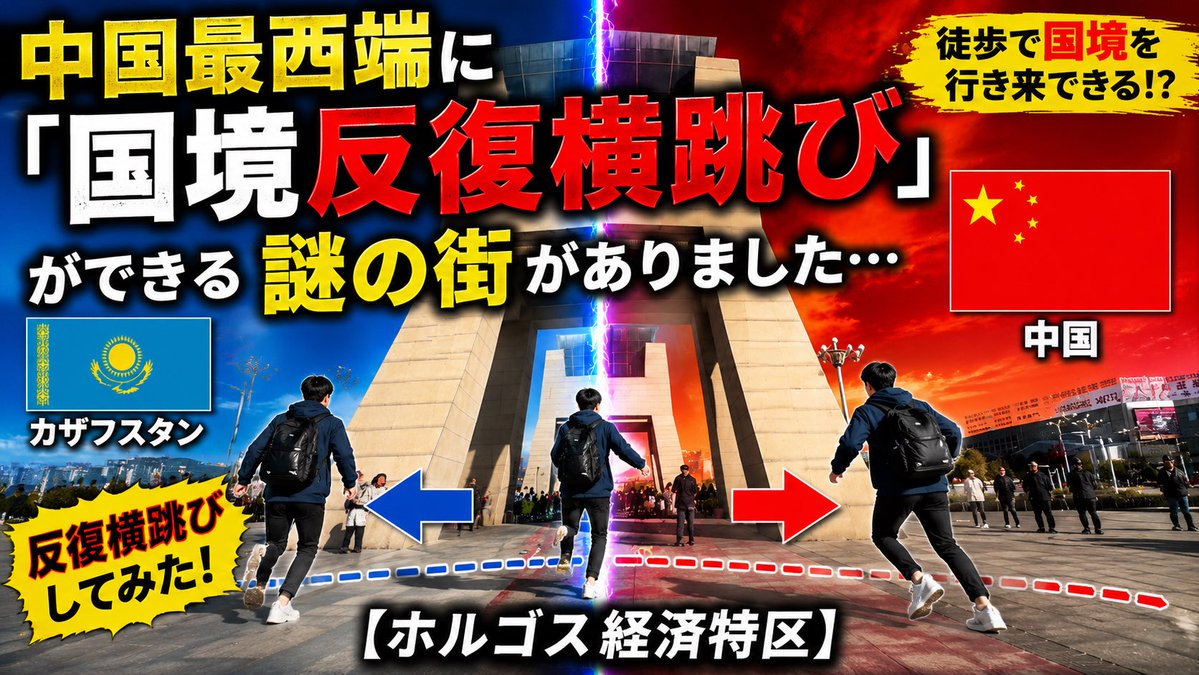
Dramatic Border Jump YouTube Thumbnail
Transforms the reference travel thumbnail into a bold Japanese viral YouTube thumbnail about repeatedly crossing the Kazakhstan-China border.
This is a gpt-image-2 prompt case for 平面海报. Use the copy-ready prompt below to generate similar visuals, and review YouMind OpenLab awesome-gpt-image-2 attribution plus commercial-use rights before reuse.

Prompt
Copy-ready prompt
Using REFERENCE_0 as the base scene, this simple travel/news thumbnail is transformed into a high-impact Japanese YouTube-style thumbnail. The same border gate landmark and plaza background are retained, but the composition is enhanced with a vertically glowing lightning bolt crack in the center: blue for Kazakhstan on the left and red/orange for China on the right. A male traveler with a backpack is added to the foreground, depicting the process of traversing the border in three repetitive poses, accompanied by a blue and red dotted path and large left and right arrows. The original text layout is replaced with a bold, oversized Japanese thumbnail font in yellow, white, and red, with a heavy black outline and shadow. Three flag panels are included: the Kazakh flag on the left, labeled "カザフスタン"; the Chinese flag on the right, labeled "中国"; no other flags are included. Add two yellow brushstroke/explosive captions: "徒歩で国境を行き来できる!?" (I walked across the border!) in the upper right corner, and "反复横跳びしてみた!" (I jumped around repeatedly!) in the lower left corner. The main title text should be "中国最西端に「国境反复横跳び」ができる谜の街がありました…" (I jumped around repeatedly across the border at the westernmost end of China), and the bottom description should be "【ホルゴス経済特区】" (Holugosu Special Zone). Remove the original large lower third title to give the final image a vibrant, viral travel video thumbnail style with cinematic contrast, saturated colors, and sharp details, in a 16:9 aspect ratio.
More cases in this category
Prioritized by category, input mode compatibility, quality, and lower risk.

Premium Sports Editorial Poster
Text to Imageunknown

Hyper Realistic FIFA Football Poster
Text to Imageunknown

Vintage Film Projection Portrait
Image to Imageunknown

Cosmic Big Bang Snooze Comic
Text to Imageunknown

Direct Flash Editorial Portrait
Text to Imageunknown

Hand-Drawn Sketch Photo Annotation
Text to Imageunknown
Reuse and source notes
Use this prompt safely after previewing the case.
- 1.Copy the prompt or open it directly in Dovoo with the generation button.
- 2.Adjust variables, aspect ratio, and reference images for your own use case.
- 3.Before publishing or paid usage, verify source rights, attribution requirements, and brand or likeness risks.
Can I use this prompt commercially?
Commercial-use status is unknown. Review the original source, license, brand constraints, and legal requirements before paid usage.
Where does this case come from?
This case is imported from YouMind OpenLab awesome-gpt-image-2; keep attribution visible and check the source URL before reuse.