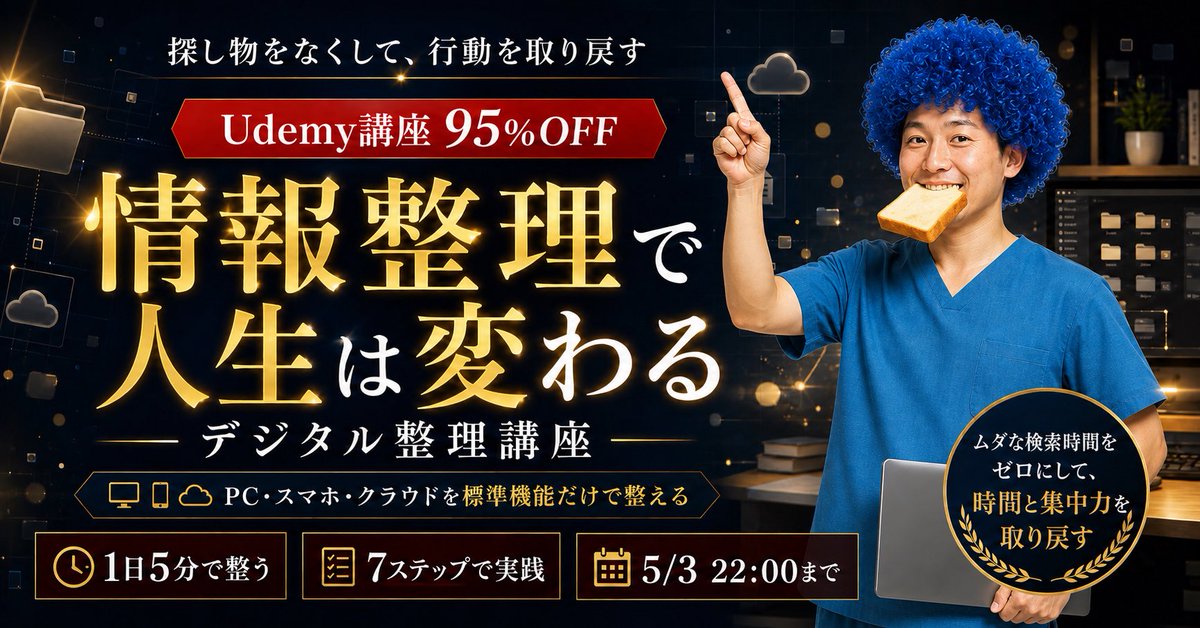
Japanese Udemy Course Sale Thumbnail
Generates a dramatic Japanese promotional banner for a discounted Udemy digital organization course with glowing typography and a face-blurred presenter.
This is a gpt-image-2 prompt case for 产品商业. Use the copy-ready prompt below to generate similar visuals, and review YouMind OpenLab awesome-gpt-image-2 attribution plus commercial-use rights before reuse.
Prompt
Copy-ready prompt
{
  "type": "Japanese Udemy course promotional thumbnail / social media banner",
  "aspect_ratio": "wide 16:9, 1200x675 style",
  "overall_style": "high-conversion online course ad, premium dark navy and black digital workspace background, glowing gold typography, cinematic lighting, sharp commercial compositing, dramatic contrast, bokeh particles, subtle tech UI squares and cloud/file icons",
  "main_subject": {
    "position": "right third",
    "description": "adult presenter from waist up wearing bright blue medical-scrub-like top, face intentionally blurred or covered by a soft rectangular mosaic for anonymity, curly vivid blue afro-style hair, one arm raised with index finger pointing upward, other arm holding a closed silver laptop against the body",
    "expression": "not visible due to face blur",
    "pose": "confident instructor pose pointing to the top-left offer banner"
  },
  "background": {
    "setting": "dark office or study room with shelves and storage boxes, warm desk lamp glow, floating digital folder and cloud motifs, scattered gold light particles and thin geometric lines",
    "mood": "organized, trustworthy, digital productivity"
  },
  "typography": {
    "primary_headline": "{argument name=\"main headline text\" default=\"Organizing information can change your life.\"}",
    "headline_position": "large center-left, stacked in multiple lines",
    "headline_style": "oversized Japanese Mincho/serif type, gold gradient with bright outer glow and subtle shadow; the smaller connecting characters are white",
    "top_copy": "{argument name=\"top copy\" default=\"Lost what you were looking for and got back on track.\"}",
    "top_copy_position": "top center-left in white Japanese serif text",
    "subheadline": "{argument name=\"course subtitle\" default=\"Digital Organization Course\"}",
    "subheadline_position": "below headline centered-left with thin horizontal gold divider lines",
    "offer_banner": {
      "position": "upper left below top copy",
      "shape": "red horizontal ribbon with angled ends and gold outline",
      "text": "{argument name=\"offer text\" default=\"Udemy lectures 95% OFF\"}",
      "style": "white bold serif text, large 95%OFF emphasized"
    }
  },
  "layout": {
    "sections": [
      {
        "title": "top message",
        "position": "top center-left",
        "count": 1,
        "labels": [
          "Lost what you were looking for and got back on track."
        ]
      },
      {
        "title": "red discount ribbon",
        "position": "upper left",
        "count": 1,
        "labels": [
          "Udemy lectures 95% OFF"
        ]
      },
      {
        "title": "main headline block",
        "position": "center-left",
        "count": 1,
        "labels": [
          "Organizing information can change your life."
        ]
      },
      {
        "title": "course subtitle block",
        "position": "lower center-left",
        "count": 1,
        "labels": [
          "Digital Organization Course"
        ]
      },
      {
        "title": "device feature strip",
        "position": "below subtitle",
        "count": 3,
        "labels": [
          "PC",
          "スマホ",
          "クラウド"
        ]
      },
      {
        "title": "bottom benefit cards",
        "position": "bottom row",
        "count": 3,
        "labels": [
          "Get in shape in just 5 minutes a day",
          "7 Steps to Implementation",
          "5/3 22:00まで"
        ]
      },
      {
        "title": "round benefit badge",
        "position": "lower right overlapping laptop",
        "count": 1,
        "labels": [
          "Eliminate wasted search time and reclaim your time and focus."
        ]
      }
    ]
  },
  "graphic_elements": {
    "bottom_cards": "Three rectangular dark cards with thin gold borders, each with one gold icon: clock icon for \"Organize in 5 minutes a day,\" checklist icon for \"Practice in 7 steps,\" and calendar icon for \"Until 5/3 22:00.\"",
    "feature_strip": "A dark, elongated outlined plaque with small gold icons for desktop monitor, smartphone, and cloud, followed by white text: \"Set up your PC, smartphone, and cloud using only standard features.\"",
    "badge": "black circular seal with gold rim and laurel leaves, mixed white and gold Japanese text, placed over the presenter and laptop",
    "decorations": "glowing file folder icon at far left, small cloud icons, floating squares, gold sparkles and lens flare accents"
  },
  "color_palette": "black, midnight navy, luminous gold, white, crimson red, bright scrub blue, warm amber highlights",
  "composition": "left side dominated by text hierarchy and promotional information, right side dominated by human presenter; ensure all Japanese text is crisp, readable, correctly spelled, and arranged like a professional Udemy sale thumbnail",
  "negative_prompt": "no extra people, no unreadable gibberish, no distorted hands, no duplicated fingers, no random English text, no clutter covering the headline"
}
Prompt variables
Editable argument placeholders found in the prompt, with their default values.
More cases in this category
Prioritized by category, input mode compatibility, quality, and lower risk.






Reuse and source notes
Use this prompt safely after previewing the case.
- 1.Copy the prompt or open it directly in Dovoo with the generation button.
- 2.Adjust variables, aspect ratio, and reference images for your own use case.
- 3.Before publishing or paid usage, verify source rights, attribution requirements, and brand or likeness risks.
Can I use this prompt commercially?
Commercial-use status is unknown. Review the original source, license, brand constraints, and legal requirements before paid usage.
Where does this case come from?
This case is imported from YouMind OpenLab awesome-gpt-image-2; keep attribution visible and check the source URL before reuse.