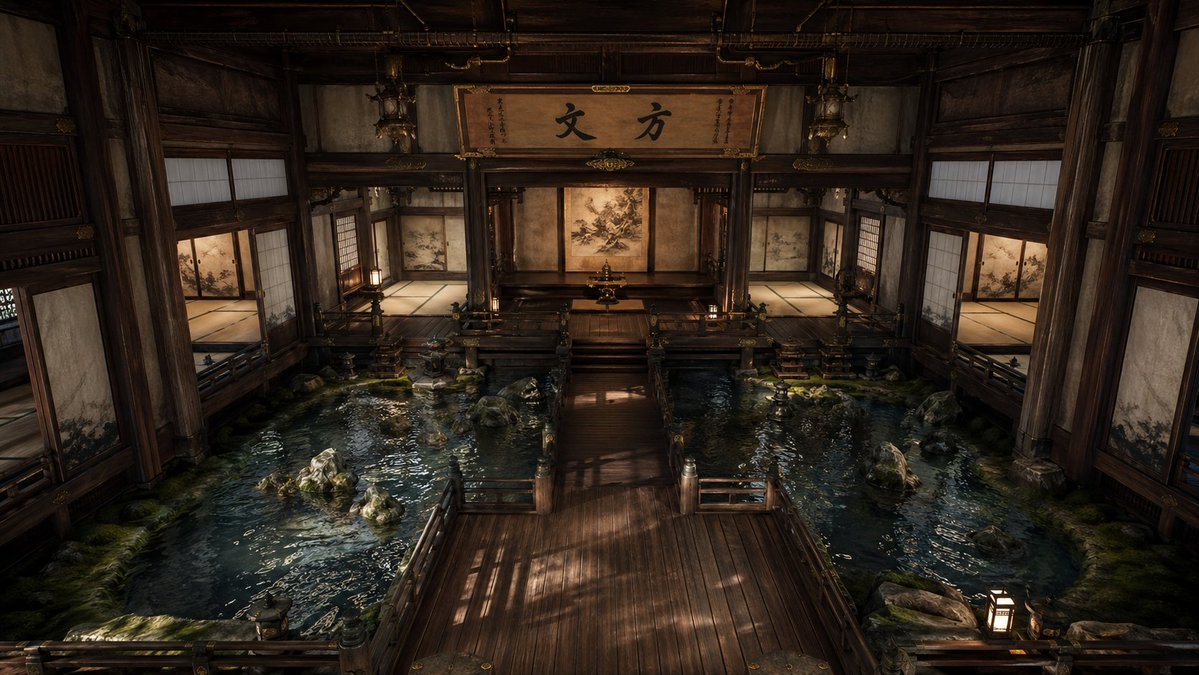
Cinematic Japanese Temple Hall
A photorealistic prompt for generating a serene traditional Japanese interior with indoor pools, wooden walkways, and dramatic atmospheric lighting.
This is a gpt-image-2 prompt case for Interior & Architecture. Use the copy-ready prompt below to generate similar visuals, and review YouMind OpenLab awesome-gpt-image-2 attribution plus commercial-use rights before reuse.
Prompt
Copy-ready prompt
The interior of a grand and cinematic traditional Japanese temple or palace, constructed almost entirely of dark, aged wood, presents a near-perfect sense of symmetry through a slightly elevated central perspective. In the foreground is a wide, polished wooden corridor leading to a raised central platform and a shrine-like inner chamber at the rear. To the left and right of the corridor are shallow indoor reflecting pools filled with deep blue-green water, dotted with natural rocks and moss patches, their delicate ripples capturing warm light. The architectural details are meticulous and solemn: robust wooden pillars, intricately carved beams, railings, tatami-floored side chambers, sliding shoji doors, fusuma panels adorned with delicate natural patterns, and hanging lanterns. At the rear center, above the shrine, a large wooden plaque displays striking Japanese calligraphy, the content of which is…{argument name="calligraphy text" default="Abbot"} The rear wall features a central screen or mural in soft tan tones, while additional painted panels are found in the side rooms. The lighting is low, warm, and dramatic, with soft amber lantern light intertwining with natural beams, creating reflections on the water and casting long shadows on the wooden floors. The overall atmosphere is serene, sacred, contemplative, and slightly mysterious, characterized by incredibly detailed textures, realistic materials, cinematic depth of field, and a sophisticated realism.Prompt variables
Editable argument placeholders found in the prompt, with their default values.
Variable
calligraphy text
Default
Abbot
Reuse and source notes
Use this prompt safely after previewing the case.
- 1.Copy the prompt or open it directly in Dovoo with the generation button.
- 2.Adjust variables, aspect ratio, and reference images for your own use case.
- 3.Before publishing or paid usage, verify source rights, attribution requirements, and brand or likeness risks.
Can I use this prompt commercially?
Commercial-use status is unknown. Review the original source, license, brand constraints, and legal requirements before paid usage.
Where does this case come from?
This case is imported from YouMind OpenLab awesome-gpt-image-2; keep attribution visible and check the source URL before reuse.