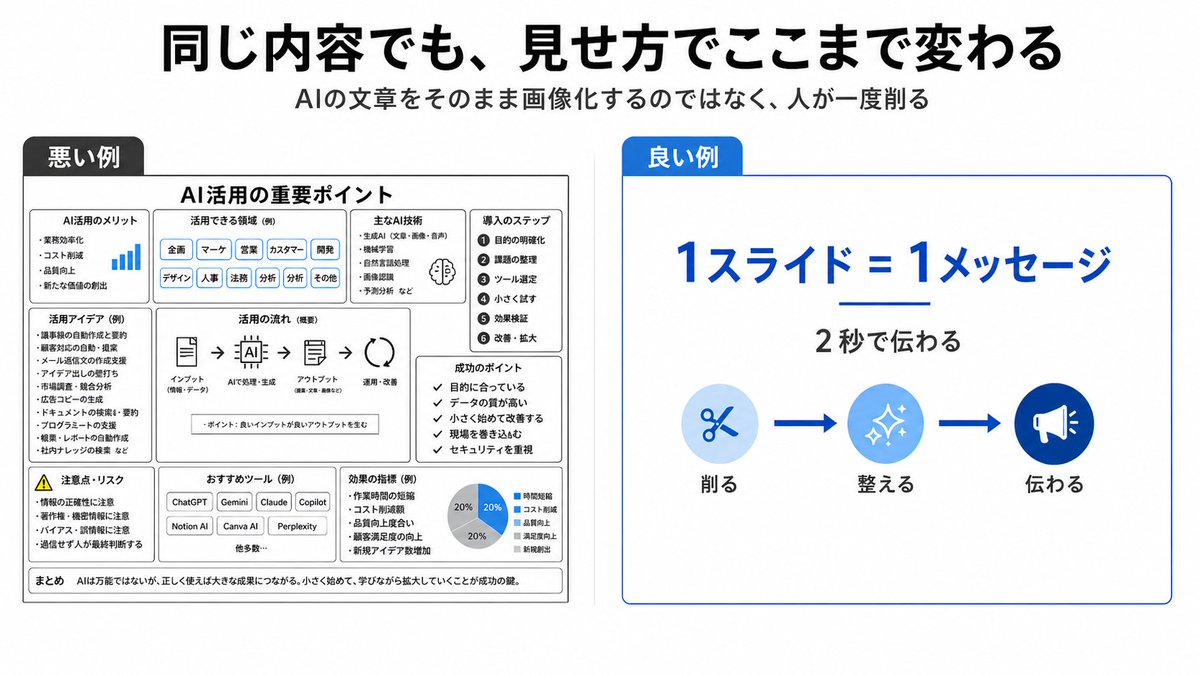
Bad vs Good Slide Design Infographic
Generates a Japanese comparison slide showing how simplifying AI-generated text into one clear message makes a presentation easier to understand.
This is a gpt-image-2 prompt case for 平面海报. Use the copy-ready prompt below to generate similar visuals, and review YouMind OpenLab awesome-gpt-image-2 attribution plus commercial-use rights before reuse.
Prompt
Copy-ready prompt
{
  "type": "Concise Japanese presentation infographics, contrasting bad and good slide designs.",
  "format": "16:9 widescreen slideshow, white background, minimalist corporate style.",
  "headline": "{argument name=\"headline text\" default=\"The same content, presented in vastly different ways.\"}",
  "subtitle": "{argument name=\"subtitle text\" default=\"Do not directly insert AI-generated text into your slides; first, manually simplify it.\"}",
  "layout": {
    "top": "Centered, large, bold, black Japanese title; below, a smaller, centered gray subtitle.",
    "comparison_panels": [
      {
        "title": "Negative examples",
        "position": "left half",
        "style": "The slides, filled with dense black, white, and gray monochrome boxes, contain numerous tiny elements, deliberately appearing cluttered and difficult to read.",
        "main_heading": "Key points of AI applications",
        "section_count": 9,
        "sections": [
          {
            "label": "Advantages of AI Applications",
            "description": "Small list with tiny blue bar chart icons"
          },
          {
            "label": "Applicable areas (examples)",
            "description": "A row of densely packed capsule labels, such as: Planning, Marketing, Sales, Customer Service, Development, Design, Human Resources, Legal, Analysis, etc."
          },
          {
            "label": "Key AI technologies",
            "description": "Compact bulleted list with tiny brain icons"
          },
          {
            "label": "Import steps",
            "description": "A 6-step vertical numerical list: 1. Define the purpose, 2. Organize the topic, 3. Select tools, 4. Small-scale trial, 5. Verify the results, 6. Improve and expand."
          },
          {
            "label": "Creative Application (Example)",
            "description": "Dense list of use case bullet points"
          },
          {
            "label": "Application Process (Summary)",
            "description": "A horizontal flowchart connecting five icons with arrows: Input, AI Processing and Generation, Output, Application and Improvement."
          },
          {
            "label": "Key to Success",
            "description": "Checklist containing 5 short items"
          },
          {
            "label": "Precautions and Risks",
            "description": "List of warning triangles and risk bullet points"
          },
          {
            "label": "Recommended tools (examples)",
            "description": "Small buttons containing multiple tools such as ChatGPT, Gemini, Claude, Copilot, Notion AI, Canva AI, and Perplexity"
          }
        ],
        "bottom_note": "In conclusion, AI is not a panacea, but when used correctly, it can yield tremendous results. Starting small and scaling up as you learn is key to success."
      },
      {
        "title": "Positive examples",
        "position": "right half",
        "style": "A clean, spacious white card with a thin blue border and a blue title label.",
        "main_message": "{argument name=\"main message\" default=\"1 slide = 1 core message\"}",
        "sub_message": "{argument name=\"sub message\" default=\"Communicating within 2 seconds\"}",
        "visual_flow": {
          "count": 3,
          "items": [
            {
              "label": "streamline",
              "icon": "The scissors in the light blue circle"
            },
            {
              "label": "tidy",
              "icon": "The flash in the blue circle"
            },
            {
              "label": "convey",
              "icon": "The loudspeaker in the dark blue circle"
            }
          ],
          "connectors": "There are two thick blue arrows between the three icons."
        }
      }
    ]
  },
  "colors": {
    "primary_blue": "#0057d8",
    "light_blue": "#d6ebff",
    "black": "#111111",
    "gray": "#555555"
  },
  "typography": "Bold modern Japanese sans-serif font, strong sense of hierarchy, highly readable on the right, and deliberately redundant on the left.",
  "composition": "Clear side-by-side contrast: the left side shows a cluttered negative example, while the right side shows a simplified positive example, with ample white space and clear vector graphics."
}
Prompt variables
Editable argument placeholders found in the prompt, with their default values.
More cases in this category
Prioritized by category, input mode compatibility, quality, and lower risk.






Reuse and source notes
Use this prompt safely after previewing the case.
- 1.Copy the prompt or open it directly in Dovoo with the generation button.
- 2.Adjust variables, aspect ratio, and reference images for your own use case.
- 3.Before publishing or paid usage, verify source rights, attribution requirements, and brand or likeness risks.
Can I use this prompt commercially?
Commercial-use status is unknown. Review the original source, license, brand constraints, and legal requirements before paid usage.
Where does this case come from?
This case is imported from YouMind OpenLab awesome-gpt-image-2; keep attribution visible and check the source URL before reuse.