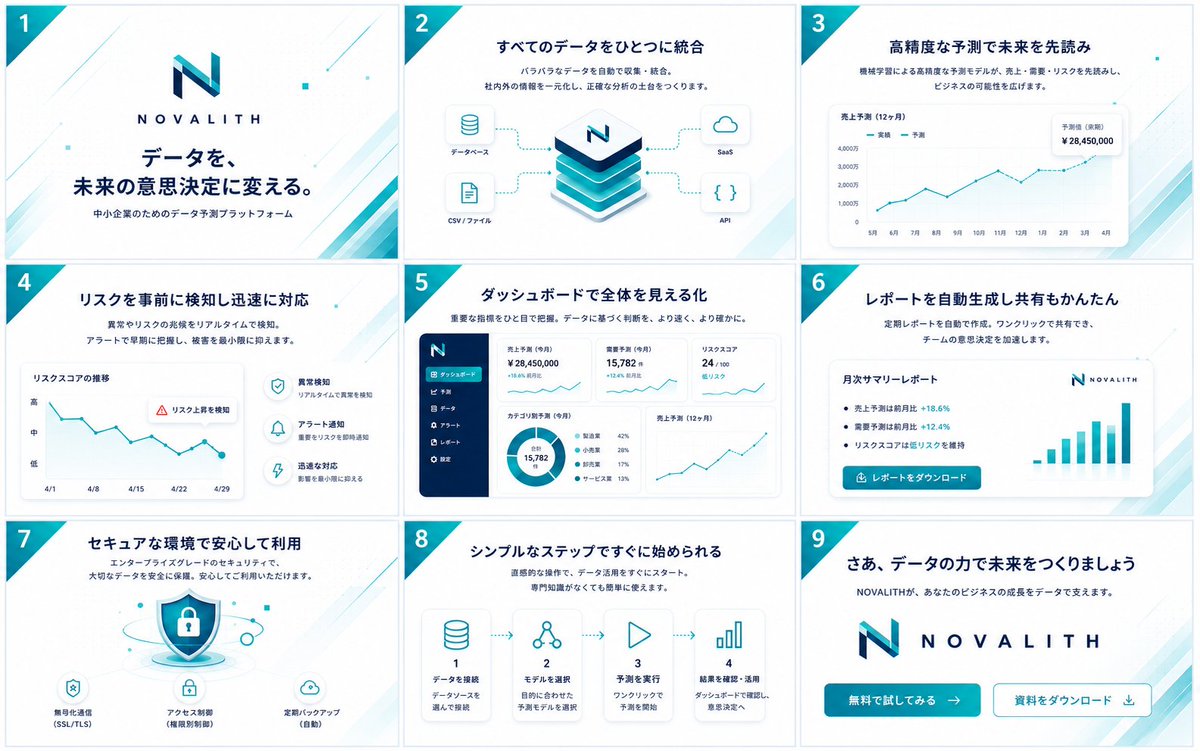
NOVALITH SaaS Pitch Deck Grid
Generates a polished 3x3 Japanese B2B SaaS presentation overview for a fictional data prediction platform.
This is a gpt-image-2 prompt case for 平面海报. Use the copy-ready prompt below to generate similar visuals, and review YouMind OpenLab awesome-gpt-image-2 attribution plus commercial-use rights before reuse.
Prompt
Copy-ready prompt
Objective: For{argument name="service name" default="NOVALITH"} Create a clean, high-end Japanese B2B SaaS presentation/service concept project showcasing 9 widescreen slides arranged in a 3x3 grid, similar to a preview LP, mobile top, banner, and presentation materials. Canvas: A landscape image containing 9 individual 16:9 slide thumbnails, evenly spaced, with thin, light-colored borders. White background with a navy and cyan corporate color scheme, featuring light cyan diagonal accents, delicate geometric dot patterns, and a cyan triangle corner ribbon in the upper left corner of each slide containing a white slide number 1 through 9. Visual Style: Modern Japanese startup/enterprise SaaS design, refined vector UI, minimalist gradients, soft shadows, rounded cards, thin cyan data cables, navy blue title bars, and ample white space. Use cyan and navy blue geometric N logos paired with appropriately spaced capital letters.{argument name="service name" default="NOVALITH"} No people or photos included; only icons, charts, dashboards, and abstract product visual elements. Text language: All visible slide text should be in Japanese. Use clear, presentation-appropriate typography with bold navy blue titles and smaller explanatory subheadings. Number of slides and layout details: Includes 9 slides: 1. Cover Slide. A large NOVALITH logo is centered, with the title "データを、未来の意思決定に変える。" and the subheading "中小企業のためのデータ预测プラットフォーム" above it. There is a decorative blue diagonal line in the corner. 2. Data Integration Slide. The title is "すべてのデータをひとつに統合", with a short subheading about automatically collecting and integrating scattered data. The center displays a stacked, isometric database/platform cube, labeled with an "N" at the top. Four connected input/output cards: "Database", "CSV/File", "SaaS", and "API". 3. Prediction Slide. Title: "Read the Future with High-Precision Predictions". A large line chart card titled "Sales Prediction (December)", with legends of "Actual Performance" and "Prediction", the X-axis representing months, accompanied by an upward cyan trend line, and a floating KPI card displaying "Predicted Value (Future Period) ¥28,450,000". 4. Risk Detection Slide. Title: "Quickly Understand Risks Beforehand". The chart card on the left is titled "The Shift in RISKS COA," displaying a descending zigzag blue line from April 1st to April 29th, with Y-axis levels of High, Medium, and Low. A warning label "Recognize RISK Upwards" is added. The right side has three lines of descriptions with circular icons: Anomaly Detection, Alert Notification, and Quick Response. 5. Dashboard Slide. Titled "See the Whole Dashboard." Shows a complete SaaS dashboard screenshot: a dark navy blue left sidebar with icons and six menu items, and the main area containing KPI cards, a pie chart, and a sales forecast line chart. Visible KPI examples include "Sales forecast (this month) ¥28,450,000", "Requirements forecast (this month) ¥15,782", and "Reference 24/100". 6. Automatic Report Slide. Title: "Automatic Report Generation". Centered on the card is a white report card titled "Monthly Report", with bullet points displaying positive percentages (e.g., +18.6% and +12.4%), a NOVALITH logo in the corner, a blue bar chart on the right, and a blue button labeled "Download Report". 7. Security Slide. The title is "Safe environment and safe use of it". A shield and padlock illustration in the center with floating security particles surrounding it. There are three security function icons and labels at the bottom: "Encrypted communication (SSL/TLS)", "Acus control (limited division)" and "Regular control (automatic)". 8. Simple steps Slide. The title is "シンプルなステップですぐに开められる". Displays 4 horizontally connected step cards with dotted arrows: Step 1 database icon "データをconnection", step 2 node/network icon "モデルを选択", step 3 play icon "prediction を実行", step 4 histogram icon "result confirmation・utilization". A short explanation line is included below each card. 9. Concluding CTA Slide. The title "さあ、データの力でをつくりましょう", subtitle "NO VALITHが、あなたのビジネスのgrowthをデータでBranchえます」. Large centered logo and wordmark. At the bottom are two call-to-action buttons: a filled cyan button “無料で试してみる→” and an outline button “資料をダウンロード↓”. Constraints: Maintain consistent brand colors, logos, spacing, slide numbering, and cyan diagonal corner themes across all nine slides. The overall image should resemble a sophisticated presentation thumbnail overview, rather than an isolated full-screen slide. Avoid redundant slides, buttons, stock photos, watermarks, or irrelevant text.Prompt variables
Editable argument placeholders found in the prompt, with their default values.
Variable
service name
Default
NOVALITH
More cases in this category
Prioritized by category, input mode compatibility, quality, and lower risk.

Premium Sports Editorial Poster
Text to Imageunknown

Hyper Realistic FIFA Football Poster
Text to Imageunknown

Hand-Drawn Sketch Photo Annotation
Text to Imageunknown

Cosmic Big Bang Snooze Comic
Text to Imageunknown

Direct Flash Editorial Portrait
Text to Imageunknown

Vintage Film Projection Portrait
Image to Imageunknown
Reuse and source notes
Use this prompt safely after previewing the case.
- 1.Copy the prompt or open it directly in Dovoo with the generation button.
- 2.Adjust variables, aspect ratio, and reference images for your own use case.
- 3.Before publishing or paid usage, verify source rights, attribution requirements, and brand or likeness risks.
Can I use this prompt commercially?
Commercial-use status is unknown. Review the original source, license, brand constraints, and legal requirements before paid usage.
Where does this case come from?
This case is imported from YouMind OpenLab awesome-gpt-image-2; keep attribution visible and check the source URL before reuse.