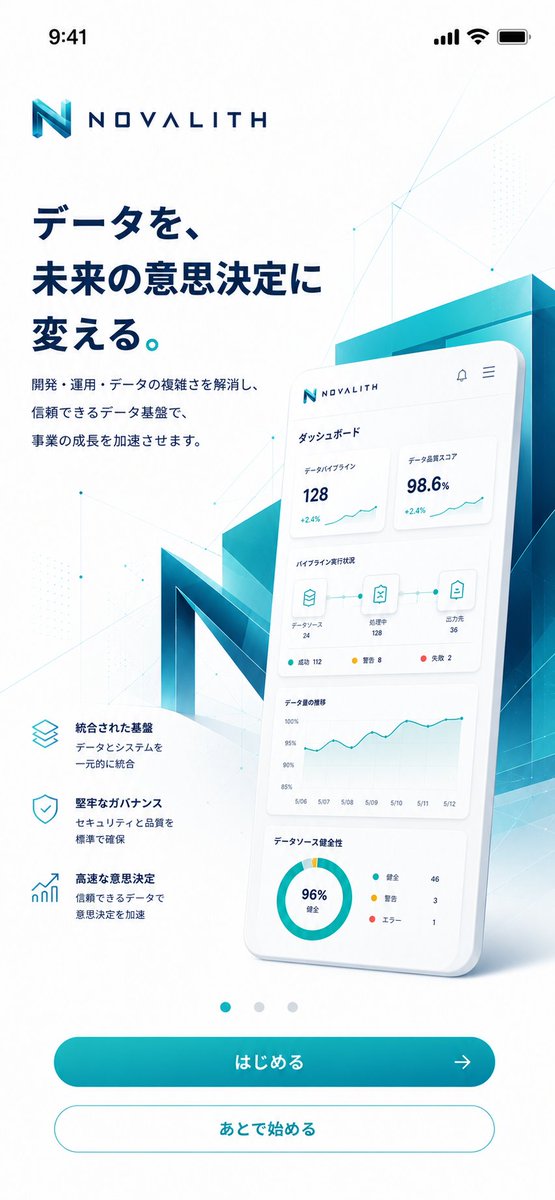
NOVALITH Mobile SaaS Onboarding Screen
A premium Japanese mobile onboarding screen for a fictional data analytics SaaS, useful for landing page or app concept mockups.
This is a gpt-image-2 prompt case for 产品商业. Use the copy-ready prompt below to generate similar visuals, and review YouMind OpenLab awesome-gpt-image-2 attribution plus commercial-use rights before reuse.
Prompt
Copy-ready prompt
Objective: For the name{argument name="brand name" default="NOVALITH"} The fictional B2B data platform creates a sophisticated mobile intro/homepage with a premium Japanese SaaS visual style. Canvas: A portrait smartphone screenshot, 9:16 aspect ratio, white background, with the top iOS status bar displayed at 9:41, including signal, Wi-Fi, and battery icons. Ample margins and clean app ad typography are used. Layout: The NOVALITH logo is placed near the top left corner, incorporating a geometric cyan "N" icon and wide-spaced dark blue text. A large, bold, dark blue Japanese title is placed below:{argument name="headline text" default="Transforming data into future decision-making."} Below the title, add a shorter two-line Japanese description:{argument name="body text" default="Eliminate the complexity of development, operations, and data, and accelerate business growth with a reliable data foundation."} In the lower left corner, three icons with thin cyan outlines are displayed, along with brief descriptions: 1) Stacked layer icon, titled "Integrated Base," described as "Integrate the data and system into one unit"; 2) Shield checkmark icon, titled "Sturdy Checkmark," described as "Ensure quality to a standard"; 3) Rising bar chart icon, titled "High-Speed Decision-Making," described as "Accelerate decision-making through reliable data." Main visual: In the right half, a large, glossy 3D smartphone card is created, slightly tilted backward, overlapping with a translucent cyan-blue building block and a large, multifaceted 3D letter N in the background. The phone screen displays a Japanese dashboard UI, containing four dashboard areas: 1) Top indicator cards displaying "Data Processing 128 +2.4%" and "Data Quality Scour 98.6% +2.4%"; 2) Pipeline status line with three connected icons labeled "Data Score 24", "Processing 128", and "Output 36", along with small status dots; 3) A line graph titled "Data Quantity Shift" showing dates from May 6th to May 12th; 4) A pie chart titled "Data Score Soundness" displaying "96% Sound" and legends "Soundness 46", "Warning 3", and "Errone 1". The dashboard text is kept concise and accurate, with neat alignment. Bottom navigation and controls: Three small carousel dots are placed centered above the buttons; the first dot is cyan and active, while the other two are light gray. Two rounded corner buttons are added to the bottom: a main button filled with a cyan gradient, labeled {argument name="primary button label" default="はじめる"} It also features a right-pointing arrow icon; and a white secondary button with a cyan outline, labeled {argument name="secondary button label" default="Start later"} Visual Style: Futuristic enterprise-grade data analytics, with a clean vector UI combined with soft 3D glass-like textures. The color palette features a gradient of white, deep navy blue, cyan, teal, and aquamarine. Subtle polygonal grid lines, tiny nodes, faint dot patterns, and light geometric overlays are added to the background. Soft shadows, clean Japanese fonts, and high contrast create a sophisticated App Store marketing feel. Avoid clutter, unnecessary buttons, and redundant features; do not add watermarks.Prompt variables
Editable argument placeholders found in the prompt, with their default values.
More cases in this category
Prioritized by category, input mode compatibility, quality, and lower risk.






Reuse and source notes
Use this prompt safely after previewing the case.
- 1.Copy the prompt or open it directly in Dovoo with the generation button.
- 2.Adjust variables, aspect ratio, and reference images for your own use case.
- 3.Before publishing or paid usage, verify source rights, attribution requirements, and brand or likeness risks.
Can I use this prompt commercially?
Commercial-use status is unknown. Review the original source, license, brand constraints, and legal requirements before paid usage.
Where does this case come from?
This case is imported from YouMind OpenLab awesome-gpt-image-2; keep attribution visible and check the source URL before reuse.